
Compass and Straightedge Construction of Product a*b
Loading the math board and drawing, please wait…
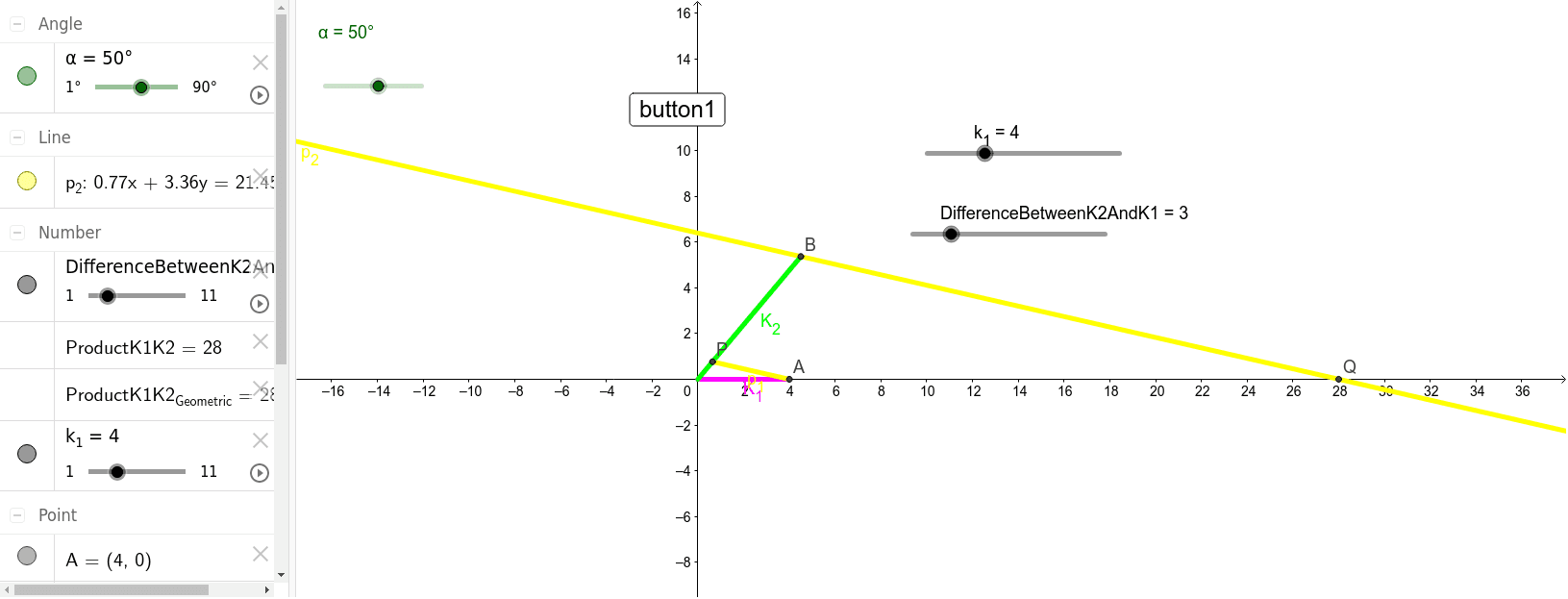
This GeoGebra example demonstrates how to construct the product of two segment lengths a and b using only compass and straightedge, visually realizing multiplication as a geometric length. The core mathematical concepts involve geometric construction, proportionality, and the use of similar triangles or parallel line intercept theorems to convert a numerical product into a segment length. The construction uses GeoGebra commands such as Segment, Line, and Intersect, along with a button (button1) to control the dynamic process. Key objects include α, k_1, k_2, points A, B, P, Q, and variables like DifferenceBetweenK2AndK1, ProductK1K2, and ProductK1K2_{Geometric} which compare the algebraic product with the geometrically constructed length. This example is suitable for middle or high school geometry classes, helping students grasp the rigor of classical constructions and the correspondence between algebra and geometry. It is also useful for teachers demonstrating geometric multiplication or for students exploring construction principles interactively.
GeoGebra Commands & Parameters
Segment((0, 0), A) → K_1Segment((0, 0), B) → K_2Segment(P, A) → p_1Line(B, p_1) → p_2Intersect(p_2, xAxis) → Q