
Comparing Rational Numbers – Fractions
Loading the math board and drawing, please wait…
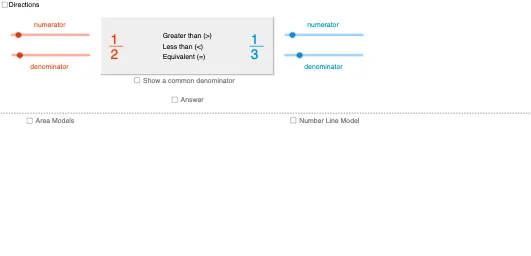
This GeoGebra example demonstrates a visual approach to comparing rational numbers and fractions, allowing students to observe their relative positions on a number line and understand inequality relationships. Key mathematical concepts include rational numbers, fraction comparison, inequalities, and number line representation. In terms of construction, it employs Min and Max commands to set ranges, If commands for conditional logic, Segment and Polygon to draw geometric elements like number lines and fraction bars, Text for labels, and Point to define key locations. Objects such as NumLnFrac1 and NumLnFrac2 represent the positions of fractions, while factor variables enable adjustments. The example is suitable for middle school math education, particularly for teaching fraction comparison through interactive visualization.
GeoGebra Commands & Parameters
Min(c_1, d) → cMax(Sequence[If[Mod[c, i] + Mod[d, i] ≟ 0, i, -1], i, 1, Min[{c, d}]]) → factor_2If(factor_2 > 0, factor_2, 1) → factor_4Min(a_1, b) → aMax(Sequence[If[Mod[a, i] + Mod[b, i] ≟ 0, i, -1], i, 1, Min[{a, b}]]) → factor_1If(factor_1 > 0, factor_1, b) → factor_3Max(Sequence[If[Mod[l, i] + Mod[n, i] ≟ 0, i, -1], i, 1, Min[{l, n}]]) → factorSegment(C, D) → eSegment((x(C) + (1 / 8 * (x(D) - x(C))), y(C) + 0.1), (x(C) + (1 / 8 * (x(D) - x(C))), y(C) - 0.1)) → gSegment((x(C) + (0 / 8 * (x(D) - x(C))), y(C) + 0.2), (x(C) + (0 / 8 * (x(D) - x(C))), y(C) - 0.2)) → fSegment((x(C) + (2 / 8 * (x(D) - x(C))), y(C) + 0.2), (x(C) + (2 / 8 * (x(D) - x(C))), y(C) - 0.2)) → hSegment((x(C) + (3 / 8 * (x(D) - x(C))), y(C) + 0.1), (x(C) + (3 / 8 * (x(D) - x(C))), y(C) - 0.1)) → iSegment((x(C) + (4 / 8 * (x(D) - x(C))), y(C) + 0.2), (x(C) + (4 / 8 * (x(D) - x(C))), y(C) - 0.2)) → jSegment((x(C) + (5 / 8 * (x(D) - x(C))), y(C) + 0.1), (x(C) + (5 / 8 * (x(D) - x(C))), y(C) - 0.1)) → pSegment((x(C) + (6 / 8 * (x(D) - x(C))), y(C) + 0.2), (x(C) + (6 / 8 * (x(D) - x(C))), y(C) - 0.2)) → qSegment((x(C) + (7 / 8 * (x(D) - x(C))), y(C) + 0.1), (x(C) + (7 / 8 * (x(D) - x(C))), y(C) - 0.1)) → rSegment((x(C) + (8 / 8 * (x(D) - x(C))), y(C) + 0.2), (x(C) + (8 / 8 * (x(D) - x(C))), y(C) - 0.2)) → sPolygon(G, H, I, J) → poly1, g_1, h_1, i_1, j_1Segment(H, I) → tSegment(G, H) → b_1Segment(I, J) → d_1Segment(J, G) → e_1Polygon(G, (x(G) + (a / b * (x(H) - x(G))), y(G)), (x(J) + (a / b * (x(H) - x(G))), y(J)), J) → poly2, g_2, f_1, k_1, j_2Segment((x(G) + (1 / b * (x(H) - x(G))), y(G)), (x(G) + (1 / b * (x(H) - x(G))), y(G) - 1)) → l_1Segment((x(G) + (2 / b * (x(H) - x(G))), y(G)), (x(G) + (2 / b * (x(H) - x(G))), y(G) - 1)) → m_1Segment((x(G) + (3 / b * (x(H) - x(G))), y(G)), (x(G) + (3 / b * (x(H) - x(G))), y(G) - 1)) → n_1Segment((x(G) + (4 / b * (x(H) - x(G))), y(G)), (x(G) + (4 / b * (x(H) - x(G))), y(G) - 1)) → p_1Segment((x(G) + (5 / b * (x(H) - x(G))), y(G)), (x(G) + (5 / b * (x(H) - x(G))), y(G) - 1)) → q_1Segment((x(G) + (6 / b * (x(H) - x(G))), y(G)), (x(G) + (6 / b * (x(H) - x(G))), y(G) - 1)) → r_1Segment((x(G) + (7 / b * (x(H) - x(G))), y(G)), (x(G) + (7 / b * (x(H) - x(G))), y(G) - 1)) → s_1Segment((x(G) + (8 / b * (x(H) - x(G))), y(G)), (x(G) + (8 / b * (x(H) - x(G))), y(G) - 1)) → t_1Segment((x(G) + (9 / b * (x(H) - x(G))), y(G)), (x(G) + (9 / b * (x(H) - x(G))), y(G) - 1)) → a_2Segment((x(G) + (10 / b * (x(H) - x(G))), y(G)), (x(G) + (10 / b * (x(H) - x(G))), y(G) - 1)) → b_2Segment((x(G) + (11 / b * (x(H) - x(G))), y(G)), (x(G) + (11 / b * (x(H) - x(G))), y(G) - 1)) → c_2Polygon(K, L, M, N) → poly3, k_2, l_2, m_2, n_2Polygon(K, (x(K) + (c / d * (x(L) - x(K))), y(K)), (x(K) + (c / d * (x(L) - x(K))), y(M)), N) → poly4, k_3, d_2, e_2, n_3Segment((x(K) + (1 / d * (x(L) - x(K))), y(K)), (x(K) + (1 / d * (x(L) - x(K))), y(K) - 1)) → f_2Segment((x(K) + (2 / d * (x(L) - x(K))), y(K)), (x(K) + (2 / d * (x(L) - x(K))), y(K) - 1)) → h_2Segment((x(K) + (3 / d * (x(L) - x(K))), y(K)), (x(K) + (3 / d * (x(L) - x(K))), y(K) - 1)) → i_2Segment((x(K) + (4 / d * (x(L) - x(K))), y(K)), (x(K) + (4 / d * (x(L) - x(K))), y(K) - 1)) → p_2Segment((x(K) + (5 / d * (x(L) - x(K))), y(K)), (x(K) + (5 / d * (x(L) - x(K))), y(K) - 1)) → q_2Segment((x(K) + (6 / d * (x(L) - x(K))), y(K)), (x(K) + (6 / d * (x(L) - x(K))), y(K) - 1)) → r_2Segment((x(K) + (7 / d * (x(L) - x(K))), y(K)), (x(K) + (7 / d * (x(L) - x(K))), y(K) - 1)) → s_2Segment((x(K) + (8 / d * (x(L) - x(K))), y(K)), (x(K) + (8 / d * (x(L) - x(K))), y(K) - 1)) → t_2Segment((x(K) + (9 / d * (x(L) - x(K))), y(K)), (x(K) + (9 / d * (x(L) - x(K))), y(K) - 1)) → a_3Segment((x(K) + (10 / d * (x(L) - x(K))), y(K)), (x(K) + (10 / d * (x(L) - x(K))), y(K) - 1)) → b_3Segment((x(K) + (11 / d * (x(L) - x(K))), y(K)), (x(K) + (11 / d * (x(L) - x(K))), y(K) - 1)) → c_3Polygon(BoxPt, BoxPt + (9, 0), BoxPt + (9, If[ans ∧ words, -4, -3]), BoxPt + (0, If[ans ∧ words, -4, -3])) → box, d_3, e_3, f_3, g_3If(c > 9 ∨ d > 9, "_______", "____") → frac2VinculumIf(a > 9 ∨ b > 9, "_______", "____") → frac1VinculumText(If[a / b > c / d, ">", If[a / b < c / d, "<", "="]]) → relationshipSymbolText(common_1) → equivFrac1NumText(common_2) → equivFrac2NumText(common_3) → equivFrac1DenomText(common_3) → equivFrac2DenomSegment(BoxPt + (0.25, -2.5), BoxPt + (8.75, -2.5)) → relationshipWordsDividerPolygon(Corner[equivFrac1Denom, 1] + (-0.1, 0.1), Corner[equivFrac1Denom, 2] + (0.1, 0.1), (x(Corner[equivFrac1Denom, 2]) + 0.1, y(Corner[equivFrac1Num, 3])), (x(Corner[equivFrac1Denom, 1]) - 0.1, y(Corner[equivFrac1Num, 4]))) → equivFrac1Box, h_3, i_3, j_3, l_3Polygon(Corner[equivFrac2Denom, 1] + (-0.1, 0.1), Corner[equivFrac2Denom, 2] + (0.1, 0.1), (x(Corner[equivFrac2Denom, 2]) + 0.1, y(Corner[equivFrac2Num, 3])), (x(Corner[equivFrac2Denom, 1]) - 0.1, y(Corner[equivFrac2Num, 4]))) → equivFrac2Box, m_3, p_3, q_3, r_3Text(If[common_1 > 99 ∨ common_3 > 99, "__________", If[common_1 > 9 ∨ common_3 > 9, "_______", "____"]]) → equivFrac1VinculumText(If[common_2 > 99 ∨ common_3 > 99, "__________", If[common_2 > 9 ∨ common_3 > 9, "_______", "____"]]) → equivFrac2VinculumText("or") → equivFrac1OrText("or") → equivFrac2OrSegment(Midpoint[G, N], Midpoint[H, M]) → areaModelDragLimitPoint(areaModelDragLimit) → areaModelDragPtSegment((x(areaModelDragPt), y(N)), (x(areaModelDragPt), y(G))) → areaModelDragLine
AI Drawing Prompt Reference
Draw a horizontal number line with tick marks at both ends. Above the line, place two rectangular bars, each representing a fraction. Divide each bar into equal segments and shade a portion to indicate the numerator. Below each bar, draw vertical dashed lines aligning with the number line to show the fraction's position. Use alternating tick lengths on the number line for clarity. The layout should clearly compare the two fractions' magnitudes.
The prompt above was compiled from the original drawing commands and is for reference only.