
Compare Numbers Practice
Loading the math board and drawing, please wait…
In collections
Ordnen und Vergleichen von Bruchzahlen
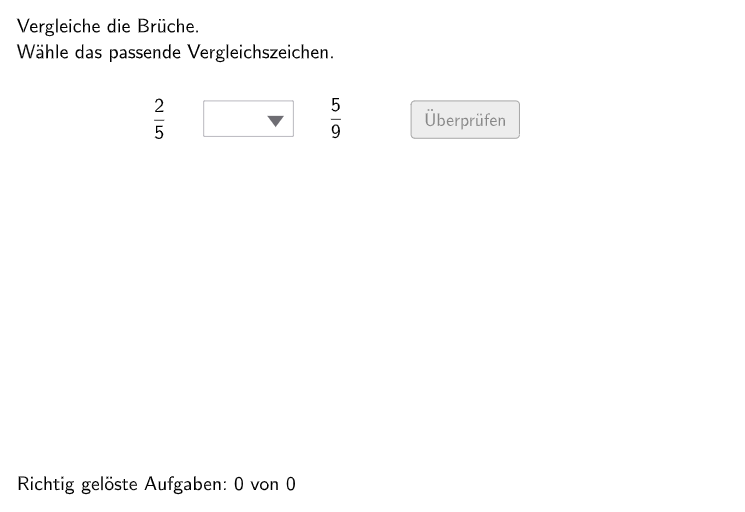
This example demonstrates how to let students compare and order natural numbers as well as non-negative decimal and fraction numbers. The core math concepts involved include number sense and rational number comparison. Key GeoGebra commands used for construction include Shuffle, Element, Textfield, Polygon, Append, Remove, Reverse, Mod, etc., to create random problems and interactive exercises. Suitable for 5-6 grade students to practice comparing and ordering natural numbers and non-negative decimals and fractions.
GeoGebra Commands & Parameters
Shuffle(Sequence[RandomElement[{2, 3, 4, 5, 6, 7, 8, 9, 10, 12, 15, 24}], i, 1, 100]) → randomB, {15, 5, 10, 4, 8, 6, 9, 5, 2, 9, 7, 12, 10, 6, 5, 15, 24, 7, 4, 4, 10, 10, 3, 24, 12, 15, 10, 12, 2, 24, 3, 15, 5, 24, 12, 9, 12, 24, 2, 15, 2, 4, 24, 12, 24, 4, 8, 5, 6, 24, 12, 12, 7, 15, 15, 24, 9, 5, 6, 4, 12, 6, 9, 4, 2, 9, 4, 2, 4, 10, 5, 5, 3, 5, 8, 12, 4, 3, 15, 3, 24, 3, 4, 4, 3, 3, 6, 6, 2, 8, 4, 15, 8, 6, 7, 3, 12, 4, 4, 8}Element(randomB, Mod[questionCount, 100] + 1) → numBShuffle(Sequence[RandomElement[{2, 3, 4, 5, 6, 7, 8, 9, 10, 12, 15, 24}], i, 1, 100] \ {numB}) → randomD, {12, 9, 15, 9, 8, 8, 2, 12, 10, 6, 12, 24, 6, 24, 7, 4, 7, 9, 24, 7, 12, 15, 10, 9, 6, 8, 15, 9, 4, 7, 12, 2, 10, 9, 2, 9, 8, 8, 10, 8, 8, 2, 3, 3, 2, 12, 10, 4, 8, 12, 2, 8, 4, 7, 3, 6, 2, 2, 12, 2, 4, 3, 9, 4, 9, 15, 3, 6, 10, 8, 10, 9, 24, 3, 6, 6, 3, 8, 24, 3, 15, 15, 7, 7, 6, 2, 7, 15, 9, 2}Element(randomD, Mod[questionCount, 100] + 1) → numDShuffle(Sequence[Random[1, numB - 1], i, 1, 100]) → randomA, {3, 2, 4, 3, 3, 1, 4, 4, 3, 1, 4, 3, 4, 4, 4, 2, 3, 3, 2, 4, 4, 3, 3, 4, 4, 2, 4, 4, 2, 4, 1, 3, 4, 3, 2, 2, 2, 2, 1, 3, 4, 4, 3, 2, 4, 2, 2, 4, 1, 1, 4, 1, 4, 2, 4, 4, 4, 1, 1, 4, 2, 1, 4, 3, 4, 1, 4, 4, 4, 3, 1, 3, 3, 1, 3, 3, 3, 1, 1, 2, 2, 4, 1, 2, 1, 4, 2, 3, 3, 1, 3, 2, 4, 4, 4, 3, 2, 1, 3, 3}Shuffle(Sequence[RandomElement[{0, 1}], i, 1, 100]) → modelist, {1, 0, 1, 1, 0, 0, 0, 1, 1, 1, 1, 1, 0, 1, 1, 1, 1, 0, 0, 1, 0, 1, 1, 1, 1, 0, 1, 0, 1, 0, 0, 1, 0, 0, 0, 1, 0, 1, 0, 0, 1, 1, 0, 0, 1, 0, 1, 0, 0, 0, 0, 1, 0, 1, 0, 0, 1, 1, 0, 0, 0, 0, 0, 1, 0, 1, 1, 0, 0, 0, 1, 1, 1, 1, 1, 0, 1, 1, 1, 1, 1, 0, 1, 0, 1, 0, 0, 0, 0, 0, 0, 0, 1, 1, 0, 1, 0, 1, 1, 1}Element(modelist, Mod[questionCount, 100] + 1) → modeShuffle(Sequence[Random[1, numD - 1], i, 1, 100] \ {numA}) → randomC, {1, 5, 8, 1, 7, 8, 5, 1, 1, 6, 4, 4, 1, 4, 4, 8, 7, 1, 5, 5, 1, 3, 1, 1, 3, 8, 1, 6, 3, 7, 5, 6, 3, 6, 8, 8, 8, 6, 6, 5, 6, 4, 7, 7, 6, 3, 8, 5, 4, 5, 1, 3, 7, 8, 7, 4, 5, 5, 3, 4, 4, 3, 3, 3, 1, 7, 8, 8, 7, 8, 1, 6, 3, 8, 7, 8, 7, 6, 1, 8, 6, 5, 7, 1, 6, 8, 5, 7, 4, 7, 4, 8, 3}Textfield(input1) → InputBox1Textfield(input2) → InputBox2Polygon(PtopLeftCornerFeedback, PtopRightCornerFeedback, PbottomRightCornerFeedback, PbottomLeftCornerFeedback) → rectangleCorrect, rectangleCorrectS3, rectangleCorrectS4, rectangleCorrectS2, rectangleCorrectS1Shuffle(Sequence[Random[0, 10], i, 1, 100]) → randomNosForX, {4, 10, 4, 4, 9, 10, 2, 6, 2, 5, 3, 6, 8, 1, 3, 5, 5, 4, 10, 3, 3, 2, 5, 8, 7, 6, 0, 5, 9, 1, 5, 2, 10, 7, 5, 8, 0, 3, 3, 8, 4, 8, 6, 5, 10, 3, 10, 8, 8, 8, 4, 1, 0, 4, 10, 10, 9, 9, 4, 10, 5, 2, 6, 9, 7, 2, 8, 4, 9, 0, 5, 0, 7, 1, 1, 3, 2, 8, 0, 9, 3, 4, 2, 1, 8, 9, 10, 0, 6, 3, 7, 10, 9, 10, 4, 6, 1, 7, 8, 3}Element(randomNosForX, Mod[questionCount, 100] + 1) → numXShuffle(Sequence[Random[0, 10], i, 1, 100]) → randomNosForY, {1, 7, 1, 6, 8, 7, 5, 5, 8, 4, 9, 10, 6, 0, 9, 8, 7, 3, 6, 2, 7, 4, 0, 5, 6, 5, 5, 3, 8, 7, 9, 7, 7, 3, 5, 4, 1, 3, 1, 3, 5, 1, 7, 8, 8, 7, 6, 6, 7, 0, 0, 5, 4, 1, 0, 2, 4, 3, 9, 9, 7, 5, 0, 1, 6, 8, 10, 6, 3, 10, 4, 9, 5, 2, 9, 3, 6, 2, 8, 0, 4, 7, 8, 10, 7, 4, 6, 2, 3, 9, 1, 10, 1, 10, 9, 7, 8, 6, 7, 3}Element(randomNosForY, Mod[questionCount, 100] + 1) → numYAppend(true, Sequence[If[randomNosForX(i) ≟ randomNosForX(i - 1), false, true], i, 2, 100]) → stayXAppend(true, Sequence[If[randomNosForY(i) ≟ randomNosForY(i - 1), false, true], i, 2, 100]) → stayYRemove(Sequence[If[stayX(i), randomNosForX(i), 0], i, 1, 100], Sequence[0, i, 1, 100]) → randomNosForXwithoutRepeatRemove(Sequence[If[stayY(i), randomNosForY(i), 0], i, 1, 100], Sequence[0, i, 1, 100]) → randomNosForYwithoutRepeatElement(randomNosForXwithoutRepeat, Mod[questionCount, Length[randomNosForXwithoutRepeat]] + 1) → numXwithoutRepeatElement(randomNosForYwithoutRepeat, Mod[questionCount, Length[randomNosForYwithoutRepeat]] + 1) → numYwithoutRepeatReverse(Sequence[Mod[floor(numLeft / 10^(i)), 10], i, -15, 0]) → splitNumLeftReverse(Sequence[Mod[floor(numRight / 10^(i)), 10], i, -15, 0]) → splitNumRightMod(numA, numB) → modFrac1Mod(numC, numD) → modFrac2
AI Drawing Prompt Reference
Draw a graph that contains two number comparison problems, each involving the comparison of natural numbers and non-negative fractions. The graph includes two number input boxes, two rectangular boxes for the comparison results, and two mode selection boxes for the comparison mode. The comparison mode can be selected as greater than, less than, or equal to. The graph also includes two lines representing the comparison results, with the line color changing according to the comparison result.
The prompt above was compiled from the original drawing commands and is for reference only.