
Compare Fractions by Andrew Barrett
Loading the math board and drawing, please wait…
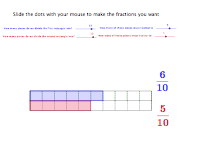
This example demonstrates how to compare the sizes of two fractions using a bar chart. Key math concepts include fractions, bar charts, and addition. GeoGebra commands used include LCM, Sequence, Element, Segment, and Polygon. Suitable for upper elementary or middle school students learning fraction comparison and addition.
GeoGebra Commands & Parameters
LCM(den1, den2) → bSequence((-5 + i * 10 / den1, 0), i, 0, den1) → list1Element(list1, 1) → cSequence((-5 + i * 10 / den1, 0.8), i, 0, den1) → list2Sequence(Segment[Element[list1, i], Element[list2, i]], i, 1, den1 + 1) → list3Sequence((-5 + i * 10 / den2, 0), i, 0, den2) → list4Sequence((-5 + i * 10 / den2, -0.8), i, 0, den2) → list5Sequence((-5 + i * 10 / b, 0), i, 0, b) → list7Sequence(Segment[Element[list4, i], Element[list5, i]], i, 0, den2 + 1) → list6Segment(D, C) → aPolygon(E, F, J_1, K_1) → poly1, e, f, j_1, k_1Polygon(H, G, K_2, J_2) → Poly2, h, g, k_2, j_2Segment(J_1, K_11) → dSegment(J_1, K_2) → iSegment(K_2, K) → jSegment(K_11, K) → k