
Common Notion 5 Math Example
Loading the math board and drawing, please wait…
In collections
Basic Constructions
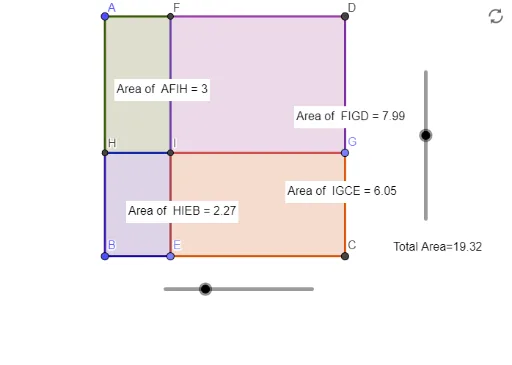
This example demonstrates the construction and operation of 2D vectors, integrating unit circles and polygons for geometric analysis. Core math concepts include vectors, unit circle, coordinate geometry, and definite integrals. Construction highlights involve GeoGebra commands like Polygon, Distance, Point, Segment, OrthogonalLine, Intersect, and PointIn. Suitable for high school and above students learning vectors, integrals, and geometric constructions.
GeoGebra Commands & Parameters
Polygon(A, B, 4) → poly1, f, g, h, i, C, DDistance(A, D) → distanceADDistance(D, C) → distanceDCPoint(Circle[D, a]) → GSegment(D, G) → kPoint(Circle[B, b]) → ESegment(B, E) → jOrthogonalLine(G, h) → lOrthogonalLine(E, g) → mIntersect(m, i) → FIntersect(l, f) → HSegment(H, G) → nSegment(E, F) → pIntersect(n, p) → IPolygon(A, F, I, H) → q1, a_1, f_1, i_1, h_1Polygon(F, I, G, D) → q2, f_2, i_2, g_1, dPolygon(H, I, E, B) → q3, h_2, i_3, e, b_1Polygon(I, G, C, E) → q4, i_4, g_2, c, e_1PointIn(q1) → Pointq1PointIn(q2) → Pointq2PointIn(q4) → Pointq4PointIn(q3) → Pointq3
AI Drawing Prompt Reference
Draw a 2D vector example featuring a square and two unit circles to demonstrate vector construction and operations. The square should have one side parallel to the x-axis and the other parallel to the y-axis. Draw an outward unit vector from one vertex of the square and a unit circle at its endpoint. Then, draw a vector along the diagonal of the square and its corresponding unit circle. Finally, connect the square and the two unit circles with line segments to form a complex geometric figure.
The prompt above was compiled from the original drawing commands and is for reference only.