
Combining Operations with Fractions in Geometric Construction
Loading the math board and drawing, please wait…
In collections
Bruchzahlen - Verbindung der Grundrechnungsarten
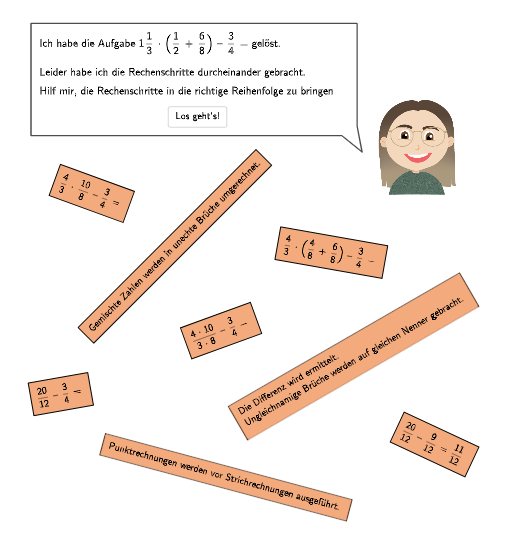
This example demonstrates how to combine basic operations with fractions in geometric construction. Key mathematical concepts include order of operations, fraction arithmetic, and geometric construction. The construction involves using GeoGebra commands such as Point, Translate, Midpoint, etc. It is suitable for students in grades 5-6 to learn about operation rules and geometric construction skills.
GeoGebra Commands & Parameters
Point(Line[P0, xAxis]) → P1Point(Line[P0, xAxis]) → P2Translate(Polygon[(0, 0), (tablesizex2, 0), (tablesizex2, tablesizey), (0, tablesizey)], P2 - ((0.2 * tablespace), (-2 * tablesizey) - (2 * tablespace))) → vrechts3Translate(Polygon[(0, 0), (tablesizex2, 0), (tablesizex2, tablesizey), (0, tablesizey)], P2 - ((0.2 * tablespace), (-tablesizey) - tablespace)) → vrechts2Translate(Polygon[(0, 0), (tablesizex3, 0), (tablesizex3, tablesizey), (0, tablesizey)], P1 - (0, (-3 * tablesizey) - (3 * tablespace))) → vlinks4Translate(Polygon[(0, 0), (tablesizex3, 0), (tablesizex3, tablesizey), (0, tablesizey)], P1 - (0, (-5 * tablesizey) - (5 * tablespace))) → vlinks6Translate(Polygon[(0, 0), (tablesizex2, 0), (tablesizex2, tablesizey), (0, tablesizey)], P2 - ((0.2 * tablespace), (-3 * tablesizey) - (3 * tablespace))) → vrechts4Translate(Polygon[(0, 0), (tablesizex2, 0), (tablesizex2, tablesizey), (0, tablesizey)], P2 - ((0.2 * tablespace), (-5 * tablesizey) - (5 * tablespace))) → vrechts6Translate(Polygon[(0, 0), (tablesizex2, 0), (tablesizex2, tablesizey), (0, tablesizey)], P2 - ((0.2 * tablespace), (-4 * tablesizey) - (4 * tablespace))) → vrechts5Translate(Polygon[(0, 0), (tablesizex3, 0), (tablesizex3, tablesizey), (0, tablesizey)], P1 - (0, 0)) → vlinks1Midpoint(Corner[TextLinks1, 1], Corner[TextLinks1, 3]) → M1Midpoint(Corner[TextRechts2, 1], Corner[TextRechts2, 3]) → M2Midpoint(Corner[TextRechts4, 1], Corner[TextRechts4, 3]) → M41Midpoint(Corner[TextRechts5, 1], Corner[TextRechts5, 3]) → M5Midpoint(Corner[TextRechts6, 1], Corner[TextRechts6, 3]) → M61Midpoint(Corner[TextLinks6, 1], Corner[TextLinks6, 3]) → M62Midpoint(Corner[TextLinks4, 1], Corner[TextLinks4, 3]) → M42Midpoint(Corner[TextRechts3, 1], Corner[TextRechts3, 3]) → M3Textfield(input1) → Eingabefeld1Textfield(input2) → Eingabefeld2CountIf(m ∈ vrechts2, m, {M1, M2, M3, M41, M42, M5, M61, M62}) → count2CountIf(m ∈ vrechts4, m, {M1, M2, M3, M41, M42, M5, M61, M62}) → count41CountIf(m ∈ vlinks4, m, {M1, M2, M3, M41, M42, M5, M61, M62}) → count42CountIf(m ∈ vrechts6, m, {M1, M2, M3, M41, M42, M5, M61, M62}) → count61CountIf(m ∈ vrechts5, m, {M1, M2, M3, M41, M42, M5, M61, M62}) → count5CountIf(m ∈ vlinks6, m, {M1, M2, M3, M41, M42, M5, M61, M62}) → count62CountIf(m ∈ vlinks1, m, {M1, M2, M3, M41, M42, M5, M61, M62}) → count1Sequence(P1 + ((-0.3 * tablespace) + textposx, (m * tablesizey) + (m * tablespace) - 0.2), m, 0, 5) → listPosAPoint(Line[A, xAxis]) → BSpeechBubbleLeft(C, 8.4, 1.1) → Vieleck1Point(Line[D, xAxis]) → EPoint(Line[F, xAxis]) → GSpeechBubbleRight(H, 12, 3.97) → Vieleck2RotateText((("\textsf{\small\fcolorbox{000000}{" * colour) * "}{\frac{20}{12} -- \frac{9}{12} = \frac{11}{12}"), -25°) → TextStartRechts6RotateText("\textsf{Rechenschritt}", 90°) → Text28Zip(Segment[P + (tablespace, (-tablespace)), P + (tablespace, tablesizey - tablespace)], P, listPosA) → listLinesTranslate(Polygon[(0, 0), (tablesizex3, 0), (tablesizex3, tablesizey), (0, tablesizey)], P1 - (0, (-tablesizey) - tablespace)) → vlinks2Translate(Polygon[(0, 0), (tablesizex3, 0), (tablesizex3, tablesizey), (0, tablesizey)], P1 - (0, (-4 * tablesizey) - (4 * tablespace))) → vlinks5Translate(Polygon[(0, 0), (tablesizex3, 0), (tablesizex3, tablesizey), (0, tablesizey)], P1 - (0, (-2 * tablesizey) - (2 * tablespace))) → vlinks3CountIf(m ∈ vrechts3, m, {M1, M2, M3, M41, M42, M5, M61, M62}) → count3Sequence(P2 + (0, (m * tablesizey) + (m * tablespace) - (0.5 * textposx)), m, 0, 5) → listPosBTranslate(Polygon[(0, 0), (tablesizex2, 0), (tablesizex2, tablesizey), (0, tablesizey)], P2 - ((0.2 * tablespace), 0)) → vrechts1RotateText((("\textsf{\small\fcolorbox{000000}{" * colour) * "}{Gemischte Zahlen werden in unechte Brüche umgerechnet.}"), 45°) → TextStartLinks1RotateText((("\textsf{\small\fcolorbox{000000}{" * colour) * "}{Punktrechnungen werden vor Strichrechnungen ausgeführt."), -15°) → TextStartLinks4RotateText((("\textsf{\small\fcolorbox{000000}{" * colour) * "}{Die Differenz wird ermittelt.\vphantom{g}\\Ungleichnamige Brüche werden auf gleichen Nenner gebracht."), 30°) → TextStartLinks6RotateText((("\textsf{\small\fcolorbox{000000}{" * colour) * "}{\frac{4}{3} \cdot \Big(\frac{4}{8} + \frac{6}{8}\Big) -- \frac{3}{4} ="), -10°) → TextStartRechts2RotateText((("\textsf{\small\fcolorbox{000000}{" * colour) * "}{\frac{4}{3} \cdot \frac{10}{8} -- \frac{3}{4} ="), -20°) → TextStartRechts3RotateText((("\textsf{\small\fcolorbox{000000}{" * colour) * "}{\frac{4 \cdot 10}{3 \cdot 8} -- \frac{3}{4} ="), 20°) → TextStartRechts4RotateText((("\textsf{\small\fcolorbox{000000}{" * colour) * "}{\frac{20}{12} -- \frac{3}{4} ="), 10°) → TextStartRechts5Point(Line[J, yAxis]) → L
AI Drawing Prompt Reference
Create a geometric construction diagram for teaching fraction operations. On the left, a column of rectangular boxes displays text instructions such as converting mixed numbers to improper fractions, performing multiplication before addition/subtraction, and finding common denominators. On the right, another column shows step-by-step fraction calculations, e.g., 4/3 times (4/8 + 6/8) minus 3/4, with simplification steps. Each box has a central marker point for counting. At the bottom, there are input fields and speech bubbles. The layout is neat, with boxes aligned vertically and evenly spaced.
The prompt above was compiled from the original drawing commands and is for reference only.