
Coloring an Ellipse with Dynamic Parameters
Loading the math board and drawing, please wait…
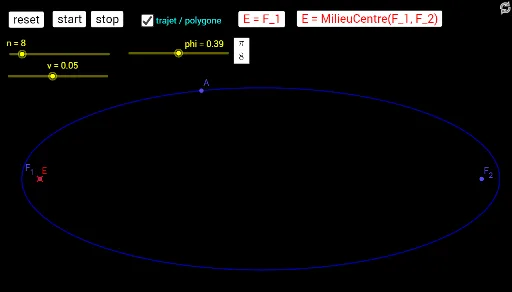
①This example demonstrates how to color an ellipse in GeoGebra and use sliders and buttons to dynamically adjust its parameters, visually showing changes in shape and position.②Core math concepts include the standard equation of an ellipse, foci and eccentricity, parametric equations, and the use of Sequence to generate point sets or loci, along with auxiliary elements like centroid (barycenter) and scalene triangles.③Construction highlights: the Ellipse command creates the ellipse, Sequence generates point sequences, sliders (n, t, v, phi) control parameters, buttons (Bouton2 to Bouton5) trigger reset or animation, and variables (vs0, ps0, etc.) store states; coloring commands fill the ellipse for visualization.④Suitable for high school or early college students, useful for teaching conic sections and analytic geometry, or as a dynamic geometry experiment to explore how parameter changes affect the ellipse.
GeoGebra Commands & Parameters
Ellipse(F_1, F_2, A) → cSequence(Element[ps0, i] + Element[vs0, i], i, 1, n) → ps1Sequence(If[Defined[Intersect[c, Segment[Element[ps0, i], Element[ps1, i]]]], Mirror[Element[ps0, i], Tangent[Intersect[c, Segment[Element[ps0, i], Element[ps1, i]]], c]], Element[ps0, i]], i, 1, n) → psc0Sequence(If[Defined[Intersect[c, Segment[Element[ps0, i], Element[ps1, i]]]], Mirror[Element[ps1, i], Tangent[Intersect[c, Segment[Element[ps0, i], Element[ps1, i]]], c]], Element[ps1, i]], i, 1, n) → psc1Sequence(Element[psc1, i] - Element[psc0, i], i, 1, n) → vs1Sequence(Segment[Element[ps0, i], Element[Append[ps0, Element[ps0, 1]], i + 1]], i, 1, n) → segSequence(Segment[Element[ps0, i], Element[ps1, i]], i, 1, n) → seg2
AI Drawing Prompt Reference
Draw a dynamic ellipse whose shape and position are controlled by sliders. The ellipse is defined by two foci and a point on it. Generate a sequence of points inside or on the ellipse, reflect each point across the tangent at its intersection with the ellipse, and connect adjacent reflected points with segments to form a polygonal frame. Also connect each original point to its reflected counterpart with segments to show reflection paths. Fill the ellipse with color and include buttons for reset or animation to visualize how parameter changes affect the ellipse and the moving point set.
The prompt above was compiled from the original drawing commands and is for reference only.