
Clifford Torus Stereographic Projection
Loading the math board and drawing, please wait…
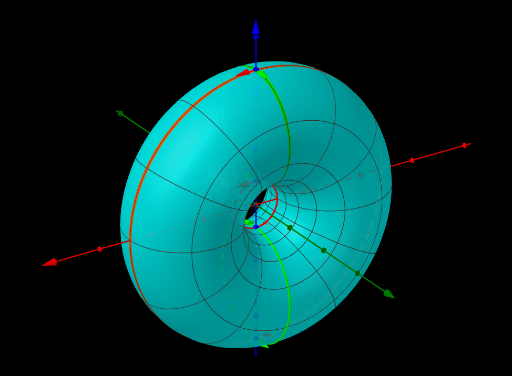
This example demonstrates the stereographic projection of a Clifford Torus from 4D to 3D. Key mathematical concepts include coordinate geometry and transformation. Using GeoGebra commands such as If, Text, Vector, Polygon, etc., the construction process of the torus is shown. Suitable for high school students and math enthusiasts.
GeoGebra Commands & Parameters
If(χStereoPrj, StereoPrj(x, y), If[χParallelPrj, (x * 6), 0]) → PrjIf(χPunctured, (R * π / 8), 0) → puncText("x^2+z^2=y^2+w^2=1 ↔ x^2+w^2=y^2+z^2=1; Rotate: ϕ=arg(z,w); Stereo-projected from w=R", (0, 0), false, true) → txtExplainVector(OW - (1, 0), OW + (1.8, 0)) → vWPolygon(OW + (sZW * (Wzxy(0, 0), Zw(0, 0))), OW + (sZW * (Wzxy(0, π), Zw(0, π))), 4) → TZWVector(OW - (0, 1), OW + (0, 1.5)) → vZAngle(PR + (-1, 1), PR, PR + (-1, -1)) → αWRSequence(Vector[PR + (0, z), PR + (-0.1, z)], z, -1, 1, 0.1) → ParallelPrjRays, {(-0.1, 0), (-0.1, 0), (-0.1, 0), (-0.1, 0), (-0.1, 0), (-0.1, 0), (-0.1, 0), (-0.1, 0), (-0.1, 0), (-0.1, 0), (-0.1, 0), (-0.1, 0), (-0.1, 0), (-0.1, 0), (-0.1, 0), (-0.1, 0), (-0.1, 0), (-0.1, 0), (-0.1, 0), (-0.1, 0), (-0.1, 0)}Vector(OW + (sZW * (Wzxy(0, 0), Zw(0, 0))), OW + (sZW * (Wzxy(π, 0), Zw(π, 0)))) → vZWUVector(OW + (sZW * (Wzxy(0, π), Zw(0, π))), OW + (sZW * (Wzxy(π, π), Zw(π, π)))) → vZWUπVector(OW + (sZW * (Wzxy(0, 0), Zw(0, 0))), OW + (sZW * (Wzxy(0, π), Zw(0, π)))) → vZWVVector(OW + (sZW * (Wzxy(π, 0), Zw(π, 0))), OW + (sZW * (Wzxy(π, π), Zw(π, π)))) → vZWVπAngle(OW + (sZW * (Wzxy(0, π), Zw(0, π))), OW + (sZW * (Wzxy(0, 0), Zw(0, 0))), OW + (sZW * (Wzxy(π, 0), Zw(π, 0)))) → αPunctureVector(PUV00, PUV00 + (0, 2, 0)) → vV00Vector(PUV0π, PUV0π + (0, -2, 0)) → vV0πVector(PUVπ0, PUVπ0 + (0, 2, 0)) → vVπ0Vector(PUVππ, PUVππ + (0, -2, 0)) → vVππVector(PUV0π, PUV0π + (2, 0, 0)) → vU0πVector(PUVπ0, PUVπ0 + (-2, 0, 0)) → vUπ0Vector(PUV00, PUV00 + (2, 0, 0)) → vU00Vector(PUVππ, PUVππ + (-2, 0, 0)) → vUππSurface(PrjX(u, v), PrjY(u, v), PrjZ(u, v), u, punc, (2 * π) - punc, v, punc, (2 * π) - punc) → TorusSurface(PrjX(u, v), PrjY(u, v), PrjZ(u, v), u, 0, (2 * π), v, (-0.005 * π), (0.005 * π)) → TorusUCurveCartesian(PrjX(u, π), PrjY(u, π), PrjZ(u, π), u, 0, (2 * π)) → TorusUπCurveCartesian(PrjX(π, v), PrjY(π, v), PrjZ(π, v), v, 0, (2 * π)) → TorusVπSurface(PrjX(u, v), PrjY(u, v), PrjZ(u, v), u, (-0.005 * π), (0.005 * π), v, 0, (2 * π)) → TorusVCurveCartesian(PrjX(u, punc), PrjY(u, punc), PrjZ(u, punc), u, (-punc), punc) → TorusPuncUCurveCartesian(PrjX(u, (-punc)), PrjY(u, (-punc)), PrjZ(u, (-punc)), u, (-punc), punc) → TorusPuncUnCurveCartesian(PrjX(punc, v), PrjY(punc, v), PrjZ(punc, v), v, (-punc), punc) → TorusPuncVCurveCartesian(PrjX((-punc), v), PrjY((-punc), v), PrjZ((-punc), v), v, (-punc), punc) → TorusPuncVnSurface(PrjX(u, v), PrjY(u, v), PrjZ(u, v), u, punc, (2 * π) - punc, v, (-punc), punc) → TorusPatchUSurface(PrjX(u, v), PrjY(u, v), PrjZ(u, v), u, (-punc), punc, v, punc, (2 * π) - punc) → TorusPatchV
AI Drawing Prompt Reference
Draw a stereographic projection of a Clifford Torus. The figure should show a three-dimensional torus shape composed of multiple torus patches joined together. The patches should be connected through circular holes, forming a complete torus structure. The projection should reflect the mapping from four-dimensional space to three-dimensional space, with annotations of coordinate relationships and rotation angles. The overall figure should clearly display the geometric features of the torus and its projected appearance, suitable for math enthusiasts.
The prompt above was compiled from the original drawing commands and is for reference only.