
Circle with Tangents: Perimeter Calculation
Loading the math board and drawing, please wait…
In collections
Unit 9 - Circles
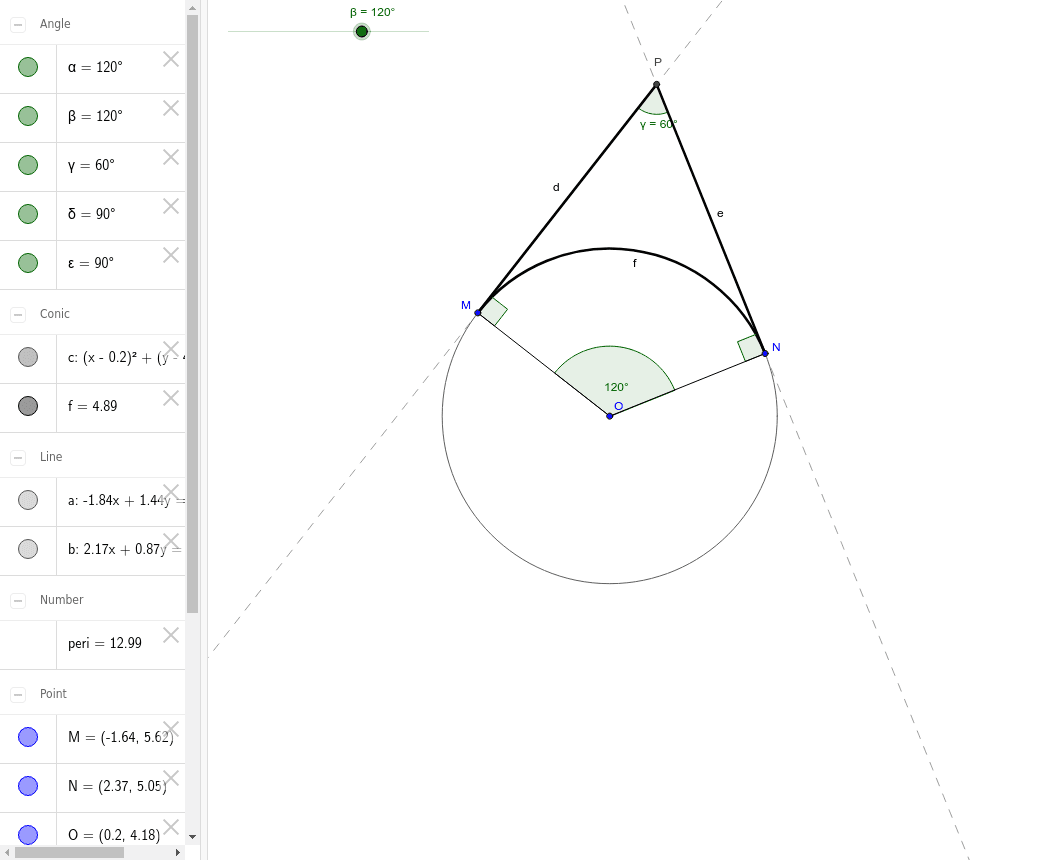
This example demonstrates how to draw tangents to a circle at a given angle and calculate the perimeter formed by the tangent segments d, e, and f. Key math concepts include circles, tangents, angles, and geometric constructions. GeoGebra commands used in the construction are Rotate, Circle, Angle, Tangent, Intersect, Segment, and CircleArc. It is suitable for high school students to practice geometric constructions and perimeter calculations, enhancing their understanding of circle and tangent properties.
GeoGebra Commands & Parameters
Rotate(M, -β, O) → NCircle(O, M) → cAngle(N, O, M) → αTangent(M, c) → a,Tangent(N, c) → b,Intersect(a, b) → PSegment(M, P) → dSegment(P, N) → eCircleArc(O, N, M) → fAngle(M, P, N) → γAngle(O, M, P) → δAngle(O, N, P) → εSegment(O, M) → gSegment(O, N) → h
AI Drawing Prompt Reference
Draw a circle and construct two tangent lines from a point on the circle such that they form a given angle with the line connecting the point to the center. Connect the points where the tangents touch the circle to the center, and draw an arc from one tangent point to the center to the other tangent point, then measure and label the lengths of the tangent segments and the arc to demonstrate geometric construction and perimeter calculation.
The prompt above was compiled from the original drawing commands and is for reference only.