
Circle-Triangle Six Point Intersection Theorem
Loading the math board and drawing, please wait…
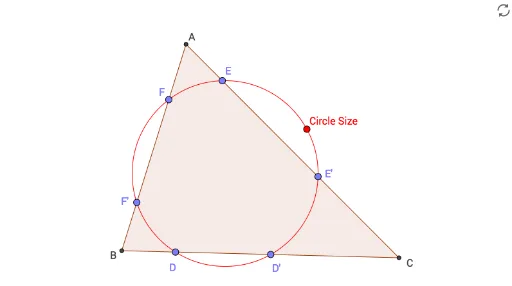
This example demonstrates a geometric theorem about the intersections between a circle and a triangle: when a circle intersects the three sides (or their extensions) of a triangle, it produces six intersection points, and these points satisfy certain collinearity or concyclicity relations. The core mathematical concepts include circles, triangles, line-circle intersections, polygons, and continuity. Construction details: using GeoGebra commands such as Circle to create the circle, Point to place points, Line to draw lines, Intersect to find intersection points, and Polygon to form the triangle; key objects include circle c, triangle poly1, lines f, g, h, and intersection points A_1, B_1, F, F', D, D', E', E. This example is suitable for high school or college geometry courses, serving as a dynamic exploration of circle-triangle intersection properties, and can help students observe the continuous variation of intersection points and special cases like tangency.
GeoGebra Commands & Parameters
Circle(A_1, B_1) → cPoint(c) → FPoint(c) → F'Point(c) → DPoint(c) → D'Point(c) → E'Point(c) → ELine(F, F') → fLine(D, D') → gLine(E', E) → hIntersect(f, h) → AIntersect(f, g) → BIntersect(g, h) → CPolygon(A, B, C) → poly1, k, i, j
AI Drawing Prompt Reference
Draw a circle intersecting a triangle at six points where the circle crosses each side (or its extension). Observe if these points exhibit specific collinearity or concyclicity. Start by creating a circle, place six points on it, form a triangle by connecting these points, then find the intersection points between the circle and the triangle's sides, and finally analyze the geometric relationships among these points.
The prompt above was compiled from the original drawing commands and is for reference only.