
Circle Theorems
Loading the math board and drawing, please wait…
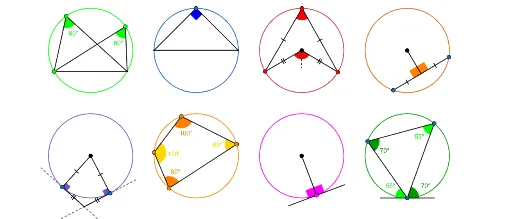
This example demonstrates circle theorems, including central angles, inscribed angles, and tangential angles. Using GeoGebra commands such as Point, Intersect, and Segment, it dynamically illustrates these theorems. Suitable for high school and above students to learn geometric constructions.
GeoGebra Commands & Parameters
Point(xAxis) → APoint(xAxis) → BPoint(c) → CIntersect(c, y = 1, 2) → DSegment(C, D) → fPoint(c) → EPoint(c) → FSegment(E, C) → gSegment(E, D) → hSegment(F, C) → iSegment(F, D) → jAngle(C, E, D) → αAngle(C, F, D) → βIntersect(c_2, y = 2, 2) → GIntersect(c_2, y = 2) → I, KSegment(I, G) → lPoint(c_2) → HSegment(H, I) → kSegment(H, K) → mAngle(I, H, K) → γPoint(c_{3}) → MPoint(c_{3}) → NPoint(c_{3}) → OSegment(M, N) → nSegment(M, O) → pSegment(O, L) → qSegment(L, N) → rAngle(N, M, O) → δAngularBisector(N, L, O) → sPoint(s) → QAngle(N, L, Q) → εAngle(Q, L, O) → ζAngle(N, L, O) → ηSegment(L, Q) → tPoint(c_{4}) → PPoint(c_{4}) → RSegment(P, R) → aMidpoint(a) → TSegment(S, T) → bAngle(S, T, R) → θAngle(S, T, P) → ιSegment(T, R) → dSegment(T, P) → ePoint(c_{5}) → VSegment(U, V) → f_1Point(c_{5}) → WSegment(U, W) → g_1OrthogonalLine(V, f_1) → h_1OrthogonalLine(W, g_1) → i_1Intersect(h_1, i_1) → ZCircle(Z, V) → c_1Circle(V, Z) → d_1Circle(W, Z) → e_1Intersect(d_1, h_1, 2) → A_1Intersect(c_1, h_1, 2) → B_1Segment(A_1, B_1) → j_1Intersect(e_1, i_1, 2) → C_1Intersect(c_1, i_1, 2) → D_1Segment(C_1, D_1) → k_1Segment(W, Z) → l_1Segment(V, Z) → m_1Angle(U, W, Z) → κAngle(U, V, Z) → λPoint(c_{6}) → JPoint(c_{6}) → E_1Point(c_{6}) → F_1Point(c_{6}) → G_1Polygon(J, E_1, F_1, G_1) → q1, j_2, n_1, p_1, q_1Angle(J, E_1, F_1) → μAngle(J, G_1, F_1) → νAngle(E_1, J, G_1) → ξAngle(G_1, F_1, E_1) → οPoint(c_{7}) → I_1Segment(H_1, I_1) → r_1OrthogonalLine(I_1, r_1) → s_1Point(s_1) → J_1Circle(I_1, J_1) → t_1Intersect(t_1, s_1, 2) → K_1Segment(K_1, J_1) → a_1Angle(H_1, I_1, J_1) → ρAngle(H_1, I_1, K_1) → σPoint(c_{8}) → M_1Segment(L_1, M_1) → b_1OrthogonalLine(M_1, b_1) → f_2Point(f_2) → N_1Circle(M_1, N_1) → d_2Intersect(d_2, f_2, 2) → O_1Segment(N_1, O_1) → g_2Point(c_{8}) → P_1Point(c_{8}) → Q_1Segment(P_1, M_1) → h_2Segment(Q_1, M_1) → i_2Segment(P_1, Q_1) → k_2Angle(P_1, M_1, N_1) → τAngle(Q_1, M_1, O_1) → υAngle(M_1, P_1, Q_1) → ϕAngle(P_1, Q_1, M_1) → χ
AI Drawing Prompt Reference
Draw a circle and mark two points on it. Find the intersection of the circle with a horizontal diameter and connect these points. Then, select two points on the circle, connect each to the center, and draw the angles formed with another point on the circle. Repeat this on the other side of the circle. Finally, draw a horizontal diameter, find its midpoint, connect it to the two points, and draw the angles and angle bisector.
The prompt above was compiled from the original drawing commands and is for reference only.