
Circle Symmetry Exploration (1a)
Loading the math board and drawing, please wait…
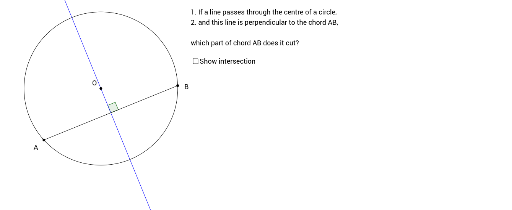
①This example dynamically demonstrates the symmetry properties of a circle, focusing on axial symmetry about a diameter and central symmetry about the center. ②Core mathematical concepts include circle symmetry, relationships between chords and diameters, perpendicular bisectors, equal angles, and geometric transformations. ③Construction highlights: using GeoGebra commands such as Intersect, Point, Circle, Segment, OrthogonalLine, and Angle to build the circle c, center O, radius point R, chords, perpendicular lines, and angle measurements, with text objects text1 and text2 annotating the results. ④Suitable for middle and high school students learning circle properties, symmetry transformations, and geometric proofs, as well as for teachers demonstrating visual verification of symmetry in the classroom.
GeoGebra Commands & Parameters
Intersect(xAxis, yAxis) → OPoint(xAxis) → RCircle(O, R) → cPoint(c) → APoint(c) → BSegment(A, B) → aOrthogonalLine(O, a) → lIntersect(l, a) → CAngle(B, C, O) → αSegment(A, C) → dSegment(C, B) → e
AI Drawing Prompt Reference
Draw a circle with its center at the origin and radius determined by a point on the x-axis. Place two points on the circle and connect them to form a chord. Construct a line through the center perpendicular to the chord, and mark its intersection with the chord. Measure and label the angle formed by one chord endpoint, the intersection point, and the center. Finally, connect the chord endpoints to the intersection point with segments, creating two smaller triangles, and display the angle value to illustrate the circle's axial symmetry about a diameter and central symmetry about the center.
The prompt above was compiled from the original drawing commands and is for reference only.