
Circle Symmetry by audience45b
Loading the math board and drawing, please wait…
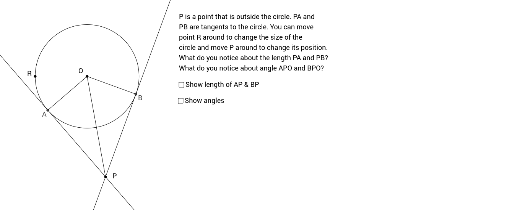
This example demonstrates the symmetry of a circle. Key mathematical concepts include circles and symmetry. Using GeoGebra commands such as Intersect, Point, Circle, Tangent, Segment, and Angle, the construction of symmetric circle figures is achieved. Suitable for middle school and above students to learn geometric transformations.
GeoGebra Commands & Parameters
Intersect(xAxis, yAxis) → OPoint(xAxis) → RCircle(O, R) → cTangent(P, c) → a, bIntersect(c, b, 1) → AIntersect(c, a, 1) → BSegment(A, O) → dSegment(O, B) → eSegment(O, P) → fSegment(A, P) → gSegment(B, P) → hAngle(B, P, O) → αAngle(O, P, A) → β
AI Drawing Prompt Reference
Draw a circle centered at the origin O. Place a point P on the positive x-axis. From P, draw two tangent lines to the circle, touching at points A and B. Connect O to A, O to B, and O to P. Also connect A to P and B to P. This forms two triangles. Mark the angles at P: one between B, P, and O, and the other between O, P, and A. The figure illustrates circle symmetry, with the tangents symmetric about the x-axis and the two angles equal.
The prompt above was compiled from the original drawing commands and is for reference only.