
Circle Sector Area Calculation
Loading the math board and drawing, please wait…
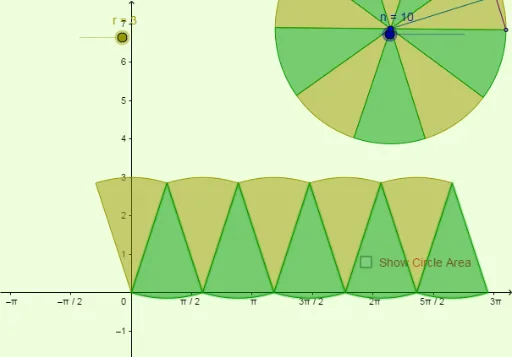
This example demonstrates the dynamic calculation of a circle's sector area (wedge). Key math concepts include circle area formulas, percentage calculations, isosceles triangles, 2D vectors, integers, and stochastic processes. Construction highlights involve using GeoGebra commands like Polygon, Circle, Point, Rotate, Segment, Midpoint, and Sequence to build the geometry, with sliders for dynamic sector manipulation. Suitable for high school mathematics education to understand the relationship between sector and circle areas, and parametric calculations.
GeoGebra Commands & Parameters
Polygon((0, 0), (base, 0), (base, r), (0, r)) → poly1, a, b, c, dCircle(A, r) → ePoint(e) → BRotate(B, (360 * ° / n), A) → B'Segment(B, B') → dxMidpoint(dx) → CSegment(A, C) → dySequence(Rotate[B, ((j * 360) * ° / n), A], j, 0, n) → list1Sequence(CircleSector[A, Element[list1, j], Element[list1, j + 1]], j, 1, n, 2) → list2Sequence(CircleSector[A, Element[list1, j], Element[list1, j + 1]], j, 2, n, 2) → list3Sequence(CircleSector[((j * dx), 0), ((j * dx) + dx / 2, dy), ((j * dx) + ((-dx)) / 2, dy)], j, 0, n / 2 - 1) → list4Sequence(CircleSector[((j * dx) + dx / 2, dy), ((j * dx) + 0, 0), ((j * dx) + dx, 0)], j, 0, n / 2 - 1) → list5