
Circle's Area and Perimeter Equality
Loading the math board and drawing, please wait…
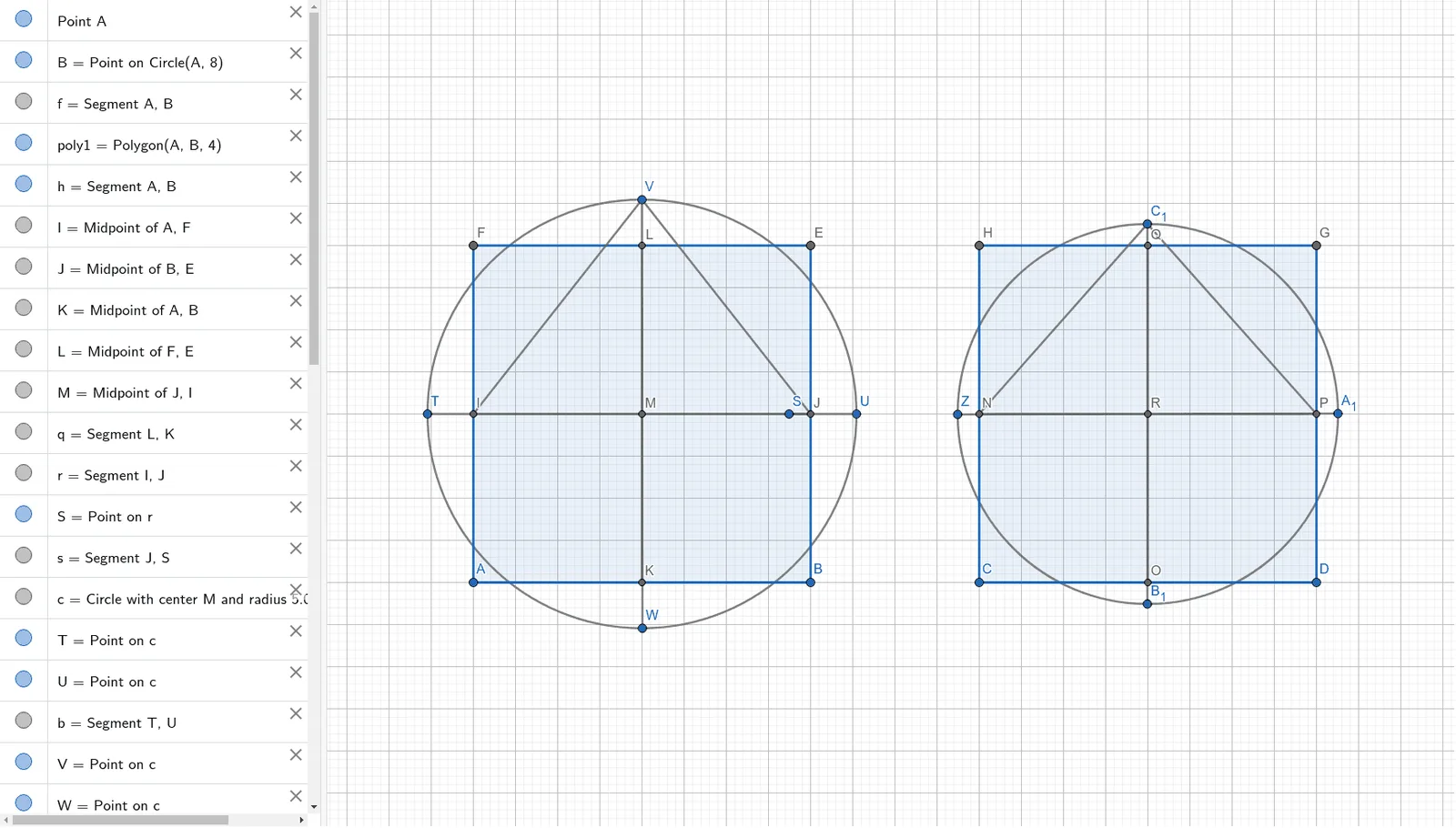
This example demonstrates how to use GeoGebra to construct shapes for comparing the perimeter and area of a circle. Key math concepts include the formulas for circle's circumference and area, and analytical geometry. Construction involves commands/objects like Point, Segment, Polygon, Midpoint, Circle. Suitable for high school mathematics teaching or exploration by math enthusiasts.
GeoGebra Commands & Parameters
Point(Circle[A, 8]) → BSegment(A, B) → fPolygon(A, B, 4) → poly1, h, i, j, k, E, FMidpoint(A, F) → IMidpoint(B, E) → JMidpoint(A, B) → KMidpoint(F, E) → LMidpoint(J, I) → MSegment(L, K) → qSegment(I, J) → rPoint(r) → SSegment(J, S) → sCircle(M, 5.088078598056276) → cPoint(c) → TPoint(c) → USegment(T, U) → bPoint(c) → VPoint(c) → WSegment(V, W) → dPoint(Circle[C, 8]) → DSegment(C, D) → gPolygon(C, D, 4) → poly2, l, m, n, p, G, HMidpoint(H, C) → NMidpoint(C, D) → OMidpoint(D, G) → PMidpoint(G, H) → QMidpoint(N, P) → RSegment(N, P) → tSegment(O, Q) → aCircle(R, 4.511353942246728) → ePoint(e) → ZPoint(e) → A_1Segment(Z, A_1) → f_1Point(e) → B_1Point(e) → C_1Segment(B_1, C_1) → g_1Segment(I, V) → h_1Segment(J, V) → i_1Segment(N, C_1) → j_1Segment(P, C_1) → k_1
AI Drawing Prompt Reference
Draw a circle with center C and radius 8. Use points A and B on the circle to draw a segment AB. Construct a square with A and B as vertices, and find the midpoints I, J, K, L of the square's sides, then draw segments connecting these midpoints. With the midpoint M of segment IJ as the center, draw a circle c. Use points T and U on circle c to draw a segment TU. Repeat the process with a circle centered at D (another point on the circle with radius 8), drawing a square with D as a vertex, finding midpoints N, O, P, Q of the square's sides, and drawing segments connecting these midpoints. With the midpoint R of segment NP as the center, draw a circle e.
The prompt above was compiled from the original drawing commands and is for reference only.