
Circle Art Sequence 1
Loading the math board and drawing, please wait…
In collections
#plottertwitter
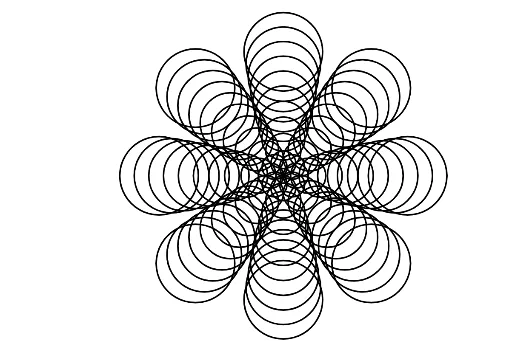
This example demonstrates a sequence of circles created through rotation and sequence generation. It involves the geometric properties of circles and transformations. Using GeoGebra commands Sequence and Rotate, a series of rotated circles are generated. Suitable for middle school and above students to learn about circle geometric transformations and sequences.
GeoGebra Commands & Parameters
Sequence((x + l)^(2) + y^(2) = l, l, 1, 10, 1) → l1Sequence(x^(2) + (y + l)^(2) = l, l, 1, 10, 1) → l2Sequence(x^(2) + (y - l)^(2) = l, l, 1, 10, 1) → l3Sequence((x - l)^(2) + y^(2) = l, l, 1, 10, 1) → l4Rotate(l1, 45°) → l1'Rotate(l2, 45°) → l2'Rotate(l3, 45°) → l3'Rotate(l4, 45°) → l4'
AI Drawing Prompt Reference
Draw a sequence of concentric circles with gradually increasing radii, then rotate each circle 45 degrees around the center. First, draw circles with equations x^2 + y^2 = l, where l ranges from 1 to 10. Then, draw circles with equations x^2 + (y + l)^2 = l, x^2 + (y - l)^2 = l, and (x - l)^2 + y^2 = l, also with l ranging from 1 to 10. Finally, rotate the first four circles 45 degrees around the center.
The prompt above was compiled from the original drawing commands and is for reference only.