
Circle and Triangle Relationship Animation
Loading the math board and drawing, please wait…
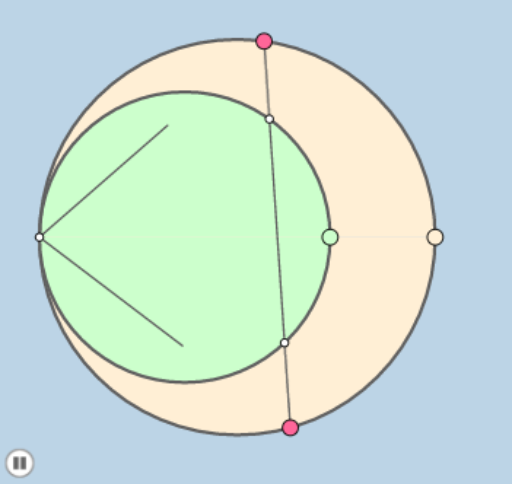
This example demonstrates the geometric relationship between circles, incircles, secant lines, and triangles through animation. Core mathematical concepts include Circle, Incircle, Secant, Triangle, Linear Functions, Correlation, Boxplot, Indefinite Integral, and Linear Programming. Construction highlights involve GeoGebra commands like Circle, Semicircle, Point, Segment, OrthogonalLine, Intersect, Distance, Mirror, Line, CircleSector, Dilate, Angle, and Rotate. Suitable for high school and above, for geometric construction and mathematical concept visualization.
GeoGebra Commands & Parameters
Circle(A_1, A) → cCircle(C_1, A) → dSemicircle(A, D_1) → eSemicircle(D_1, A) → fPoint(e) → D_2Segment(A, D_2) → gOrthogonalLine(D_2, h) → iIntersect(h, i) → EDistance(A, g) → distanceAgIntersect(e, j_1, 1) → ISemicircle(A, H) → c_1Circle(D_2, 2) → d_1Circle(D_2, 2) → r_1Segment(A, D_1) → b_1Mirror(cc, y = 0) → cc'Mirror(c_1, y = 0) → e_2Mirror(e, y = 0) → e'Mirror(ee, y = 0) → ee'Point(c) → BLine(D_2, B) → jIntersect(cc', j) → C, FIntersect(cc, j) → D, LSegment(A, D_2) → kSegment(A, D) → lSegment(A, C) → nSegment(A, B) → pCircle(A, (0.3 * Min[{p, n, l, k}])) → qIntersect(q, p, 1) → GIntersect(q, n, 1) → JCircleSector(A, G, J) → rDilate(D_2, If[0 < m ≤ 1, 1 - m, 0], D) → KSegment(D_2, K) → sDilate(D, If[1 < m ≤ 2, 2 - m, 0], C) → D'Segment(D, D') → tDilate(C, If[2 < m ≤ 3, 3 - m, 0], B) → C'Segment(C, C') → f_1Dilate(A, If[3 < m ≤ 4, 4 - m, 0], B) → A'Dilate(A, If[3 < m ≤ 4, 4 - m, 0], D_2) → A'_1Segment(A, A'_1) → g_1Segment(A, A') → h_1Segment(A, J) → i_1Dilate(A, If[4 < m ≤ 5, 5 - m, 0], C) → A'_2Dilate(A, If[4 < m ≤ 5, 5 - m, 0], D) → A'_3Segment(A, A'_3) → k_1Segment(A, A'_2) → l_1Angle(C, A, D_2) → αRotate(r, If[5.5 < m ≤ 6.5, ((m - 5.5) * α), α], A) → r'
AI Drawing Prompt Reference
Draw a circle and triangle relationship animation. Start by drawing two circles c and d, then their tangents and intersection points. Construct point D2 and line segment AD2, followed by a perpendicular line h and its intersection E. Use distance and reflection to create triangle sides and related arcs, and finally apply scaling and rotation to dynamically show changes in the triangle sides.
The prompt above was compiled from the original drawing commands and is for reference only.