
Circle and Locus in a Right Triangle
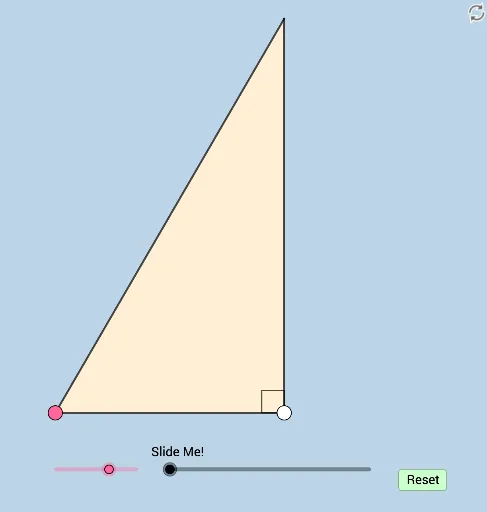
Loading the math board and drawing, please wait…
This example illustrates a problem involving a circle and locus within a right triangle. Key mathematical concepts include circles, right triangles, and loci. Using GeoGebra commands such as Segment, Rotate, Circle, etc., the dynamic generation of the circle and locus is demonstrated. Suitable for students at the junior high school level and above to learn geometric construction and locus concepts.
GeoGebra Commands & Parameters
Segment(A, B) → fRotate(A, (a * π / 180), B) → A'Angle(A, B, A') → αRay(B, A') → gOrthogonalLine(A, f) → hIntersect(h, g) → DPolygon(B, A, D) → t1, d, b, a_1Segment(B, D) → iAngle(D, A, B) → βSegment(A, D) → jRotate(A, α / 3, B) → A'_1Angle(A, B, A'_1) → γRotate(A'_1, α / 3, B) → CAngle(A'_1, B, C) → δRay(B, A'_1) → kRay(B, C) → lIntersect(j, k) → EOrthogonalLine(E, i) → mIntersect(m, i) → FOrthogonalLine(A, k) → nIntersect(n, k) → GDistance(A, G) → distanceAGDistance(E, F) → distanceEFCircle(B, (0.25 * f)) → cAngle(B, G, A) → εAngle(B, F, E) → ζMidpoint(E, F) → HIntersect(c, g) → I,Intersect(c, l) → J,Intersect(l, m) → KIntersect(f, g) → LMidpoint(B, K) → MDilate(B, If[0 < e ≤ 1, 1 - e, 0], E) → B'Dilate(A, If[7.5 < e ≤ 8.5, 8.5 - e, 0], G) → A'_2Segment(B, B') → pSegment(A, A'_2) → qDilate(G, If[1 < e ≤ 2, 2 - e, 0], E) → G'Dilate(B, If[1 < e ≤ 2, 2 - e, 0], M) → B'_1Segment(B, B'_1) → rRotate(I, If[2 < e ≤ 3, ((-(e - 2)) * γ), (-γ)], B) → I'CircleSector(B, I', I) → sRotate(s, If[4 < e ≤ 5, ((-(e - 4)) * γ), (-γ)], B) → s'Rotate(s', If[6 < e ≤ 7, ((-(e - 6)) * γ), (-γ)], B) → s''Dilate(E, If[9 < e ≤ 10, 10 - e, 0], H) → E'Segment(E, E') → tDilate(H, If[10 < e ≤ 11, 11 - e, 0], F) → H'Segment(H, H') → f_1Line(F, q) → g_1Intersect(g_1, p) → NAngle(N, F, E) → ηDilate(G, If[11.5 < e ≤ 12.5, 12.5 - e, 0], F) → G'_1Vector(G, G'_1) → uTranslate(A, u) → A'_3Translate(A'_2, u) → OTranslate(A, u) → A'_4Translate(A'_2, u) → PSegment(A'_4, P) → q'Rotate(A'_4, If[12.5 < e ≤ 13.5, ((e - 12.5) * η), η], F) → QRotate(P, If[12.5 < e ≤ 13.5, ((e - 12.5) * η), η], F) → P'Segment(Q, P') → q''Dilate(G, If[13.5 < e ≤ 14.5, 14.5 - e, 0], H) → G'_2Vector(G, G'_2) → vTranslate(A, v) → A'_5Translate(A'_2, v) → RSegment(A'_5, R) → q'_1Rotate(A'_5, If[14.5 < e ≤ 15.5, ((e - 14.5) * η), η], H) → SRotate(R, If[14.5 < e ≤ 15.5, ((e - 14.5) * η), η], H) → R'Segment(S, R') → h_1
AI Drawing Prompt Reference
Draw a right triangle with one leg horizontal. From the right-angle vertex, draw a ray toward the hypotenuse, intersecting a perpendicular to the horizontal leg, creating an interior point. Rotate the right-angle vertex around the hypotenuse endpoint to form two equal angles, and draw corresponding rays that intersect triangle sides at multiple points. With the hypotenuse endpoint as center and the leg length as radius, draw a circle intersecting the triangle sides and rays. Construct several perpendiculars and segments inside the triangle, marking midpoints. Finally, use a dynamic slider to progressively reveal circular sectors, segment extensions or contractions, and point movements, illustrating the locus and circle relationships.
The prompt above was compiled from the original drawing commands and is for reference only.