
Chord Bisector Demo
Loading the math board and drawing, please wait…
In collections
Unit 9 - Circles
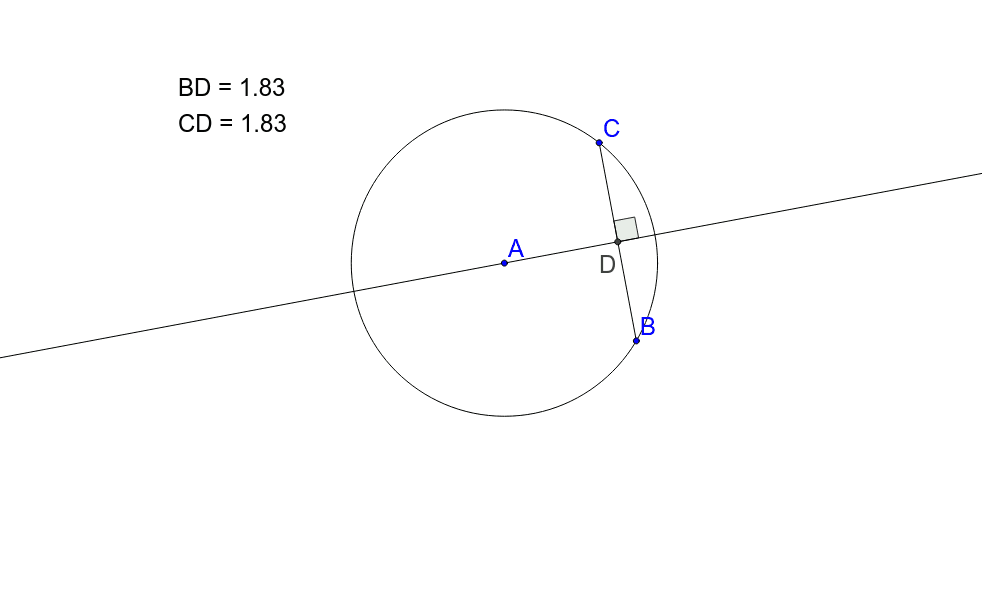
This example demonstrates the geometric property that the perpendicular bisector of a chord in a circle is the diameter. It involves core math concepts like circle, chord, perpendicular bisector, diameter, and angle. The construction uses commands such as Circle, Point, Segment, LineBisector, Intersect, and Angle in GeoGebra. Suitable for middle school students and above for learning and teaching circle geometry properties.
GeoGebra Commands & Parameters
Circle(A, B) → cPoint(c) → CSegment(B, C) → aLineBisector(a) → bIntersect(b, a) → DPoint(b) → EPoint(b) → FAngle(E, D, C) → αSegment(C, D) → dSegment(D, B) → e
AI Drawing Prompt Reference
Draw a circle with a center point and a point on the circumference. Choose another point on the circle and connect it to the center to form a chord. Construct the perpendicular bisector of this chord, which intersects the chord at its midpoint. Pick two arbitrary points on the bisector and connect them to the midpoint and one endpoint of the chord to create angles. Finally, connect the midpoint to both endpoints of the chord to illustrate that the perpendicular bisector passes through the circle's center and bisects the chord.
The prompt above was compiled from the original drawing commands and is for reference only.