
Cayley Surface
Loading the math board and drawing, please wait…
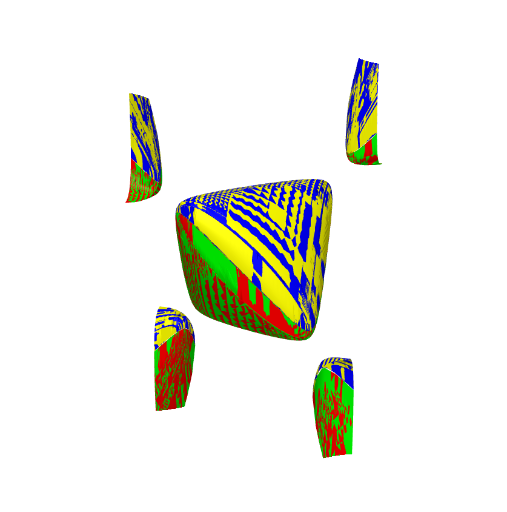
This example demonstrates the 3D visualization and variations of the Cayley surface. It involves core mathematical concepts such as surface, piecewise functions, natural numbers, conditional probability, quadrilaterals, and equations. The construction uses commands like Surface and objects a, d, k, g, h, b, c. Suitable for high school and above learners to understand advanced geometry and parametric surfaces.
GeoGebra Commands & Parameters
Surface(u, v, (((-u) * v) + sqrt((u^(2) * v^(2)) - ((4 * a) * ((a * (u^(2) + v^(2))) - (k * a^(3)))))) / ((2 * a)), u, (-d), d, v, (-d), d) → gSurface(u, v, (((-u) * v) - sqrt((u^(2) * v^(2)) - ((4 * a) * ((a * (u^(2) + v^(2))) - (k * a^(3)))))) / ((2 * a)), u, (-d), d, v, (-d), d) → hSurface(u, v, (((-u) * v) + sqrt((u^(2) * v^(2)) - ((4 * a) * ((a * (u^(2) + v^(2))) - (k * a^(3)))))) / ((2 * a)), u, (-d) + 0.01, d, v, (-d), d) → bSurface(u, v, (((-u) * v) - sqrt((u^(2) * v^(2)) - ((4 * a) * ((a * (u^(2) + v^(2))) - (k * a^(3)))))) / ((2 * a)), u, (-d), d, v, (-d) + 0.01, d) → c
AI Drawing Prompt Reference
Visualize a 3D Cayley surface consisting of two main parts: a complete Cayley surface and a slightly offset variant. Both are defined by parametric equations involving square roots and conditional expressions, showcasing intricate geometric forms. First draw the complete Cayley surface, then create a variant by adjusting parameters slightly to highlight the relationship and differences between the two surfaces.
The prompt above was compiled from the original drawing commands and is for reference only.