
Car Motion Animation
Loading the math board and drawing, please wait…
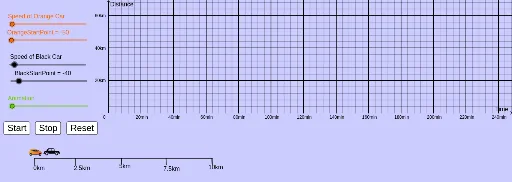
This example demonstrates the trajectory and velocity changes of moving cars, involving core math concepts like linear equations, functions, matrices, and angle calculations. It uses commands such as Segment, Point, and Text to construct car paths, speed indicators, and annotations, making it suitable for high school mathematics education to illustrate the connection between function graphs and real-world motion.
GeoGebra Commands & Parameters
Segment(LP, RP) → f_1Segment(LP, A_1) → gPoint(f_1) → BSegment(B, C) → hPoint(f_1) → DSegment(D, E) → iPoint(f_1) → FSegment(F, G) → jPoint(f_1) → HSegment(H, I) → kSegment(D, E) → lSegment(H, I) → mText("km") → dis
AI Drawing Prompt Reference
Draw a horizontal segment as a road with two endpoints marking start and finish. Place several points along the road, and from each point draw a short segment extending upward or downward to represent the position or velocity direction of a car at different moments. Vary the lengths or angles of these short segments slightly to show speed differences. Add the text "km" above the road as a distance unit label. The overall figure illustrates how car positions change along a straight path and compares velocity directions and magnitudes visually.
The prompt above was compiled from the original drawing commands and is for reference only.