
Calculating the Area of a Circle by Krystal Swarzes
Loading the math board and drawing, please wait…
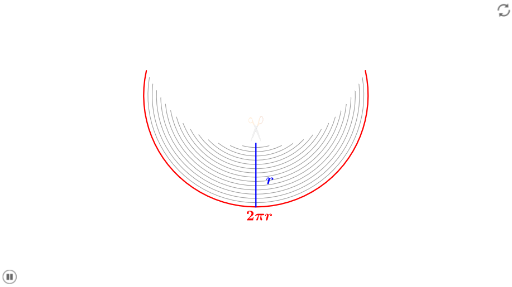
This example demonstrates how to calculate the area of a circle using GeoGebra. Core mathematical concepts include circle properties, area formulas, and geometric constructions. The construction utilizes GeoGebra commands and objects such as Sequence, Element, and Segment, along with elements like q, t, A, list1, list2, list3, P2, P3, etc., to visually illustrate the calculation process. Suitable for middle school and above students for geometry teaching and concept comprehension.
GeoGebra Commands & Parameters
Sequence(CircleArc[A, Rotate[A + (0, ((t * (q - p)) + p) / ((q * (1 - t)))), ((π * t) * q^(2) / ((q * ((q * t) - (p * t) + p)))), A], Rotate[A + (0, ((t * (q - p)) + p) / ((q * (1 - t)))), (((-π) * t) * q^(2) / ((q * ((q * t) - (p * t) + p)))), A]], p, 1, q) → list1Sequence(Circle[(0, 0), p / q], p, 1, q) → list2Sequence(Segment[(((-π), -1) * p / q), ((π, -1) * p / q)], p, 1, q) → list3Element(list2, q) → P2Element(list3, q) → P3Element(list1, q) → P1Segment((0, 0), (0, -1)) → a
AI Drawing Prompt Reference
Draw a circle to demonstrate how to calculate its area by segmentation. Start by plotting a circle centered at the origin, then create a series of concentric circular arcs with varying radii and angles. Next, draw a horizontal line segment from -π to π on the x-axis, and select key points on the circle. Connect the origin to a point below the circle to form a geometric construction, visually illustrating the area calculation process.
The prompt above was compiled from the original drawing commands and is for reference only.