
Calculating Parallelogram Area
Loading the math board and drawing, please wait…
In collections
Parallelogramm und Raute: Flächeninhalt
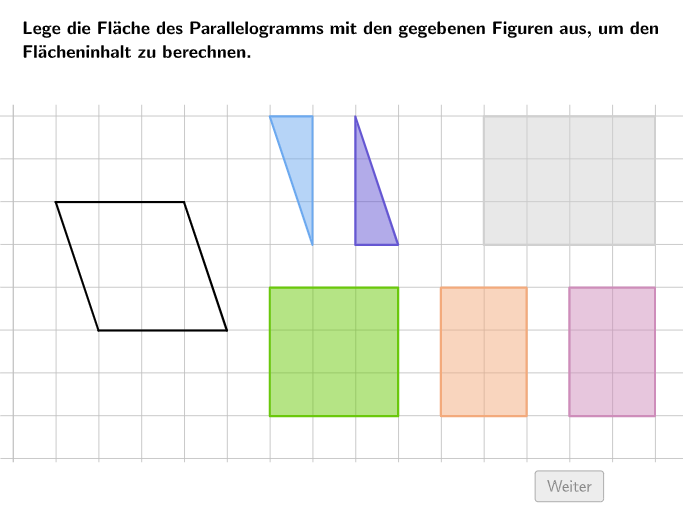
This example demonstrates how to calculate the area of a parallelogram by dividing and combining it into triangles. Key math concepts include the parallelogram area formula, triangle area calculation, geometric transformations, and decomposition. It uses GeoGebra commands/objects like Textfield, Point, Polygon, PointIn, Spline, SelectedIndex, Vertex, Translate, Text for creating graphics, text, and interactive elements. Suitable for 5-6th grade students to learn and apply the parallelogram area formula.
GeoGebra Commands & Parameters
Textfield(input1) → InputBox1Textfield(input2) → InputBox2Textfield(input3) → InputBox3Textfield(input4) → InputBox4Point(KantenParallelogramm) → EPoint(KantenParallelogramm) → FPolygon(A, E, D) → Area1, d, a, ePolygon(D, F, B, E) → Area2, d_1, f, b, e_1Polygon(F, C, B) → Area3, b_1, f_1, cPolygon(BoundaryP1, BoundaryP2, BoundaryP3, BoundaryP4) → Boundary, boundaryp1, boundaryp2, boundaryp3, boundaryp4PointIn(Boundary) → TriBlueAnchorPointIn(Boundary) → TriCyanAnchorPointIn(Boundary) → RectGrayAnchorPointIn(Boundary) → RectLilaAnchorPointIn(Boundary) → RectOrangeAnchorPointIn(Boundary) → RectGreenAnchorSpline({D, SplineMidOrange, RectOrangeAnchor}, 3) → hSpline({C, SplineMidCyan, TriCyanAnchor}, 3) → iSelectedIndex(DD1) → Index1SelectedIndex(DD2) → Index2Spline({D, SplineMidBlue, TriBlueAnchor}, 3) → gSpline({TriCyanAnchor, Midpoint[TriCyanAnchor, TriBlueAnchor], TriBlueAnchor}, 3) → jVertex(PolyAnimBlue(1), 1) → PolyAnimBluePVertex(PolyAnimCyan(1), 1) → PolyAnimCyanPVertex(PolyAnimOrange(1), 1) → PolyAnimOrangePTranslate(l1, (0, -13.5)) → l1'Text("\textsf{A_1}", O, false, true, 0, 0) → Text8Text("\textsf{A_3}", M, false, true, 0, 0) → Text9Text((("\textsf{\textcolor{" * ColorText) * "}{A_2}"), N, false, true, 0, 0) → Text10
AI Drawing Prompt Reference
Draw an example parallelogram area decomposition on a coordinate plane. First place four vertices and connect them to form the parallelogram boundary. Then partition the interior into several polygon regions: three triangular regions and an overall enclosing boundary region. Show each region with its own polygon outline. Add clear text labels for the area of the different subregions using A-style symbols with different indices, using distinct text coloring or placement to help differentiate the parts. Construct the figure in a natural order: boundary first, then internal partition polygons, then the area annotations.
The prompt above was compiled from the original drawing commands and is for reference only.