
Calculate the Area of Special Quadrilaterals
Loading the math board and drawing, please wait…
In collections
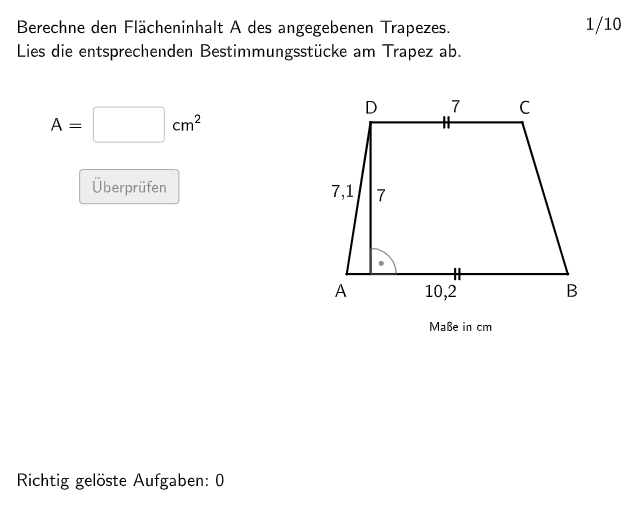
Trapez - Flächeninhalt
This example demonstrates how to calculate the areas of special quadrilaterals (parallelogram, trapezoid, rhombus, square) using GeoGebra. The construction summary includes commands like Join, Sequence, Zip, etc., to clearly show the construction points. Suitable for 5-6 grade students for practice.
GeoGebra Commands & Parameters
Join(Sequence[Shuffle[Sequence[1, maxexnum]], m, 1, 15]) → randomNosSequence(m, m, 5, 9) → listPoolSequence(RandomElement[listPool], m, 1, 110) → randomNosForA, {8, 6, 9, 9, 8, 8, 7, 7, 5, 9, 8, 9, 5, 9, 9, 6, 7, 5, 5, 5, 6, 9, 5, 9, 7, 9, 8, 8, 9, 7, 8, 6, 7, 7, 9, 8, 6, 6, 8, 5, 5, 9, 7, 9, 8, 6, 6, 6, 9, 5, 9, 5, 8, 7, 7, 9, 5, 8, 7, 6, 6, 7, 7, 8, 6, 7, 6, 7, 8, 7, 6, 6, 7, 5, 5, 9, 7, 5, 7, 9, 6, 8, 7, 8, 6, 6, 5, 9, 7, 7, 8, 5, 5, 5, 7, 8, 6, 8, 7, 6, 6, 7, 8, 6, 9, 5, 6, 6, 5, 6}Sequence(Random[4, 7], m, 1, 110) → randomNosForH, {6, 5, 7, 5, 6, 5, 4, 7, 6, 5, 5, 5, 4, 4, 7, 7, 7, 4, 7, 4, 6, 5, 7, 7, 5, 4, 7, 5, 4, 5, 7, 4, 5, 7, 6, 7, 7, 6, 7, 7, 6, 6, 5, 5, 6, 7, 7, 6, 5, 5, 6, 5, 4, 6, 6, 4, 5, 5, 6, 7, 6, 7, 5, 7, 5, 6, 6, 6, 6, 4, 5, 4, 6, 5, 4, 5, 4, 7, 4, 6, 6, 5, 4, 6, 6, 5, 7, 5, 7, 4, 5, 7, 5, 7, 7, 6, 6, 6, 5, 7, 5, 6, 4, 7, 4, 5, 7, 6, 6, 4}Sequence((Random[5, 20] * 0.1), m, 1, 110) → randomNosForAbsLinks, {1.1, 0.7000000000000001, 0.6000000000000001, 0.7000000000000001, 2, 1.2000000000000002, 1.9000000000000001, 1.5, 1.1, 0.6000000000000001, 1.7000000000000002, 1.6, 1.5, 1.7000000000000002, 1, 0.5, 0.6000000000000001, 1.9000000000000001, 0.7000000000000001, 1.8, 0.6000000000000001, 2, 1.6, 1.4000000000000001, 2, 1.5, 1.3, 0.7000000000000001, 1.3, 1.2000000000000002, 1.9000000000000001, 0.9, 1, 0.7000000000000001, 1.7000000000000002, 1.5, 1.7000000000000002, 1.6, 0.5, 1.5, 1.3, 1.3, 0.9, 1.1, 1, 1.1, 1.8, 1.4000000000000001, 1.1, 1.6, 1.5, 1.2000000000000002, 0.9, 0.5, 1.4000000000000001, 1.3, 1.1, 1.4000000000000001, 1.1, 1.1, 0.8, 0.5, 1.4000000000000001, 1.6, 1.8, 1.7000000000000002, 1.1, 1.6, 1.4000000000000001, 1.8, 0.8, 1, 0.8, 0.7000000000000001, 1.6, 1.5, 1.2000000000000002, 0.9, 1.8, 1.2000000000000002, 1.8, 1.2000000000000002, 1.3, 0.9, 1.6, 2, 1.1, 1.7000000000000002, 0.6000000000000001, 1.4000000000000001, 1.2000000000000002, 1.8, 1.2000000000000002, 2, 1.6, 0.8, 1.2000000000000002, 0.6000000000000001, 1.8, 0.5, 0.8, 1.2000000000000002, 2, 1.5, 1.9000000000000001, 0.7000000000000001, 0.7000000000000001, 0.8, 1.1, 0.5}Zip(Random[3, m - 1], m, randomNosForA) → randomNosForCSequence(RandomElement[Sequence[0.3, 0.5, 0.01]], m, 1, 110) → randomNosForProp, {0.4200000000000001, 0.5000000000000001, 0.4300000000000001, 0.49000000000000016, 0.31, 0.5000000000000001, 0.4300000000000001, 0.4300000000000001, 0.4100000000000001, 0.49000000000000016, 0.5000000000000001, 0.35000000000000003, 0.34, 0.38000000000000006, 0.33, 0.4300000000000001, 0.4300000000000001, 0.4500000000000001, 0.35000000000000003, 0.4400000000000001, 0.32, 0.39000000000000007, 0.36000000000000004, 0.39000000000000007, 0.35000000000000003, 0.4100000000000001, 0.34, 0.4300000000000001, 0.49000000000000016, 0.4100000000000001, 0.32, 0.37000000000000005, 0.32, 0.33, 0.4200000000000001, 0.4300000000000001, 0.33, 0.34, 0.37000000000000005, 0.36000000000000004, 0.4200000000000001, 0.4400000000000001, 0.38000000000000006, 0.5000000000000001, 0.36000000000000004, 0.48000000000000015, 0.4400000000000001, 0.48000000000000015, 0.4400000000000001, 0.5000000000000001, 0.39000000000000007, 0.33, 0.37000000000000005, 0.34, 0.35000000000000003, 0.4100000000000001, 0.48000000000000015, 0.4100000000000001, 0.48000000000000015, 0.46000000000000013, 0.35000000000000003, 0.4100000000000001, 0.4500000000000001, 0.4400000000000001, 0.3, 0.5000000000000001, 0.4000000000000001, 0.37000000000000005, 0.3, 0.49000000000000016, 0.4500000000000001, 0.32, 0.35000000000000003, 0.31, 0.4000000000000001, 0.39000000000000007, 0.48000000000000015, 0.31, 0.39000000000000007, 0.32, 0.38000000000000006, 0.31, 0.31, 0.4300000000000001, 0.5000000000000001, 0.47000000000000014, 0.49000000000000016, 0.37000000000000005, 0.4300000000000001, 0.4200000000000001, 0.4400000000000001, 0.4500000000000001, 0.46000000000000013, 0.47000000000000014, 0.4400000000000001, 0.34, 0.31, 0.4300000000000001, 0.4500000000000001, 0.32, 0.33, 0.48000000000000015, 0.36000000000000004, 0.34, 0.4200000000000001, 0.49000000000000016, 0.4200000000000001, 0.31, 0.33, 0.38000000000000006}Textfield(input1) → InputBox1Textfield(input2) → InputBox2Polygon(PtopLeftCornerFeedback, PtopRightCornerFeedback, PbottomRightCornerFeedback, PbottomLeftCornerFeedback) → rectangleCorrect, rectangleCorrectS3, rectangleCorrectS4, rectangleCorrectS2, rectangleCorrectS1Append(true, Sequence[If[randomNosForA(i) ≟ randomNosForA(i - 1), false, true], i, 2, 100]) → stayXAppend(true, Sequence[If[randomNosForC(i) ≟ randomNosForC(i - 1), false, true], i, 2, 100]) → stayYRemove(Sequence[If[stayX(i), randomNosForA(i), 0], i, 1, 100], Sequence[0, i, 1, 100]) → randomNosForXwithoutRepeatRemove(Sequence[If[stayY(i), randomNosForC(i), 0], i, 1, 100], Sequence[0, i, 1, 100]) → randomNosForYwithoutRepeatElement(randomNosForXwithoutRepeat, Mod[questionCount, Length[randomNosForXwithoutRepeat]] + 1) → numXwithoutRepeatElement(randomNosForYwithoutRepeat, Mod[questionCount, Length[randomNosForYwithoutRepeat]] + 1) → numYwithoutRepeatDefined(input1) → fixedNumberSeparationComma((numA * numC)) → numberSeparationZaehlerIntersect(Line[D, yAxis], Line[A, B]) → SAngle(B, S, D) → αSegment(D, S) → fSegment(A, B) → streckeaSegment(C, D) → streckecIf((10 * numD) - floor((10 * numD)) < 0.5, (floor((10 * numD)) * 0.1), (floor((10 * numD)) * 0.1) + 0.1) → numDroundIf((10 * numB) - floor((10 * numB)) < 0.5, (floor((10 * numB)) * 0.1), (floor((10 * numB)) * 0.1) + 0.1) → numBroundSegment(B, C) → streckebSegment(A, D) → strecked
AI Drawing Prompt Reference
On a coordinate plane, draw a construction diagram for special quadrilaterals: place four corners in a specific order (top-left, top-right, bottom-right, bottom-left) and connect them to form a closed polygon. Identify a key intersection point by intersecting two lines defined by the construction. From this intersection point, draw the segment to a chosen endpoint and also create the angle at the middle vertex using that intersection point and the two rays through the relevant endpoints. Finally, draw the additional segments between the corresponding vertices so the figure clearly shows the relationships among vertices, the intersection point, the drawn sides, and the constructed angle.
The prompt above was compiled from the original drawing commands and is for reference only.