
Calculate the Area of a Parallelogram - Level 1
Loading the math board and drawing, please wait…
In collections
Parallelogramm und Raute: Flächeninhalt
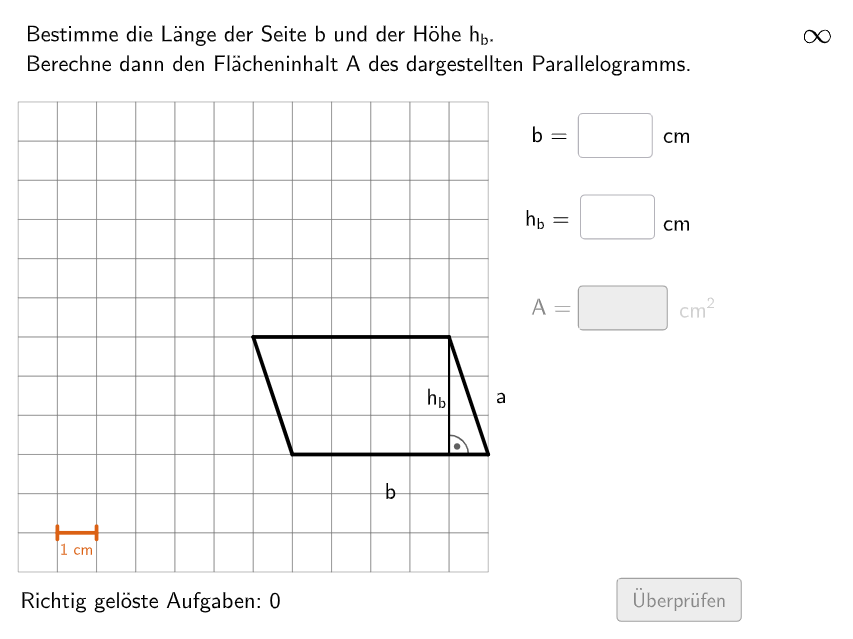
This example demonstrates how to calculate the area of a parallelogram using a grid. Key mathematical concepts include the formula for the area of a parallelogram. GeoGebra commands such as Polygon, Segment, and Intersect are used for construction. Suitable for primary school students in grades 5-6 to practice and understand the calculation of parallelogram areas.
GeoGebra Commands & Parameters
Shuffle(Sequence[Random[7, coordheight - 2], m, 1, 100]) → randomNosForX, {9, 8, 10, 10, 7, 7, 8, 9, 7, 8, 10, 8, 7, 7, 7, 10, 10, 8, 8, 10, 10, 10, 8, 9, 10, 9, 8, 9, 7, 9, 8, 10, 8, 10, 8, 8, 10, 8, 7, 10, 10, 9, 10, 10, 7, 9, 9, 7, 9, 8, 9, 8, 7, 7, 7, 7, 10, 7, 10, 10, 9, 10, 10, 10, 7, 9, 9, 10, 10, 10, 8, 9, 7, 9, 10, 8, 7, 9, 8, 10, 10, 10, 7, 10, 9, 9, 9, 7, 9, 7, 7, 7, 7, 10, 8, 8, 10, 9, 10, 10}Element(randomNosForX, Mod[questionCount, 100] + 1) → numXShuffle(Sequence[Random[4, coordwidth - 2], m, 1, 100]) → randomNosForY, {10, 6, 7, 9, 8, 10, 8, 5, 7, 9, 9, 5, 7, 5, 7, 8, 10, 10, 8, 7, 7, 4, 9, 9, 7, 4, 7, 10, 9, 6, 7, 4, 5, 5, 10, 9, 9, 7, 9, 9, 9, 6, 10, 7, 10, 8, 6, 10, 5, 8, 10, 7, 10, 10, 7, 6, 10, 6, 5, 5, 9, 8, 4, 5, 5, 8, 6, 8, 7, 10, 6, 4, 4, 6, 9, 9, 9, 5, 9, 7, 5, 7, 5, 9, 8, 8, 5, 9, 5, 4, 7, 9, 6, 9, 5, 8, 7, 6, 5, 7}Element(randomNosForY, Mod[questionCount, 100] + 1) → numYTextfield(input1) → InputBox1Textfield(input2) → InputBox2Shuffle(Sequence[i, i, 6, 12] \ {axold}) → AxList, {6, 7, 12, 9, 11, 8, 10}Shuffle(Sequence[i, i, 1, 12] \ {ax - 2, ax - 1, ax, ax + 1, ax + 2}) → CxList, {12, 9, 3, 2, 10, 11, 1}Shuffle(Sequence[i, i, 2, abs(cx - ax)] \ {abs(cx - ax)}) → LaengeaList, {5, 3, 4, 2}Shuffle(Sequence[i, i, 1, 9] \ {ayold}) → AyList, {6, 5, 2, 7, 8, 3, 1, 4, 9}Shuffle(Sequence[i, i, 1, 12] \ {ay - 2, ay - 1, ay, ay + 1, ay + 2}) → CyList, {3, 2, 9, 12, 11, 10, 1}If(cx < ax, C + (size * (laengea, 0)), C - (size * (laengea, 0))) → BIf(cx < ax, A - (size * (laengea, 0)), A + (size * (laengea, 0))) → DPolygon(C, B, A, D) → v2, j, k, l, mOrthogonalLine(D, l) → nIntersect(n, Line[C, B]) → ESegment(D, E) → pPolygon(PtopLeftCornerFeedback, PtopRightCornerFeedback, PbottomRightCornerFeedback, PbottomLeftCornerFeedback) → rectangleCorrect, rectangleCorrectS3, rectangleCorrectS4, rectangleCorrectS2, rectangleCorrectS1Append(true, Sequence[If[randomNosForX(i) ≟ randomNosForX(i - 1), false, true], i, 2, 100]) → stayXAppend(true, Sequence[If[randomNosForY(i) ≟ randomNosForY(i - 1), false, true], i, 2, 100]) → stayYRemove(Sequence[If[stayX(i), randomNosForX(i), 0], i, 1, 100], Sequence[0, i, 1, 100]) → randomNosForXwithoutRepeatRemove(Sequence[If[stayY(i), randomNosForY(i), 0], i, 1, 100], Sequence[0, i, 1, 100]) → randomNosForYwithoutRepeatElement(randomNosForXwithoutRepeat, Mod[questionCount, Length[randomNosForXwithoutRepeat]] + 1) → numXwithoutRepeatElement(randomNosForYwithoutRepeat, Mod[questionCount, Length[randomNosForYwithoutRepeat]] + 1) → numYwithoutRepeatDefined(input3) → fixedFlatten(Sequence[Sequence[O + (m * (size, 0)) + (j * (0, size)), m, 0, coordwidth - 1], j, 0, coordheight - 1]) → listPointsZip(Polygon[P, P + (0, size), P + (0, size) + (size, 0), P + (size, 0)], P, listPoints) → listCoordsSegment(P1, P3) → esRandom(2, numX - 2) → propSegment(P4, P2) → fsSegment(G1, G2) → gTranslate(Segment[(0, -0.1), (0, 0.1)], G1) → hTranslate(Segment[(0, -0.1), (0, 0.1)], G2) → iIntersect(es, fs) → STextfield(input3) → InputBox3Shuffle({1, 2}) → ModusList, {2, 1}If(y(C) < y(D), Midpoint[C, B], Midpoint[D, A]) → MittelpunktUntenIf(x(A) > x(D), Midpoint[A, B], Midpoint[D, C]) → MittelpunktRechtsMidpoint(D, B) → MText(BeschTextb, F, false, true, 0, 0) → Text3Text(BeschTexta, G, false, true, 0, 0) → Text4If(x(E) > x(B) ∧ y(B) > y(A) ∨ x(B) < x(E) ∧ y(B) < y(A), Midpoint[p] - (0.2, 0), Midpoint[p] + (0.2, 0)) → HText(BeschTexth, H, false, true, 0, 0) → Text8Segment(C, E) → hintCESegment(B, E) → hintBEAngle(A, D, E) → αAngle(C, E, D) → βAngle(D, E, C) → γAngle(E, D, A) → δDistance(H, F) → diffIf(x(A) < x(D), Midpoint[A, B], Midpoint[D, C]) → MittelpunktLinksText(BeschTextb, I, false, true, 0, 0) → Text16
AI Drawing Prompt Reference
Draw a parallelogram on a coordinate grid with a horizontal base. Choose random vertices so the shape is not aligned with axes. From one vertex of the base, drop a perpendicular to the opposite side, marking the foot. Show the height as a dashed segment. Label the base and height lengths near the segments. Display the area formula nearby. The grid has unit squares for easy calculation. Include the parallelogram, the perpendicular, the foot, and auxiliary segments for clarity.
The prompt above was compiled from the original drawing commands and is for reference only.