
Calculate Area of Special Quadrilaterals
Loading the math board and drawing, please wait…
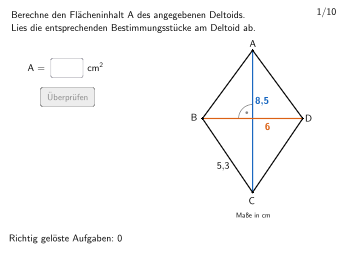
This example demonstrates how to calculate the areas of special quadrilaterals (parallelogram, trapezoid, rhombus, square) using GeoGebra commands such as Join, Sequence, Zip, etc. Students can understand and verify the application of these quadrilaterals' area formulas. Suitable for 5-6 grade students.
GeoGebra Commands & Parameters
Join(Sequence[Shuffle[Sequence[1, maxexnum]], m, 1, 15]) → randomNosSequence(2, 15) → listPoolSequence(RandomElement[listPool], m, 1, 110) → randomNosForX, {9, 8, 7, 15, 8, 14, 13, 4, 4, 11, 2, 2, 8, 14, 6, 14, 10, 2, 8, 9, 7, 3, 11, 7, 12, 9, 4, 10, 10, 2, 11, 10, 2, 12, 6, 6, 11, 14, 13, 9, 8, 3, 11, 11, 4, 4, 7, 9, 14, 7, 3, 6, 14, 6, 8, 4, 12, 2, 9, 10, 4, 7, 12, 5, 14, 12, 12, 4, 11, 11, 15, 5, 13, 3, 5, 7, 7, 3, 14, 8, 9, 14, 3, 9, 10, 4, 5, 12, 2, 6, 11, 9, 2, 8, 14, 3, 4, 8, 3, 4, 8, 3, 6, 6, 5, 13, 13, 11, 14, 14}Zip(RandomElement[listPool \ Join[{{m}, Sequence[1, (floor(m) * (1 - percentage))], Sequence[(ceil(m) * (1 + percentage)), 50]}]], m, randomNosForX) → randomNosForYIf(numX ≥ numY, P1, P5) → AIf(numX ≥ numY, P3, P7) → CSegment(A, C) → e1Sequence(RandomElement[Sequence[0.3, 0.5, 0.01]], m, 1, 110) → randomNosForProp, {0.48000000000000015, 0.4000000000000001, 0.4400000000000001, 0.4200000000000001, 0.37000000000000005, 0.4100000000000001, 0.4500000000000001, 0.37000000000000005, 0.48000000000000015, 0.4200000000000001, 0.47000000000000014, 0.39000000000000007, 0.4200000000000001, 0.49000000000000016, 0.46000000000000013, 0.32, 0.3, 0.47000000000000014, 0.4400000000000001, 0.4400000000000001, 0.4000000000000001, 0.34, 0.37000000000000005, 0.34, 0.33, 0.37000000000000005, 0.36000000000000004, 0.3, 0.4400000000000001, 0.31, 0.33, 0.35000000000000003, 0.4000000000000001, 0.4200000000000001, 0.47000000000000014, 0.31, 0.37000000000000005, 0.33, 0.39000000000000007, 0.49000000000000016, 0.4400000000000001, 0.36000000000000004, 0.38000000000000006, 0.4000000000000001, 0.5000000000000001, 0.4100000000000001, 0.48000000000000015, 0.3, 0.31, 0.35000000000000003, 0.34, 0.32, 0.47000000000000014, 0.36000000000000004, 0.36000000000000004, 0.37000000000000005, 0.39000000000000007, 0.4000000000000001, 0.38000000000000006, 0.46000000000000013, 0.34, 0.4400000000000001, 0.4300000000000001, 0.34, 0.4100000000000001, 0.37000000000000005, 0.4400000000000001, 0.4100000000000001, 0.34, 0.31, 0.3, 0.5000000000000001, 0.4300000000000001, 0.5000000000000001, 0.3, 0.48000000000000015, 0.31, 0.4000000000000001, 0.4400000000000001, 0.39000000000000007, 0.34, 0.34, 0.38000000000000006, 0.4500000000000001, 0.5000000000000001, 0.4500000000000001, 0.4300000000000001, 0.4400000000000001, 0.38000000000000006, 0.4200000000000001, 0.39000000000000007, 0.4000000000000001, 0.4200000000000001, 0.3, 0.4100000000000001, 0.4000000000000001, 0.32, 0.35000000000000003, 0.35000000000000003, 0.3, 0.4000000000000001, 0.3, 0.46000000000000013, 0.4400000000000001, 0.49000000000000016, 0.47000000000000014, 0.4300000000000001, 0.34, 0.4500000000000001, 0.4100000000000001}If(numX ≥ numY, P4, P8) → DIf(numX ≥ numY, P2, P6) → BSegment(B, D) → f1Textfield(input1) → InputBox1Textfield(input2) → InputBox2Polygon(PtopLeftCornerFeedback, PtopRightCornerFeedback, PbottomRightCornerFeedback, PbottomLeftCornerFeedback) → rectangleCorrect, rectangleCorrectS3, rectangleCorrectS4, rectangleCorrectS2, rectangleCorrectS1Append(true, Sequence[If[randomNosForX(i) ≟ randomNosForX(i - 1), false, true], i, 2, 100]) → stayXAppend(true, Sequence[If[randomNosForY(i) ≟ randomNosForY(i - 1), false, true], i, 2, 100]) → stayYRemove(Sequence[If[stayX(i), randomNosForX(i), 0], i, 1, 100], Sequence[0, i, 1, 100]) → randomNosForXwithoutRepeatRemove(Sequence[If[stayY(i), randomNosForY(i), 0], i, 1, 100], Sequence[0, i, 1, 100]) → randomNosForYwithoutRepeatElement(randomNosForXwithoutRepeat, Mod[questionCount, Length[randomNosForXwithoutRepeat]] + 1) → numXwithoutRepeatElement(randomNosForYwithoutRepeat, Mod[questionCount, Length[randomNosForYwithoutRepeat]] + 1) → numYwithoutRepeatDefined(input1) → fixedIntersect(e1, f1) → EAngle(A, E, D) → αNumberSeparationComma((numX * numY)) → numberSeparationZaehlerIf((10 * numA) - floor((10 * numA)) < 0.5, (floor((10 * numA)) * 0.1), (floor((10 * numA)) * 0.1) + 0.1) → numAroundIf((10 * numB) - floor((10 * numB)) < 0.5, (floor((10 * numB)) * 0.1), (floor((10 * numB)) * 0.1) + 0.1) → numBroundMidpoint(A, B) → MaMidpoint(B, C) → MbMidpoint(C, D) → McMidpoint(D, A) → MdSequence(Random[1, 4], m, 1, 130) → randomBate, {4, 1, 2, 3, 3, 3, 1, 3, 4, 1, 4, 4, 1, 4, 1, 1, 2, 1, 4, 3, 1, 2, 3, 4, 2, 3, 1, 4, 3, 1, 3, 2, 3, 4, 4, 2, 3, 4, 3, 3, 4, 3, 4, 2, 3, 1, 4, 3, 2, 1, 4, 1, 2, 2, 3, 3, 1, 3, 1, 1, 2, 4, 1, 1, 2, 2, 4, 1, 1, 4, 3, 3, 2, 1, 1, 1, 4, 1, 2, 4, 4, 1, 3, 4, 2, 2, 3, 4, 4, 4, 4, 1, 3, 1, 4, 1, 3, 2, 4, 4, 1, 2, 3, 3, 3, 1, 1, 3, 1, 4, 3, 3, 1, 1, 2, 1, 3, 4, 1, 3, 2, 2, 3, 2, 2, 4, 4, 2, 2, 1}
AI Drawing Prompt Reference
Draw a collection of special quadrilaterals including parallelograms, trapezoids, rhombuses, and squares to demonstrate area calculations. Start by plotting random pairs of points to form quadrilaterals, then connect these points to create different shapes. Label the diagonals and find their intersection points. Display the area formulas and calculations next to the shapes, using different colors to distinguish each quadrilateral.
The prompt above was compiled from the original drawing commands and is for reference only.