
Building a Square Pyramid and Its Net
Loading the math board and drawing, please wait…
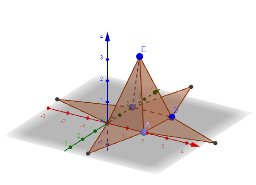
①This example demonstrates how to construct a square pyramid and simultaneously generate its 3D solid and 2D net (unfolded surface) in GeoGebra, visually linking the solid and its planar representation. ②Core mathematical concepts include solid geometry of pyramids, square base, triangular lateral faces, edges and vertices, and the net as a planar arrangement of all faces that can be folded into the pyramid. ③Construction highlights: from the summary, commands such as Point, Intersect, Polygon, Pyramid, and Net are used; base vertices A, B, C, D and polygon poly1 are created, the pyramid is generated via the Pyramid command, and the net is produced using Net; multiple faces (e.g., faceABCD, faceADE) and edges (edgeAD, edgeAB) are defined, along with auxiliary points F, G, H, I, J, K, L, M to build the net faces (faceFGHI, faceFGJ, etc.). ④This is suitable for middle or high school solid geometry lessons, helping students understand pyramid structure, surface area calculation, and the relationship between 3D shapes and their 2D nets, as well as enhancing spatial visualization and geometric construction skills.
GeoGebra Commands & Parameters
Point(xAxis) → AIntersect(yAxis, zAxis) → BPoint(yAxis) → CPolygon(D, A, B, C) → poly1, d, a, b, cPyramid(D, A, B, C, E) → e, faceABCD, edgeDE, edgeAE, edgeBE, edgeCE, faceADE, faceABE, faceBCE, faceCDE, edgeAD, edgeAB, edgeBC, edgeCDNet(e, f) → g, F, faceFGJ, faceGHK, faceHIL, faceFIM, edgeFG, edgeGH, edgeHI, edgeFI, edgeFJ, edgeGJ, G, edgeGK, edgeHK, edgeHL, edgeIL, edgeIM, edgeFM, H, I, J, K, L, M, faceFGHI
AI Drawing Prompt Reference
Draw a square pyramid and its net. First, create the four vertices A, B, C, D for the square base, then use these points and vertex E to construct the square pyramid. Finally, generate the net of the pyramid, showing all the side and base faces in a 2D layout.
The prompt above was compiled from the original drawing commands and is for reference only.