
Breather Surface Demonstration
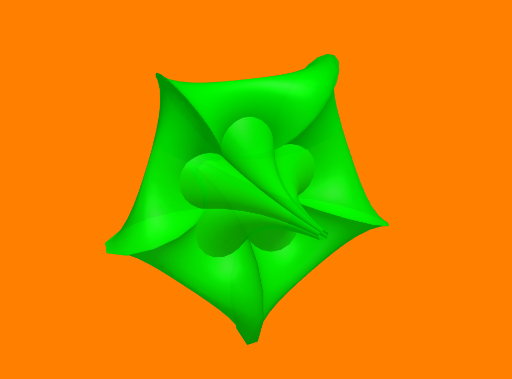
Loading the math board and drawing, please wait…
This example demonstrates the 3D visualization and dynamic behavior of a breather surface. It involves core mathematical concepts such as surface, means, addition, statistical characteristics, trapezoid, and pyramid. The construction utilizes the Surface command and parameters a, U, V, b. Suitable for high school and above students studying solid geometry and parametric equations.
GeoGebra Commands & Parameters
Surface((-u) + ((((2 * (1 - a^(2))) * cosh((a * u))) * sinh((a * u)))) / ((a * (((sqrt(1 - a^(2)) * cosh((a * u))))^(2) + ((a * sin((sqrt(1 - a^(2)) * v))))^(2)))), ((((2 * sqrt(1 - a^(2))) * cosh((a * u))) * ((-(((sqrt(1 - a^(2)) * sin(v)) * cos((sqrt(1 - a^(2)) * v))))) + (cos(v) * sin((sqrt(1 - a^(2)) * v)))))) / ((a * (((sqrt(1 - a^(2)) * cosh((a * u))))^(2) + ((a * sin((sqrt(1 - a^(2)) * v))))^(2)))), ((((2 * sqrt(1 - a^(2))) * cosh((a * u))) * ((-(((sqrt(1 - a^(2)) * cos(v)) * cos((sqrt(1 - a^(2)) * v))))) - (sin(v) * sin((sqrt(1 - a^(2)) * v)))))) / ((a * (((sqrt(1 - a^(2)) * cosh((a * u))))^(2) + ((a * sin((sqrt(1 - a^(2)) * v))))^(2)))), u, (-U), U, v, (-V), V) → b
AI Drawing Prompt Reference
Draw a 3D breather surface with parameters a, U, V, and b, defined by three complex trigonometric expressions. First set the value of parameter a, then draw the surface with u ranging from -U to U and v ranging from -V to V.
The prompt above was compiled from the original drawing commands and is for reference only.