
Box Volume Calculator
Loading the math board and drawing, please wait…
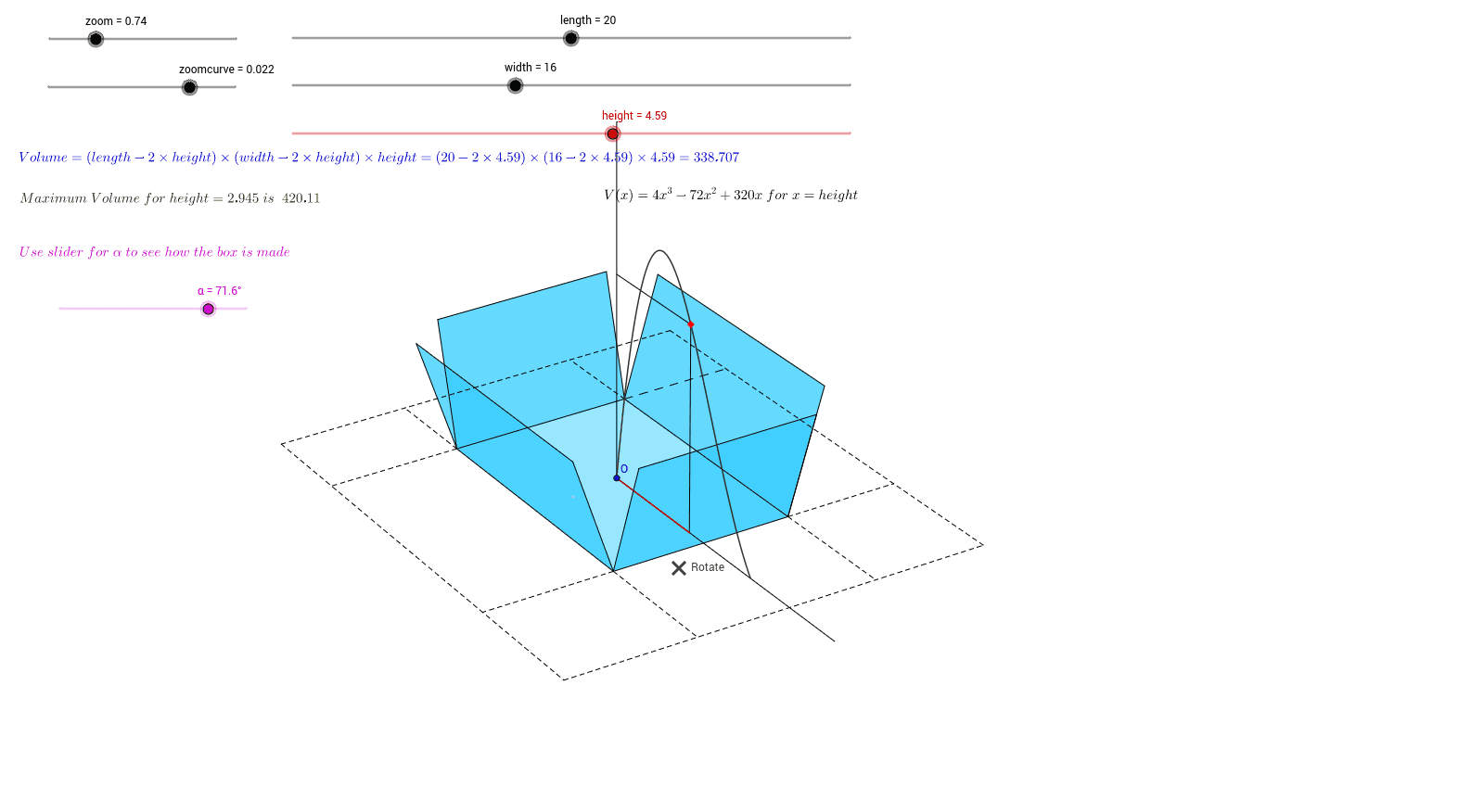
This example demonstrates how to calculate and visualize the volume of a box by adjusting its length, width, and height in real-time. Key math concepts include volume calculation formula (length×width×height), 3D spatial geometry. Construction highlights involve commands like Line, Polygon, Distance, Rotate, Dilate from GeoGebra. Suitable for middle school students learning 3D geometry volume and high school math teaching on variable relationships.
GeoGebra Commands & Parameters
Line(AA, BB) → aOrthogonalLine(CC, a) → bOrthogonalLine(CC, b) → cCircle(CC, l) → dCircle(CC, br) → eIntersect(d, c) → D, EIntersect(e, b) → F, GOrthogonalLine(G, b) → fOrthogonalLine(D, c) → gOrthogonalLine(F, b) → hOrthogonalLine(E, c) → iIntersect(f, i) → HIntersect(g, f) → IIntersect(g, h) → JIntersect(h, i) → KPolygon(H, I, J, K) → mangekant1, h_1, i_1, j, kOrthogonalLine(Rotate, h_1) → mOrthogonalLine(Rotate, k) → nIntersect(h_1, m) → MIntersect(k, n) → NDistance(Rotate, M) → avstandLMDistance(Rotate, N) → avstandLNOrthogonalLine(O, a) → pOrthogonalLine(O, p) → qCircle(O, size) → rIntersect(r, q) → P, QIntersect(r, p) → R, SOrthogonalLine(S, p) → sOrthogonalLine(P, q) → tOrthogonalLine(R, p) → a_1OrthogonalLine(Q, q) → b_1Intersect(s, b_1) → TIntersect(s, t) → UIntersect(a_1, t) → VIntersect(a_1, b_1) → WPolygon(U, T, W, V) → mangekant2, u, t_1, w, vRotate(U, ho, O) → U'Rotate(T, ho, O) → T'Rotate(W, ho, O) → W'Rotate(V, ho, O) → V'Polygon(U', T', W', V') → mangekant2', u', t', w', v'OrthogonalLine(T', q) → c_1OrthogonalLine(W', q) → d_1OrthogonalLine(V', q) → e_1OrthogonalLine(U', q) → f_1OrthogonalLine(T', q) → g_1OrthogonalLine(V', q) → j_1OrthogonalLine(U', q) → k_1OrthogonalLine(W', q) → l_1Intersect(g_1, q) → ZIntersect(l_1, q) → A_1Intersect(q, k_1) → B_1Intersect(q, j_1) → C_1Distance(Z, T') → avstandZT'Distance(B_1, U') → avstandB1U'Dilate(T', l1, Z) → T''Dilate(W', l1, A_1) → W''Dilate(U', l1, B_1) → U''Dilate(V', l1, C_1) → V''Polygon(T'', W'', V'', U'') → mangekant3, t'', w'', v'', u''Midpoint(W'', V'') → D_1Midpoint(V'', U'') → E_1Distance(O, D_1) → avstandOD1Distance(O, E_1) → avstandOE1If(((-π < ve) ∧ (ve < (-π) / 2) ∨ (π / 2 < ve) ∧ (ve < π)) ∧ ((-π) / 2 < ho) ∧ (ho < π / 2) ∨ ((-π) / 2 < ve) ∧ (ve < π / 2) ∧ ((-π < ho) ∧ (ho < (-π) / 2) ∨ (π / 2 < ho) ∧ (ho < π)), van / (size - xp) + 3, (-van) / (size - xp) - 3) → ixDilate(D_1, ix, O) → F_1If((0 < ho) ∧ (ho < π) ∧ ((-π) / 2 < ve) ∧ (ve < π / 2) ∨ (-π < ho) ∧ (ho < 0) ∧ ((-π < ve) ∧ (ve < (-π) / 2) ∨ (π / 2 < ve) ∧ (ve < π)), van / (size - yp) + 3, (-van) / (size - yp) - 3) → iyDilate(E_1, iy, O) → G_1If((-π < ve) ∧ (ve < (-π) / 2) ∨ (0 < ve) ∧ (ve < π / 2), (-van) / (size - zp) - 3, van / (size - zp) + 3) → izCircle(O, size) → p_1Circle(O, zp) → q_1Intersect(q_1, p) → J_1, K_1Dilate(K_1, iz, O) → H_1Dilate(D_1, xpos, O) → I_1Dilate(D_1, xneg, O) → L_1Dilate(E_1, ypos, O) → M_1Dilate(E_1, yneg, O) → N_1Line(M_1, F_1) → m_1Line(N_1, F_1) → n_1Line(L_1, G_1) → r_1Line(I_1, G_1) → s_1Intersect(n_1, r_1) → O_1Intersect(m_1, r_1) → P_1Intersect(s_1, m_1) → Q_1Intersect(s_1, n_1) → R_1Polygon(P_1, O_1, R_1, Q_1) → mangekant4, p_2, o_1, r_2, q_2Dilate(K_1, zpos, O) → S_1Dilate(K_1, zneg, O) → T_1Segment(I_1, L_1) → a_2Segment(N_1, M_1) → b_2Line(F_1, S_1) → c_2Line(T_1, F_1) → d_2Line(S_1, G_1) → e_2Line(T_1, G_1) → f_2Line(H_1, N_1) → g_2Line(H_1, I_1) → h_2Line(H_1, L_1) → i_2Line(H_1, M_1) → j_2Intersect(g_2, e_2) → V_1Intersect(g_2, f_2) → W_1Intersect(e_2, j_2) → Z_1Intersect(f_2, j_2) → A_2Line(V_1, F_1) → k_2Line(Z_1, F_1) → l_2Line(W_1, F_1) → m_2Line(A_2, F_1) → n_2Intersect(i_2, c_2) → B_2Intersect(i_2, d_2) → C_2Intersect(c_2, h_2) → D_2Intersect(h_2, d_2) → E_2Line(B_2, G_1) → s_2Line(D_2, G_1) → t_2Line(E_2, G_1) → a_3Line(C_2, G_1) → b_3Intersect(k_2, s_2) → F_2Intersect(s_2, l_2) → G_2Intersect(t_2, l_2) → H_2Intersect(t_2, k_2) → I_2Intersect(m_2, b_3) → J_2Intersect(m_2, a_3) → K_2Intersect(a_3, n_2) → L_2Intersect(n_2, b_3) → M_2Segment(F_2, G_2) → c_3Segment(G_2, H_2) → d_3Segment(H_2, I_2) → e_3Segment(I_2, F_2) → f_3Segment(F_2, J_2) → g_3Segment(I_2, K_2) → h_3Segment(L_2, H_2) → i_3Segment(G_2, M_2) → j_3Segment(M_2, L_2) → k_3Segment(L_2, K_2) → l_3Segment(K_2, J_2) → m_3Segment(J_2, M_2) → n_3Segment(T_1, S_1) → p_3Dilate(I_1, enxm, O) → S_2Line(S_2, G_1) → g_4Intersect(q_2, g_4) → S_3Intersect(o_1, g_4) → P_4Dilate(M_1, enym, O) → N_5Line(N_5, F_1) → h_6Intersect(p_2, h_6) → H_6Intersect(r_2, h_6) → E_7Dilate(I_1, x1, O) → ADilate(I_1, x1m, O) → BDilate(M_1, y1, O) → CDilate(M_1, y1m, O) → LLine(L, F_1) → q_3Line(C, F_1) → r_3Line(B, G_1) → s_3Line(A, G_1) → t_3Intersect(r_3, s_3) → N_2Intersect(q_3, s_3) → O_2Intersect(r_3, t_3) → P_2Intersect(q_3, t_3) → Q_2Polygon(O_2, Q_2, P_2, N_2) → poly1, o_2, q_4, p_4, n_4Dilate(I_1, x3, O) → R_2Dilate(I_1, x2, O) → T_2Dilate(I_1, x3m, O) → U_2Dilate(I_1, x2m, O) → V_2Dilate(M_1, y3, O) → W_2Dilate(M_1, y2, O) → Z_2Dilate(M_1, y3m, O) → A_3Dilate(M_1, y2m, O) → B_3Dilate(S_1, z1, O) → C_3Line(V_2, G_1) → a_4Line(R_2, G_1) → b_4Line(Z_2, F_1) → c_4Line(B_3, F_1) → d_4Intersect(a_4, d_4) → D_3Intersect(c_4, a_4) → E_3Intersect(c_4, b_4) → F_3Intersect(d_4, b_4) → G_3Polygon(D_3, G_3, F_3, E_3) → poly2, d_5, g_5, f_4, e_4Line(H_1, T_2) → h_4Line(H_1, U_2) → i_4Line(H_1, A_3) → j_4Line(H_1, W_2) → k_4Line(C_3, G_1) → l_4Line(T_2, G_1) → m_4Line(U_2, G_1) → r_4Line(A_3, F_1) → s_4Line(W_2, F_1) → t_4Line(C_3, F_1) → a_5Intersect(i_4, a_5) → H_3Intersect(h_4, a_5) → I_3Intersect(j_4, l_4) → J_3Intersect(k_4, l_4) → K_3Intersect(c_4, m_4) → L_3Intersect(m_4, d_4) → M_3Intersect(r_4, c_4) → N_3Intersect(r_4, d_4) → O_3Intersect(s_4, a_4) → P_3Intersect(b_4, s_4) → Q_3Intersect(t_4, b_4) → R_3Intersect(t_4, a_4) → T_3Line(H_1, Q_3) → b_5Line(H_1, P_3) → c_5Line(H_1, R_3) → e_5Line(H_1, T_3) → f_5Line(H_1, M_3) → h_5Line(H_1, L_3) → i_5Line(H_1, O_3) → j_5Line(H_1, N_3) → k_5Line(I_3, G_1) → l_5Line(H_3, G_1) → m_5Line(J_3, F_1) → n_5Line(K_3, F_1) → p_5Intersect(j_5, m_5) → U_3Intersect(k_5, m_5) → V_3Polygon(D_3, U_3, V_3, E_3) → poly3, d_6, u_3, v_3, e_6Intersect(f_5, p_5) → W_3Intersect(e_5, p_5) → Z_3Polygon(E_3, W_3, Z_3, F_3) → poly4, e_7, w_3, z_3, f_6Intersect(c_5, n_5) → A_4Intersect(b_5, n_5) → B_4Polygon(A_4, D_3, G_3, B_4) → poly5, a_6, d_7, g_6, b_6Intersect(i_5, l_5) → C_4Intersect(h_5, l_5) → D_4Polygon(G_3, D_4, C_4, F_3) → poly6, g_7, d_8, c_6, f_7Intersect(a_4, q_3) → E_4Intersect(b_4, q_3) → F_4Intersect(t_3, d_4) → G_4Intersect(t_3, c_4) → H_4Intersect(r_3, b_4) → I_4Intersect(r_3, a_4) → J_4Intersect(d_4, s_3) → K_4Intersect(s_3, c_4) → L_4Polygon(L_4, E_3, J_4, N_2) → poly7, l_6, e_8, j_6, n_6Polygon(E_4, D_3, K_4, O_2) → poly8, e_9, d_9, k_6, o_3Polygon(I_4, F_3, H_4, P_2) → poly9, i_6, f_8, h_7, p_6Polygon(Q_2, G_4, G_3, F_4) → poly10, q_5, g_8, g_9, f_9Segment(O_2, N_2) → r_5Segment(O_2, Q_2) → s_5Segment(Q_2, P_2) → t_5Segment(P_2, N_2) → m_6Segment(L_4, N_2) → q_6Segment(N_2, J_4) → r_6Segment(K_4, O_2) → s_6Segment(O_2, E_4) → t_6Segment(F_4, Q_2) → a_7Segment(Q_2, G_4) → b_7Segment(H_4, P_2) → c_7Segment(P_2, I_4) → i_7Segment(O, C_3) → j_7Segment(D_3, E_3) → k_7Segment(E_3, F_3) → l_7Segment(F_3, G_3) → m_7Segment(G_3, D_3) → n_7Segment(D_3, K_4) → p_7Segment(D_3, E_4) → q_7Segment(G_3, F_4) → r_7Segment(G_3, G_4) → s_7Segment(F_3, H_4) → t_7Segment(F_3, I_4) → a_8Segment(E_3, J_4) → b_8Segment(E_3, L_4) → c_8Dilate(I_1, hei, O) → M_4Dilate(S_1, vol, O) → N_4Line(N_4, F_1) → h_8Line(H_1, M_4) → i_8Intersect(h_8, i_8) → O_4Locus(O_4, height) → loc1Segment(O, S_1) → j_8Segment(O, I_1) → k_8Segment(O_4, N_4) → l_8Segment(O_4, M_4) → m_8Segment(O, M_4) → n_8Segment(T_3, N_2) → p_8Segment(D_3, U_3) → q_8Segment(U_3, V_3) → r_8Segment(V_3, E_3) → s_8Segment(E_3, W_3) → t_8Segment(W_3, Z_3) → a_9Segment(Z_3, F_3) → b_9Segment(C_4, F_3) → c_9Segment(C_4, D_4) → h_9Segment(D_4, G_3) → i_9Segment(G_3, B_4) → j_9Segment(B_4, A_4) → k_9Segment(A_4, D_3) → l_9Polygon(D_3, E_3, F_3, G_3) → poly11, d_{10}, e_{10}, f_{10}, g_{10}
AI Drawing Prompt Reference
Draw a cube with adjustable length, width, and height to visualize its volume in real-time. The base is a square, and the sides are constructed using the diagonals of the square. The top face is created by rotating the base and connecting corresponding vertices. Use orthogonal lines, circles, intersections, and polygons to form the six square faces, then rotate and connect the top vertices to complete the 3D effect.
The prompt above was compiled from the original drawing commands and is for reference only.