
Borromini's San Carlo Plan
Loading the math board and drawing, please wait…
In collections
circles, ovals, ellipses and architecture
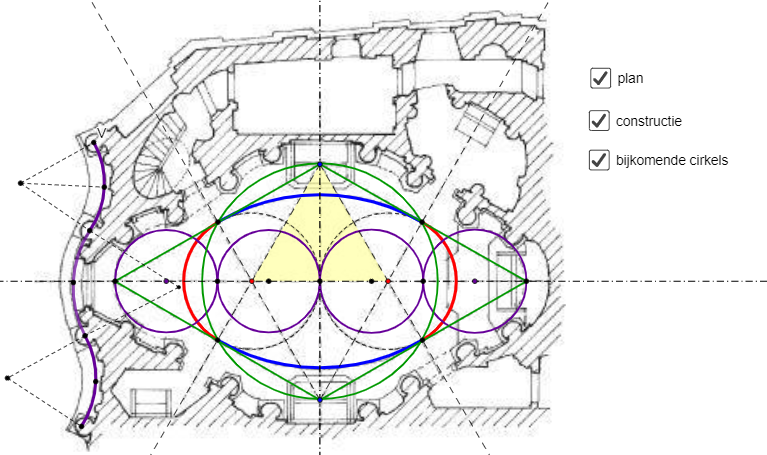
This example demonstrates the plan of the San Carlo church designed by architect Borromini in Rome. Key mathematical concepts include geometric construction and coordinate geometry. It uses commands such as Point, Circle, Ray, Intersect, CircleArc, Polygon, Segment, and LineBisector. Suitable for high school mathematics education and learning plane geometry.
GeoGebra Commands & Parameters
Point(xAxis) → CPoint(xAxis) → DCircle(C, O) → cCircle(D, O) → dPoint(yAxis) → EPoint(yAxis) → FRay(F, C) → fRay(F, D) → gRay(E, C) → hRay(E, D) → iIntersect(c, f, 2) → GIntersect(d, g) → H, IIntersect(c, h, 1) → JIntersect(d, i, 1) → KCircleArc(C, G, J) → eCircleArc(D, K, I) → kCircleArc(F, I, G) → pCircleArc(E, J, K) → qPolygon(C, D, E) → driehoek1, e_1, c_1, d_1Point(xAxis) → LPoint(xAxis) → QSegment(E, Q) → lSegment(E, L) → mSegment(L, F) → nSegment(F, Q) → jjCircle(P, L) → rCircle(M, N) → sCircle(R, O) → tCircle(T, S) → f_1Circle(O, G) → g_1LineBisector(V, U) → i_1LineBisector(V, U) → j_1LineBisector(V, U) → h_1LineBisector(U, W) → k_1LineBisector(W, Z) → l_1Point(h_1) → A_1CircleArc(A_1, U, V) → p_1Point(l_1) → B_1CircleArc(B_1, Z, W) → q_1Point(k_1) → C_1CircleArc(C_1, U, W) → r_1Intersect(p_1, h_1) → D_1,Intersect(r_1, k_1) → E_1,Intersect(q_1, l_1, 1) → F_1Segment(A_1, V) → m_1Segment(A_1, D_1) → n_1Segment(A_1, U) → s_1Segment(U, C_1) → t_1Segment(C_1, W) → a_1Segment(W, B_1) → b_1Segment(B_1, Z) → f_2
AI Drawing Prompt Reference
Draw a geometric construction consisting of a circle and a triangle. The circle has its center at the origin, and two points are on the x-axis. Draw rays from these points and intersect them with the circle to get two points. Then construct a triangle using these points and add line segments and arcs to connect them. Keep the diagram simple and clear.
The prompt above was compiled from the original drawing commands and is for reference only.