
Basic Concept of Venn Diagram
Loading the math board and drawing, please wait…
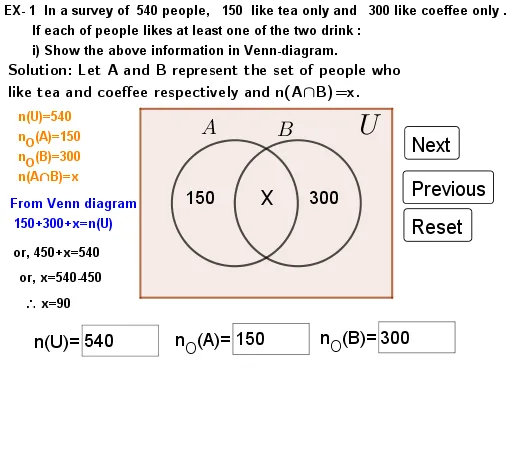
This example demonstrates the basic concept of Venn diagrams through set problems. Key mathematical concepts include sets, subsets, intersection, and union. GeoGebra commands such as TextField, Point, Circle, Intersect, and Polygon are used for construction. Suitable for students in middle school and above learning set theory.
GeoGebra Commands & Parameters
Textfield(U) → InputBox2Textfield(A_O) → InputBox3Textfield(B_O) → InputBox4Point(xAxis) → ACircle(A, 2) → cPoint(xAxis) → BIntersect(c, xAxis, 2) → GCircle(G, 2) → dPolygon(H, I, J, K) → q1, h, i, j, k_{1}
AI Drawing Prompt Reference
Create a basic Venn diagram in a mathematical coordinate system to illustrate the relationship between two sets. First, determine the center of the first circle on the horizontal axis and draw a circle centered at that point. Then find the intersection point between this circle and the axis to the right, and draw a second circle centered at that intersection point, forming the standard Venn diagram shape with two overlapping circles. The two circles represent set A and set B respectively, with their overlapping region indicating the intersection. Add three text input fields for entering the names of the universal set, set A, and set B. Finally, draw a polygon in the intersection region to highlight this area. The entire diagram should clearly demonstrate the concepts of union, intersection, and complement suitable for teaching set theory.
The prompt above was compiled from the original drawing commands and is for reference only.