
Barycentric Coordinates by Jonathan Holland
Loading the math board and drawing, please wait…
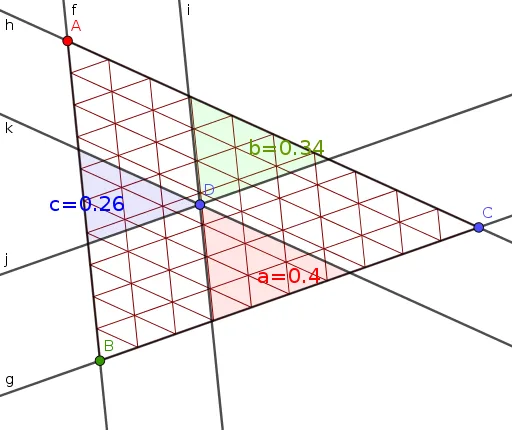
This example demonstrates how to represent the position of any point inside a triangle using barycentric coordinates. It involves core mathematical concepts like barycentric coordinates, coordinate geometry, triangle area, and vector operations. Construction highlights include commands like Line, Intersect, Area, Sequence, Distance, Polygon, and Centroid. Suitable for high school mathematics teaching and geometric construction learning.
GeoGebra Commands & Parameters
Line(B, C) → gLine(C, A) → hLine(D, h) → kIntersect(g, k) → JLine(A, B) → fLine(D, f) → iIntersect(g, i) → GIntersect(h, i) → HIntersect(f, k) → ILine(D, g) → jIntersect(f, j) → FArea(D, I, F) → c1Intersect(h, j) → EArea(D, E, H) → b1Area(D, G, J) → a1Sequence((t * B) + ((1 - t) * C), t, 0, 1, 0.1) → L_1Sequence((t * A) + ((1 - t) * B), t, 0, 1, 0.1) → L_2Sequence((t * C) + ((1 - t) * A), t, 0, 1, 0.1) → L_3Sequence(Segment[(t * B) + ((1 - t) * A), (t * C) + ((1 - t) * A)], t, 0, 1, 0.1) → L_4Sequence(Segment[(t * A) + ((1 - t) * C), (t * B) + ((1 - t) * C)], t, 0, 1, 0.1) → L_5Sequence(Segment[(t * C) + ((1 - t) * B), (t * A) + ((1 - t) * B)], t, 0, 1, 0.1) → L_6Distance(B, F) → BFDistance(A, B) → ABDistance(G, C) → GCDistance(B, C) → BCDistance(B, G) → BGPolygon(D, G, J) → t1, j_1, d_1, g_1Polygon(I, F, D) → t2, d_2, i_1, f_1Polygon(D, E, H) → t3, h_1, d_3, eCentroid(t2) → KCentroid(t1) → LCentroid(t3) → M
AI Drawing Prompt Reference
Draw a triangle and mark multiple smaller triangles inside and on its boundary with different colors, connected by vertices and midpoints of the sides. Show line segments from the vertices to the midpoints of the sides, and their intersections with the triangle's boundaries. Finally, label the centroids of these smaller triangles and connect them with dashed lines to form a new triangle.
The prompt above was compiled from the original drawing commands and is for reference only.