
Array of Equilateral Triangles
Loading the math board and drawing, please wait…
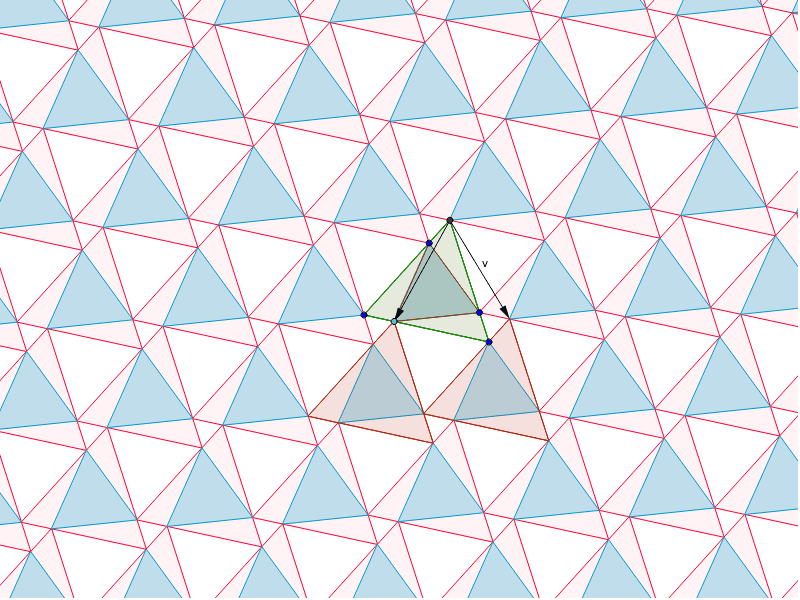
Demonstrates symmetry in an array of equilateral triangles; involves concepts of equilateral triangles, vectors, and transformations; constructed using commands like Polygon, Translate, and Rotate; suitable for high school geometry education.
GeoGebra Commands & Parameters
Polygon(A, B, 3) → poly1, a, b, c, CPoint(a) → DVector(C, D) → uTranslate(poly1, u) → poly1'Rotate(u, 60*°, C) → vTranslate(poly1, v) → poly1'_1Sequence(Translate[Sequence[Translate[poly1, Vector[(n * u)]], n, -10, 10], Vector[(m * v)]], m, -10, 10) → list1Translate(A, w) → A'Translate(B, Vector[(-v)]) → B'Polygon(D, A', B') → poly2, b', d, a'Sequence(Translate[Sequence[Polygon[Translate[D, Vector[(n * u)]], Translate[A', Vector[(n * u)]], Translate[B', Vector[(n * u)]]], n, -10, 10], Vector[(m * v)]], m, -10, 10) → list2
AI Drawing Prompt Reference
Draw an array of equilateral triangles to demonstrate symmetry. Start with a single equilateral triangle, then use vector translation and rotation to create multiple copies, forming a symmetric pattern. Apply repeated translations and rotations based on vectors to generate a complex grid of triangles, highlighting symmetry and transformation relationships.
The prompt above was compiled from the original drawing commands and is for reference only.