
Array of Equilateral Triangles with Transformations
Loading the math board and drawing, please wait…
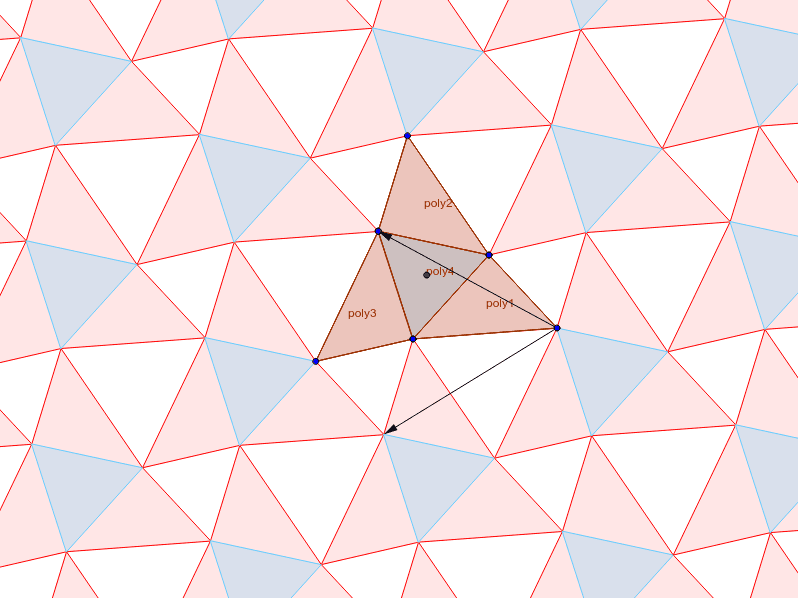
This example demonstrates the symmetrical transformations of an array of equilateral triangles. Key mathematical concepts include the properties of equilateral triangles, rotational symmetry, and vectors. Using GeoGebra commands such as Polygon, Rotate, and Vector, a specific symmetrical array of equilateral triangles can be constructed. Suitable for middle school and above students or teachers for geometry instruction.
GeoGebra Commands & Parameters
Polygon(A, B, C) → poly1, c, a, bPolygon(A, B, 3) → poly4, d, e, f, DCircle(B, A, D) → gCenter(g) → ERotate(A, 120*°, E) → A'Rotate(B, 120*°, E) → B'Rotate(C, 120*°, E) → C'Polygon(A', B', C') → poly2, c', a', b'Rotate(A, 240*°, E) → A'_1Rotate(B, 240*°, E) → B'_1Rotate(C, 240*°, E) → C'_1Polygon(A'_1, B'_1, C'_1) → poly3, c'_1, a'_1, b'_1Vector(C, D) → uRotate(u, 60*°, C) → vPolygon(C, B, C', D, C'_1, A) → poly5, c_1, b_1, c'_2, d_1, c'_3, a_1Sequence(Translate[Sequence[Polygon[Translate[C, Vector[(n * u)]], Translate[B, Vector[(n * u)]], Translate[C', Vector[(n * u)]], Translate[D, Vector[(n * u)]], Translate[C'_1, Vector[(n * u)]], Translate[A, Vector[(n * u)]]], n, -10, 10], Vector[(m * v)]], m, -10, 10) → list1Sequence(Translate[Sequence[Translate[poly4, Vector[(n * u)]], n, -10, 10], Vector[(m * v)]], m, -10, 10) → list2
AI Drawing Prompt Reference
Draw a series of equilateral triangles with rotational symmetry around a center. Start by creating an equilateral triangle, then rotate it 120 degrees and 240 degrees to get two more equilateral triangles. Define a vector u and rotate it 60 degrees to get vector v. Use vectors u and v to translate the original triangle and its rotated triangles, forming a symmetrical array. Finally, through translation and rotation, generate a series of equilateral triangles to create a complex symmetrical pattern.
The prompt above was compiled from the original drawing commands and is for reference only.