
Areas of Equilateral Triangles & 45-45-90s
Loading the math board and drawing, please wait…
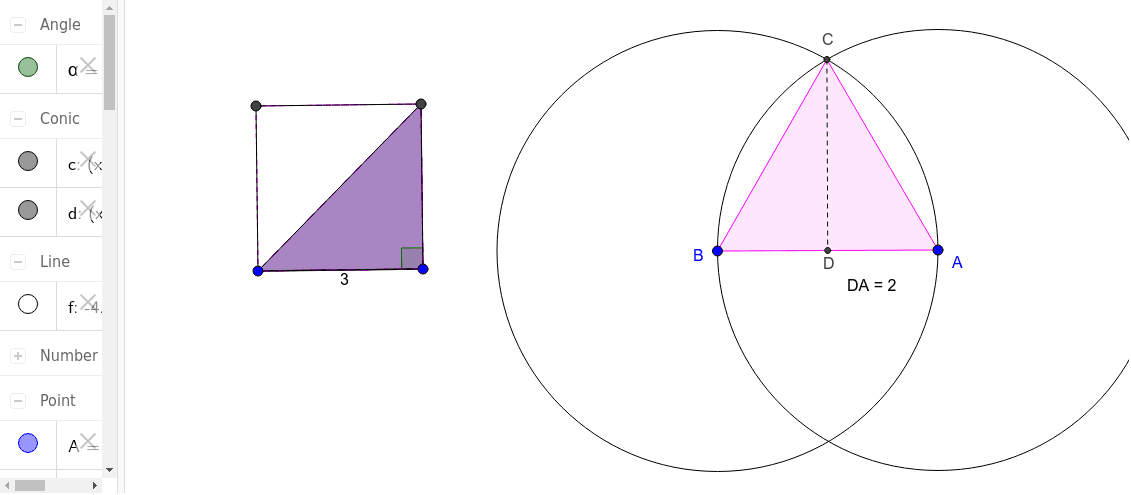
This example demonstrates the area calculations and geometric relationships of equilateral triangles and 45-45-90 right triangles. It involves core concepts like area formulas, geometric constructions, inequalities, geometric mean, centroid, and scatter plots. The construction uses GeoGebra commands such as Circle, Intersect, Polygon, OrthogonalLine, Segment, Distance, Perimeter, PointIn, and Angle. Suitable for high school mathematics teaching and geometric construction learning.
GeoGebra Commands & Parameters
Circle(A, B) → cCircle(B, A) → dIntersect(c, d, 2) → CPolygon(B, A, C) → poly1, c_1, b, aOrthogonalLine(C, c_1) → fIntersect(f, c_1) → DSegment(C, D) → gDistance(D, A) → distanceDAPolygon(E, F, 4) → poly2, h, i, j, k, G, HPolygon(E, G, F) → poly3, f_1, e, g_1Polygon(G, E, F) → poly4, f_2, g_2, e_1Polygon(G, E, F) → poly5, f_3, g_3, e_2Perimeter(poly2) → perimeterpoly2PointIn(poly2) → Pointpoly2Segment(G, F) → lSegment(F, E) → mSegment(E, G) → nSegment(G, H) → pSegment(H, E) → qAngle(G, F, E) → α
AI Drawing Prompt Reference
Draw an equilateral triangle and an inscribed 45-45-90 right triangle to demonstrate their area calculations and geometric relationships. Start by drawing two intersecting circles and connecting their intersection points to form the equilateral triangle. Then, draw a perpendicular line from one vertex to the opposite side, connecting the vertex and the foot of the perpendicular to create the right triangle. Construct multiple polygons to represent different geometric regions, label key distances and angles, and include a scatter plot to visualize related data.
The prompt above was compiled from the original drawing commands and is for reference only.