
Area Unit Conversion: Convert km², ha, dm², m² into mm² or cm²
Loading the math board and drawing, please wait…
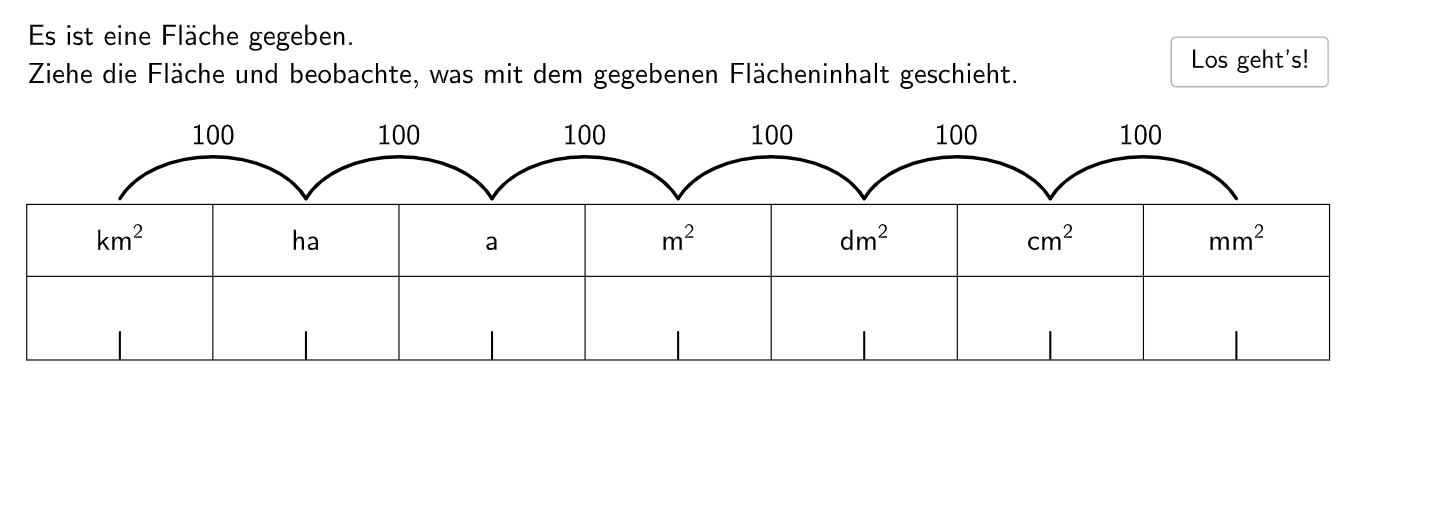
This GeoGebra example provides an interactive question-and-check activity for converting area units such as m², km², dm², mm², cm² and ha (e.g., 1 km² = ? m²; 1 dm² = ? mm²; 4 dm² = ? mm²; 189 ha = ? km²; 0.0345 m² = ? cm²). The key math concepts are the power-based conversion rules for area (length scales by powers of 10, while area scales by the square of that factor), proportional reasoning in unit conversion, and automated validation of student input. From the construction summary, the implementation uses Polygon/Point/Segment for organizing visual elements, Text/Text2/Text1 and TableText/Sequence for generating and displaying problem statements and outputs, and Shuffle/RandomElement/RandomNos1 with Num1/Num2 plus attemptCount to randomize parameters and track attempts. Feedback is handled with showcalc, errorWord/errorWord1 and related interface controls such as Schaltfläche1 and the associated variables (e.g., allowedPos, l_1/l1/l3/l4, dy). Suitable for primary-level (grades 5–6) practice and for classroom reinforcement or interactive homework with immediate checking.
GeoGebra Commands & Parameters
Polygon(T_1, M_1, N_1, U_1) → q1, l_1, m_1, n_1, e_2Shuffle(Sequence[Random[1, 9], i, 1, 100]) → RandomNos1, {1, 8, 5, 6, 3, 8, 5, 7, 4, 8, 4, 5, 7, 3, 3, 2, 4, 7, 3, 4, 2, 8, 1, 9, 4, 3, 2, 2, 5, 8, 7, 6, 8, 8, 7, 5, 8, 5, 1, 4, 4, 6, 7, 6, 5, 7, 2, 9, 8, 8, 2, 1, 1, 8, 4, 9, 3, 4, 3, 6, 3, 2, 7, 7, 4, 1, 7, 5, 5, 2, 2, 9, 7, 8, 8, 3, 3, 7, 7, 4, 6, 4, 7, 4, 1, 8, 7, 3, 6, 8, 5, 8, 2, 8, 5, 3, 8, 4, 4, 2}RandomElement(RandomNos1) → Num1TableText({"\vphantom{\frac{1}{2}}km^2", "ha", "a", "m^2", "dm^2", "cm^2", "mm^2"}, {"\vphantom{\large{\frac{1}{2}}}\hspace{4cm}", "\hspace{4cm}", "\hspace{4cm}", "\hspace{4cm}", "\hspace{4cm}", "\hspace{4cm}", "\hspace{4cm}"}, "c_|h") → text6Sequence(((i * 1), 1.55), i, -8, 5, 2) → l1Sequence(Midpoint[l1(i), l1(i + 1)] - (0, 0.4), i, 1, Length[l1] - 1) → MsSequence(CircleArc[Ms(i), l1(i + 1), l1(i)], i, 1, Length[Ms]) → l4Sequence(Text["$\textsf{100}$", Midpoint[l1(i), l1(i + 1)] + (0, dy), true, true, 0], i, 1, Length[l1] - 1) → l3Point(allowedPos) → APolygon(A, (x(A), y(A) - 0.4), (x(A) + 0.5, y(A) - 0.4), (x(A) + 0.5, y(A))) → q2, f, g, h, iSequence(((i * 1), -0.6), i, -8, 5, 2) → l5Sequence(((i * 1), -1.03), i, -8, 5, 2) → l2Point(l2) → DPoint(l5) → ESegment(D, E) → jPoint(l2) → FPoint(l5) → GSegment(F, G) → kPoint(l2) → HPoint(l5) → ISegment(H, I) → lPoint(l2) → JPoint(l5) → KSegment(J, K) → mPoint(l2) → LPoint(l5) → MSegment(L, M) → nPoint(l2) → NPoint(l5) → OSegment(N, O) → pPoint(l2) → PPoint(l5) → QSegment(P, Q) → q
AI Drawing Prompt Reference
Draw a graph with multiple circular arcs and numerical labels. The graph contains a large circle with six smaller circles inside, each with a numerical label ranging from -8 to 5, incrementing by 2, located at different positions within the large circle. The graph also includes various line segments and points to connect and mark the circles and labels.
The prompt above was compiled from the original drawing commands and is for reference only.