
Area Under a Curve Using an Integral
Loading the math board and drawing, please wait…
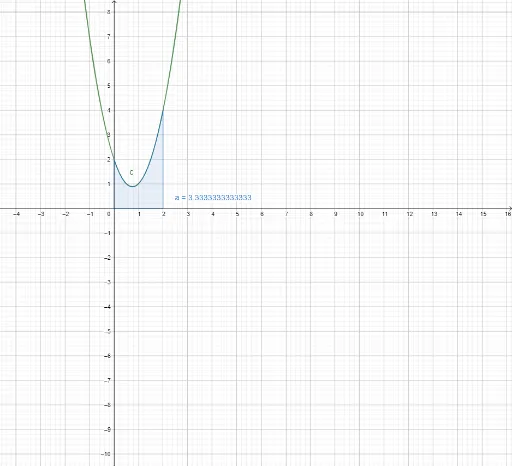
This example demonstrates how to calculate the area under a curve using integral calculus. It involves core math concepts like definite integrals, the Fundamental Theorem of Calculus, and function graphs. The construction uses the GeoGebra 'Integral' command to compute the area between a function f(x) and the x-axis over an interval [a, c], where a and c are adjustable sliders. Suitable for high school and university students learning calculus, function graphs, and geometric area relationships.
GeoGebra Commands & Parameters
Integral(c, 0, 2) → a
AI Drawing Prompt Reference
Draw a region under a curve. The curve is represented by a line graph, intersecting the x-axis at two points. The area region starts from the first intersection point and ends at the second. Sliders can adjust the start and end points of the curve. The graphic should clearly show the area between the curve and the x-axis, illustrating the concept of area under a curve.
The prompt above was compiled from the original drawing commands and is for reference only.