
Area of Trapezoid in Grid
Loading the math board and drawing, please wait…
In collections
Trapez - Flächeninhalt
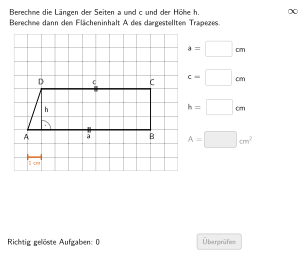
This example demonstrates the area calculation of a trapezoid in a grid. Key mathematical concepts include the formula for the area of a trapezoid and its application. Using GeoGebra commands such as Shuffle, Element, and Zip, students can dynamically explore the area changes of the trapezoid. Suitable for 5-6 grade students for practice.
GeoGebra Commands & Parameters
Shuffle(Sequence[Random[3, coordheight - 4], m, 1, 100]) → randomNosForH, {3, 5, 3, 5, 4, 3, 5, 3, 6, 6, 6, 6, 3, 4, 5, 6, 4, 5, 6, 6, 4, 3, 5, 6, 4, 3, 5, 4, 5, 6, 6, 3, 4, 3, 5, 4, 6, 3, 4, 4, 3, 5, 5, 5, 6, 5, 6, 6, 4, 5, 6, 3, 6, 6, 3, 3, 6, 3, 5, 6, 6, 5, 4, 6, 6, 5, 6, 3, 3, 6, 3, 6, 6, 6, 3, 5, 6, 5, 3, 5, 6, 6, 5, 3, 3, 3, 4, 4, 5, 3, 5, 4, 6, 5, 4, 3, 5, 5, 6, 3}Element(randomNosForH, Mod[questionCount, 100] + 1) → numHShuffle(Sequence[Random[6, coordwidth - 2], m, 1, 100]) → randomNosForA, {9, 6, 7, 9, 7, 6, 10, 8, 9, 8, 9, 9, 10, 8, 9, 8, 8, 10, 7, 9, 9, 8, 8, 8, 9, 7, 8, 9, 6, 10, 9, 10, 9, 9, 6, 8, 9, 10, 6, 7, 6, 8, 8, 7, 9, 9, 9, 9, 6, 10, 9, 7, 10, 6, 6, 10, 10, 10, 10, 7, 7, 7, 10, 10, 6, 8, 10, 7, 9, 6, 9, 7, 8, 6, 7, 10, 8, 10, 10, 7, 8, 9, 7, 10, 9, 9, 9, 6, 6, 6, 7, 9, 9, 6, 8, 9, 6, 10, 8, 9}Element(randomNosForA, Mod[questionCount, 100] + 1) → numAZip(Random[3, m - 1], m, randomNosForA) → randomNosForCElement(randomNosForC, Mod[questionCount, 100] + 1) → numCZip(Max[{0, Random[1, coordwidth - a - 3]}], a, randomNosForC) → randomNosForAbsLinksJoin(Sequence[Shuffle[{2, 3, 4, 5}], m, 1, 30]) → listEHSegment(PA, PC) → esTextfield(input1) → InputBox1Textfield(input2) → InputBox2Polygon(PtopLeftCornerFeedback, PtopRightCornerFeedback, PbottomRightCornerFeedback, PbottomLeftCornerFeedback) → rectangleCorrect, rectangleCorrectS3, rectangleCorrectS4, rectangleCorrectS2, rectangleCorrectS1Append(true, Sequence[If[randomNosForA(i) ≟ randomNosForA(i - 1), false, true], i, 2, 100]) → stayXAppend(true, Sequence[If[randomNosForC(i) ≟ randomNosForC(i - 1), false, true], i, 2, 100]) → stayYRemove(Sequence[If[stayX(i), randomNosForA(i), 0], i, 1, 100], Sequence[0, i, 1, 100]) → randomNosForXwithoutRepeatRemove(Sequence[If[stayY(i), randomNosForC(i), 0], i, 1, 100], Sequence[0, i, 1, 100]) → randomNosForYwithoutRepeatElement(randomNosForXwithoutRepeat, Mod[questionCount, Length[randomNosForXwithoutRepeat]] + 1) → numXwithoutRepeatElement(randomNosForYwithoutRepeat, Mod[questionCount, Length[randomNosForYwithoutRepeat]] + 1) → numYwithoutRepeatDefined(input4) → fixedFlatten(Sequence[Sequence[O + (m * (size, 0)) + (j * (0, size)), m, 0, coordwidth - 1], j, 0, coordheight - 1]) → listPointsRandom(2, numA - 2) → propSegment(PB, PD) → fsSegment(G1, G2) → gTranslate(Segment[(0, -0.1), (0, 0.1)], G1) → hTranslate(Segment[(0, -0.1), (0, 0.1)], G2) → iIntersect(Line[PA, PB], Line[PD, yAxis]) → STextfield(input4) → InputBox4Zip(Polygon[P, P + (0, size), P + (0, size) + (size, 0), P + (size, 0)], P, listPoints) → listCoordsSegment(PD, Intersect[Line[PD, yAxis], Line[PA, xAxis]]) → fAngle(PB, S, PD) → αTextfield(input3) → InputBox3Segment(PA, PB) → streckeaSegment(PD, PC) → streckec
AI Drawing Prompt Reference
Draw a trapezoid on a coordinate grid for an area practice. Construct the trapezoid as a polygon using four vertices located on grid points: make the top and bottom sides parallel (use two horizontal segments as the bases), and connect the corresponding top and bottom vertices to form the two slanted legs. Add key supporting elements such as a segment along a leg and an angle marker defined by three relevant points (using the intersection point formed by extending edges to the axes). Place a few text input boxes on the diagram for recording parameters like the trapezoid’s height and an angle, so the viewer can relate the geometry to the area. Keep the outline and angle/segments clearly visible.
The prompt above was compiled from the original drawing commands and is for reference only.