
Area of Parallelogram by A. G. Gomez ([email protected])
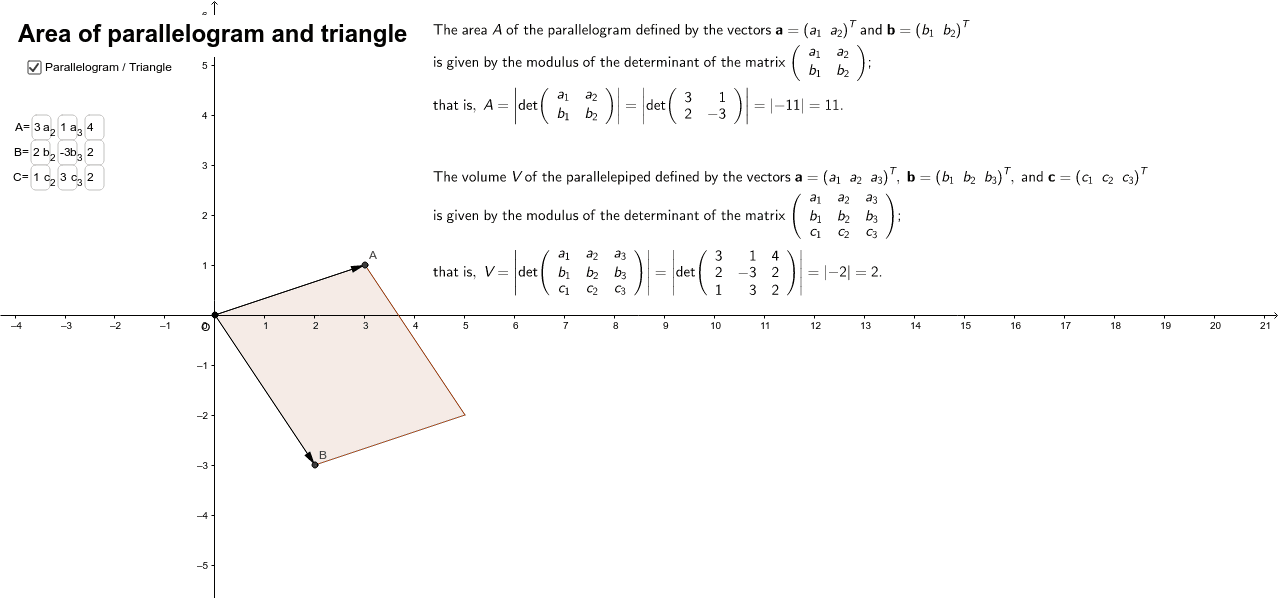
Loading the math board and drawing, please wait…
This example demonstrates how to find the areas of parallelograms and triangles using matrices, and even the volume of a parallelepiped. It uses commands like Vector, Polygon, and Determinant in GeoGebra. Suitable for students learning coordinate and solid geometry.
GeoGebra Commands & Parameters
Textfield(a_1) → inputBox1Textfield(a_2) → inputBox2Vector(O, A) → uTextfield(b_1) → inputBox3Textfield(b_2) → inputBox4Textfield(c_1) → inputBox5Textfield(c_2) → inputBox6Vector(O, B) → vVector(O, C) → wPolygon(O, A, P, B) → poly1, p'''', p', p'', p'''Textfield(a_3) → inputBox7Textfield(b_3) → inputBox8Textfield(c_3) → inputBox9Determinant(M) → d_MDeterminant(N) → d_NPolygon(A, C, B) → poly2, b, a, cDeterminant(Q) → d_Q
AI Drawing Prompt Reference
Draw a parallelogram with point O as the origin. Input coordinates for points A, B, and C to get vectors u, v, and w. Construct a parallelogram using points O, A, B, and C. Calculate the determinant of vectors u and v to find the area of the parallelogram. Finally, construct triangle ABC and calculate its area.
The prompt above was compiled from the original drawing commands and is for reference only.