
Area of Obtuse Triangle
Loading the math board and drawing, please wait…
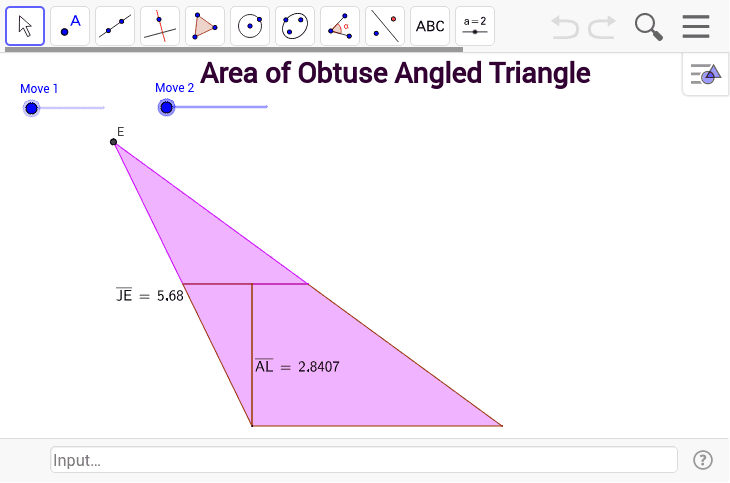
This example demonstrates how to calculate the area of an obtuse triangle, highlighting that the perpendicular height may lie outside the triangle itself. Key math concepts include triangle area formulas, obtuse angle properties, and height definitions. GeoGebra commands like Point, Segment, Rotate, Angle, OrthogonalLine, Line, Circle, Intersect, Distance, Midpoint, Polygon, Dilate, Vector, and Translate are used to construct the figure and compute the area. Suitable for high school mathematics education, illustrating area calculation methods and height positioning in obtuse triangles.
GeoGebra Commands & Parameters
Point(Circle[A, a]) → BSegment(A, B) → cRotate(B, α, A) → B'_1Angle(B, A, B'_1) → βOrthogonalLine(A, c) → dLine(A, B'_1) → gLine(A, B) → ePoint(e) → CCircle(C, b) → fIntersect(f, g) → D, ESegment(E, B) → hDistance(E, C) → distanceECDistance(A, B) → distanceABOrthogonalLine(E, d) → iOrthogonalLine(B, e) → kIntersect(i, k) → FIntersect(i, d) → GMidpoint(G, F) → HMidpoint(A, B) → IPolygon(A, I, H, G) → poly1, a_1, i_1, h_1, g_1Distance(G, H) → distanceGHDistance(G, A) → distanceGAOrthogonalLine(E, e) → lIntersect(l, e) → JDistance(J, E) → distanceJEMidpoint(E, A) → KLine(K, e) → mIntersect(m, d) → LIntersect(h, m) → MPolygon(A, B, M, L) → poly2, a_2, b_1, m_1, l_1Polygon(A, L, K) → poly3, k_1, a_3, l_2Polygon(E, K, M) → poly4, m_2, e_1, k_2Rotate(M, γ, M) → M'_1Rotate(E, -γ, M'_1) → E'Rotate(K, -γ, M'_1) → K'_1Rotate(M, -γ, M'_1) → M'Polygon(E', K'_1, M') → poly4', m'_1, e'_1, k'_1Dilate(B, j, A) → B'Vector(A, B') → uTranslate(A, u) → A'Translate(L, u) → L'Translate(K, u) → K'Polygon(A', L', K') → poly3', k', a', l'Distance(A, L) → distanceAL