
Area of Deltoid in Grid - Level 2
Loading the math board and drawing, please wait…
In collections
Deltoid - Flächeninhalt
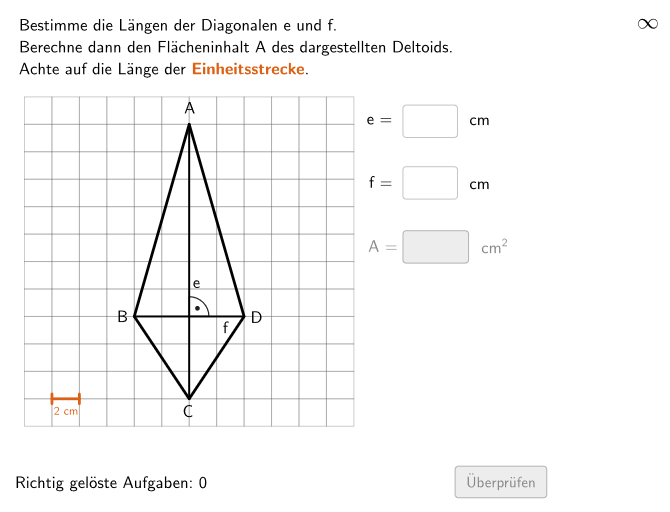
This example demonstrates the calculation of the area of a deltoid in a grid. The core mathematical concept involved is the formula for the area of a deltoid. Using GeoGebra commands such as Shuffle, Element, Random, etc., students can learn how to construct and calculate the area of a deltoid. Suitable for 5-6 grade students for practice.
GeoGebra Commands & Parameters
Shuffle(Sequence[Random[4, coordwidth - 2], m, 1, 100]) → randomNosForY, {4, 7, 6, 5, 6, 10, 10, 9, 9, 4, 4, 10, 6, 5, 4, 5, 8, 8, 8, 8, 10, 7, 9, 6, 9, 7, 4, 9, 8, 6, 5, 7, 4, 6, 8, 4, 10, 10, 9, 4, 4, 4, 8, 7, 8, 8, 10, 7, 8, 5, 7, 5, 4, 4, 8, 5, 5, 6, 8, 7, 5, 5, 4, 6, 8, 5, 9, 8, 8, 9, 7, 6, 7, 10, 7, 10, 10, 7, 5, 4, 9, 10, 9, 4, 4, 7, 5, 8, 10, 9, 8, 9, 10, 9, 7, 5, 9, 9, 5, 4}Shuffle(Sequence[Random[7, coordheight - 2], m, 1, 100]) → randomNosForX, {10, 8, 9, 9, 10, 8, 7, 10, 9, 7, 9, 10, 10, 10, 8, 8, 10, 9, 10, 10, 10, 9, 9, 10, 10, 9, 10, 7, 10, 8, 9, 9, 9, 8, 8, 10, 9, 9, 8, 8, 10, 9, 7, 8, 7, 8, 10, 9, 7, 7, 10, 9, 7, 7, 8, 9, 9, 10, 8, 9, 9, 8, 7, 9, 9, 8, 10, 10, 9, 9, 7, 10, 9, 9, 9, 7, 10, 7, 8, 10, 7, 8, 10, 7, 8, 10, 10, 9, 9, 10, 8, 9, 10, 10, 9, 10, 10, 8, 7, 8}Element(randomNosForY, Mod[questionCount, 100] + 1) → numYElement(randomNosForX, Mod[questionCount, 100] + 1) → numXRandom(2, numX - 2) → propSegment(P4, P2) → fsSegment(P1, P3) → esJoin(Sequence[Shuffle[{2, 3, 4, 5}], m, 1, 30]) → listEHTextfield(input1) → InputBox1Textfield(input2) → InputBox2Polygon(PtopLeftCornerFeedback, PtopRightCornerFeedback, PbottomRightCornerFeedback, PbottomLeftCornerFeedback) → rectangleCorrect, rectangleCorrectS3, rectangleCorrectS4, rectangleCorrectS2, rectangleCorrectS1Append(true, Sequence[If[randomNosForX(i) ≟ randomNosForX(i - 1), false, true], i, 2, 100]) → stayXAppend(true, Sequence[If[randomNosForY(i) ≟ randomNosForY(i - 1), false, true], i, 2, 100]) → stayYRemove(Sequence[If[stayX(i), randomNosForX(i), 0], i, 1, 100], Sequence[0, i, 1, 100]) → randomNosForXwithoutRepeatRemove(Sequence[If[stayY(i), randomNosForY(i), 0], i, 1, 100], Sequence[0, i, 1, 100]) → randomNosForYwithoutRepeatElement(randomNosForXwithoutRepeat, Mod[questionCount, Length[randomNosForXwithoutRepeat]] + 1) → numXwithoutRepeatElement(randomNosForYwithoutRepeat, Mod[questionCount, Length[randomNosForYwithoutRepeat]] + 1) → numYwithoutRepeatDefined(input3) → fixedFlatten(Sequence[Sequence[O + (m * (size, 0)) + (j * (0, size)), m, 0, coordwidth - 1], j, 0, coordheight - 1]) → listPointsSegment(G1, G2) → gTranslate(Segment[(0, -0.1), (0, 0.1)], G1) → hTranslate(Segment[(0, -0.1), (0, 0.1)], G2) → iIntersect(es, fs) → STextfield(input3) → InputBox3Zip(Polygon[P, P + (0, size), P + (0, size) + (size, 0), P + (size, 0)], P, listPoints) → listCoordsLaTeX(ez, true, true) → Text2LaTeX(fz, true, true) → Text3LaTeX(sol, true, true) → Text4LaTeX(solEH, true, true) → Text13NumberSeparationComma(solEH) → Text14NumberSeparationComma((solEH * 2)) → Text15Angle(P2, Midpoint[P2, P4], P1) → α
AI Drawing Prompt Reference
On a coordinate grid, first choose four vertices of a rectangle (top-left, top-right, bottom-right, bottom-left) and draw the rectangle using those corners. Then, within the grid, pick two points on the top and bottom boundary aligned with the rectangle so they serve as the upper and lower endpoints of the target quadrilateral. Add two further interior/adjacent points so that, together with the chosen top and bottom endpoints, they form a four-sided deltoid-like quadrilateral whose sides are drawn as connecting segments between the selected points. Finally, place an angle marking inside the rectangle to show the angle determined by a vertex and its two connecting rays.
The prompt above was compiled from the original drawing commands and is for reference only.