
Area of a Parallelogram - Interactive Demonstration
Loading the math board and drawing, please wait…
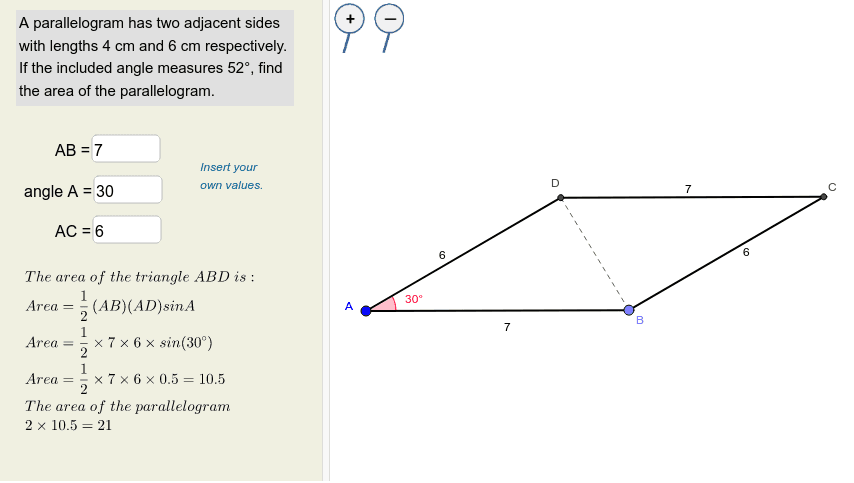
① This GeoGebra example interactively demonstrates how to compute the area of a parallelogram, allowing users to adjust parameters via input boxes and observe the resulting area changes. ② Core mathematical concepts include the parallelogram area formula (base × height), geometric transformations such as rotation and translation, and the relationship between area, base, and height, along with basic geometric elements like angles and vectors. ③ Construction highlights: Based on the construction summary, commands such as Point, Rotate, Angle, Ray, Circle, Intersect, Segment, and Line are used to build the figure, with Textfield and InputBox providing interactive controls. Objects include points A, B, C, D, segments a, b, c, d, etc., and texts text1, text2, text3, plus images pic1 and pic2 for labeling and auxiliary explanations. ④ Suitable for middle or high school geometry teaching, for teachers creating dynamic lesson materials, or for students exploring the derivation of the area formula through hands-on experimentation.
GeoGebra Commands & Parameters
Point(Circle[A, a]) → BRotate(B, g°, A) → B'Angle(B, A, B') → αRay(A, B') → cCircle(A, b) → dIntersect(d, c, 1) → DSegment(A, B) → eSegment(A, D) → fTextfield(a) → InputBox1Textfield(g) → InputBox2Textfield(b) → InputBox3Line(D, e) → hLine(B, f) → iIntersect(h, i) → CSegment(D, C) → jSegment(C, B) → kSegment(D, B) → l
AI Drawing Prompt Reference
Draw an interactive parallelogram area demonstration. Start with a circle and pick a point on it as one vertex. Rotate this point around the vertex by an adjustable angle to determine the direction of the adjacent side. Draw a ray from the vertex and intersect it with a second circle to fix the neighboring vertex. Connect these two vertices to form two sides. Then draw lines through each vertex parallel to the opposite side; their intersection gives the fourth vertex. Complete the parallelogram by connecting all vertices. Include three adjustable parameters: base length, rotation angle, and side length, along with text labels showing the area calculation.
The prompt above was compiled from the original drawing commands and is for reference only.