
Area of a Kite by GeoGebra Materials Team
Loading the math board and drawing, please wait…
In collections
Area, Surface Area, Volume--Nets
Area, perimeter and volume of shapes
Area and Surface Area
Area and Surface Area
Deriving area formulas for Geometry
Area, Perimeter and Volume of shapes
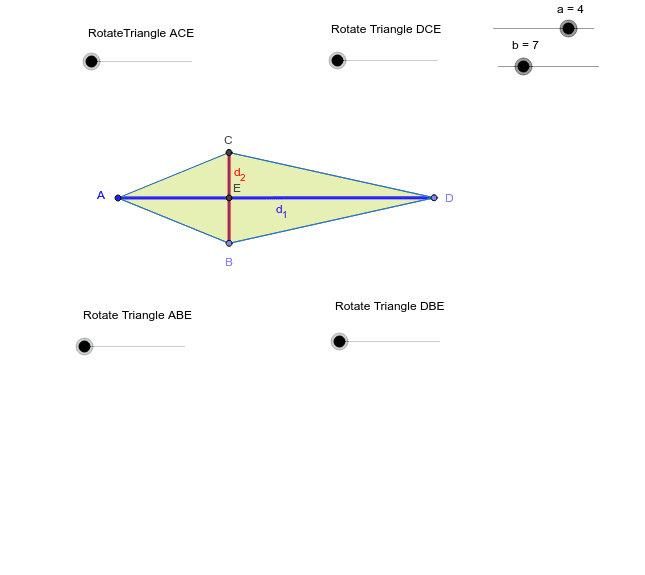
This example demonstrates how to calculate the area of a kite using geometric construction. Key mathematical concepts include area formulas, sine functions, and multiplication. Using GeoGebra commands such as point, segment, circle, intersection, polygon, midpoint, mirror, and rotate, the kite is constructed and its area is calculated. Suitable for middle school and above students learning geometry and trigonometry.
GeoGebra Commands & Parameters
Point(Circle[A, a]) → BSegment(A, B) → b_3Circle(A, B) → cPoint(Circle[B, b]) → DSegment(B, D) → fCircle(D, B) → gIntersect(c, g, 1) → CSegment(A, C) → dSegment(C, D) → hSegment(A, D) → d_1Segment(B, C) → d_2Intersect(d_1, d_2) → E_1Polygon(C, E_1, D) → P, d_4, c_1, e_1Polygon(E_1, B, D) → Q, d_3, e_2, b_1Polygon(E_1, C, A) → R, a_1, e_3, c_2Polygon(E_1, B, A) → S, a_2, e_4, b_2Midpoint(C, D) → FMirror(C, F) → C'Mirror(E_1, F) → E'Mirror(D, F) → D'Midpoint(A, C) → GMidpoint(A, B) → HMidpoint(B, D) → IMirror(E_1, G) → E'_1Mirror(C, G) → C'_1Mirror(A, G) → A'Mirror(E_1, H) → E'_2Mirror(B, H) → B'Mirror(A, H) → A'_1Mirror(E_1, I) → E'_3Mirror(B, I) → B'_1Mirror(D, I) → D'_1Midpoint(B, C) → ERotate(E_1, α, G) → E_1'Rotate(C, α, G) → C'_2Rotate(A, α, G) → A'_2Polygon(E_1', C'_2, A'_2) → R', a'_2, e_1', c'_2Rotate(C, -β, F) → C'_4Rotate(E_1, -β, F) → E_3Rotate(D, -β, F) → D'_3Polygon(C'_4, E_3, D'_3) → P', d'_3, c'_4, e_5Rotate(E_1, γ, H) → E_2Rotate(B, γ, H) → B'_2Rotate(A, γ, H) → A'_3Polygon(E_2, B'_2, A'_3) → S', a'_3, e_6, b'_2Rotate(E_1, -δ, I) → E_4Rotate(B, -δ, I) → B'_3Rotate(D, -δ, I) → D'_2Polygon(E_4, B'_3, D'_2) → Q', d'_2, e_7, b'_3
AI Drawing Prompt Reference
Draw a kite to demonstrate the calculation of its area through geometric construction. Start by drawing two intersecting line segments, then use their intersection points and endpoints as centers to draw circles. Find the intersection points of these circles to form the four vertices of the kite. Next, calculate and draw the diagonals of the kite, locating their intersection point and the midpoints of each side. Utilize midpoints and symmetry to draw mirrored and rotated constructions of the kite, ultimately showing its various parts and their relationships, highlighting key mathematical concepts involved in area calculation.
The prompt above was compiled from the original drawing commands and is for reference only.