
Area of a Circle by mercheid4788
Loading the math board and drawing, please wait…
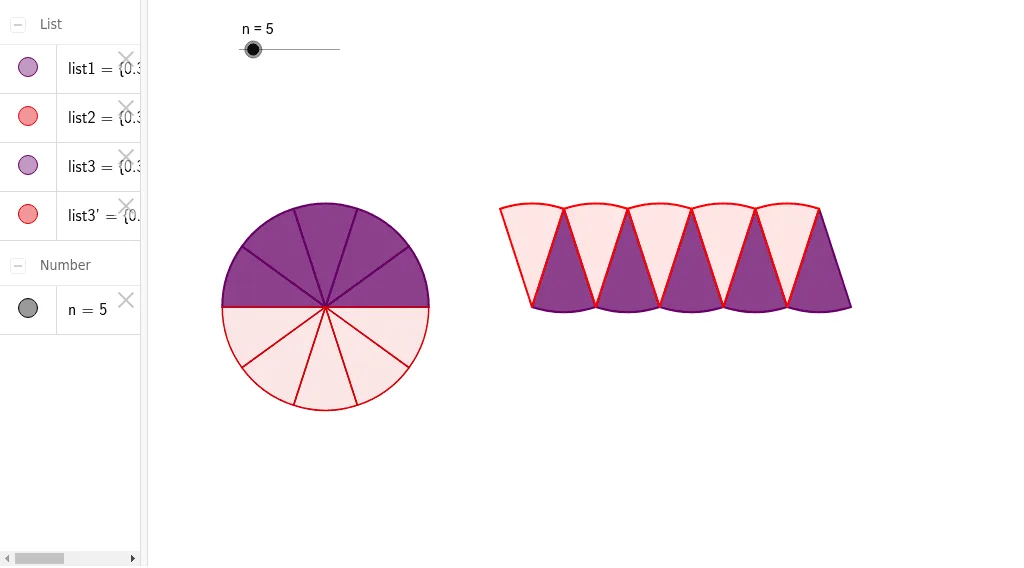
This example demonstrates how to calculate the area of a circle by changing its radius. Key mathematical concepts include the area formula of a circle. It uses GeoGebra commands such as Sequence and Mirror. Suitable for middle school and above students to learn about circles.
GeoGebra Commands & Parameters
Sequence(CircleSector[((2 * k - 1) * sin(π / (2 * n)), cos(π / (2 * n))), ((2 * k - 2) * sin(π / (2 * n)), 0), (2 * k * sin(π / (2 * n)), 0)], k, 1, n) → list1Sequence(CircleSector[((2 * k - 2) * sin(π / (2 * n)), 0), ((2 * k - 1) * sin(π / (2 * n)), cos(π / (2 * n))), ((2 * k - 3) * sin(π / (2 * n)), cos(π / (2 * n)))], k, 1, n) → list2Sequence(CircleSector[(-2, 0), (-2 + cos((k - 1) * π / n), sin((k - 1) * π / n)), (-2 + cos(k * π / n), sin(k * π / n))], k, 1, n) → list3Mirror(list3, xAxis) → list3'
AI Drawing Prompt Reference
Draw a diagram illustrating the area of a circle: on the left, a rectangle-like shape formed by two rows of triangular sectors, with upper and lower vertices on parallel horizontal lines, creating a zigzag edge; on the right, a semicircle of equal sectors radiating from a center point, mirrored across the horizontal axis. All sectors are uniform in size, and the number of sectors is adjustable, showing how the circle's area relates to its radius.
The prompt above was compiled from the original drawing commands and is for reference only.