
Area of a 45-45-90 Triangle: Scaling with Side Length
Loading the math board and drawing, please wait…
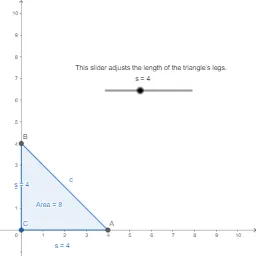
①This interactive GeoGebra example demonstrates how the area of an isosceles right triangle (45-45-90) scales proportionally to the square of its leg length, illustrating the relationship between similar triangles and area ratios.②Core mathematical concepts include properties of 45-45-90 triangles, similarity, area formula (area = 1/2 × base × height), and the square relationship between similarity ratio and area ratio, along with ideas of linear functions and continuity.③Construction details: Using GeoGebra commands Polygon to create the triangle, PointIn for draggable points, and objects such as s (area), A, B, C (vertices), t1 (triangle), c (circumcircle), a, b (side lengths), Pointt1 (point on triangle), and text1 (text display) to enable dynamic interaction—dragging vertices updates the area and side-length ratios in real time.④Suitable for upper middle school to high school students, this example is ideal for geometry lessons or exploratory activities on similar triangle area properties, and serves as a teacher demonstration tool to visualize scaling laws.
GeoGebra Commands & Parameters
Polygon(A, B, C) → t1, c, a, bPointIn(t1) → Pointt1
AI Drawing Prompt Reference
Draw an isosceles right triangle with two 45-degree angles, where the leg lengths can be adjusted using a slider. First, create a triangle, then place a draggable point inside the triangle to dynamically change the side lengths and area in real time.
The prompt above was compiled from the original drawing commands and is for reference only.