
Archimedes Quadrature of Parabola Prop. 2
Loading the math board and drawing, please wait…
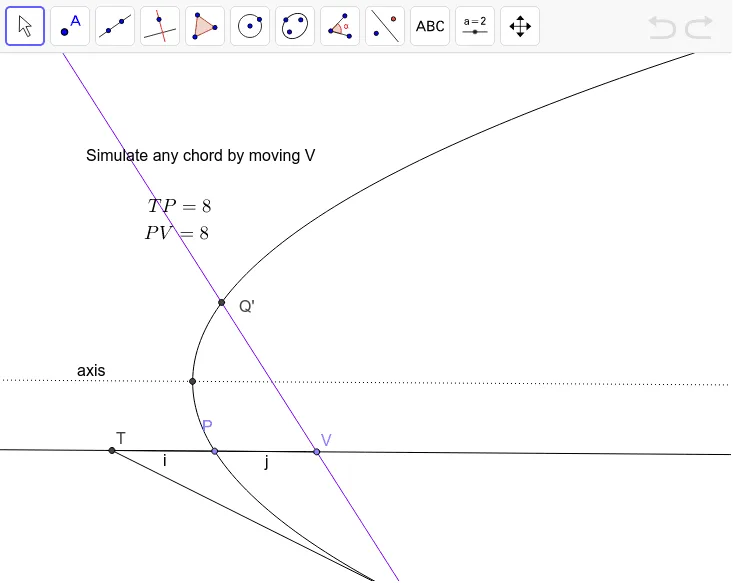
This example demonstrates the geometric method for calculating the area under a parabola. Key mathematical concepts include the parabola equation, area segmentation, and integral ideas. Construction involves GeoGebra commands such as Point, Line, Parabola, Intersect, and Tangent to create the parabola, determine intersection points, and draw tangents. Suitable for high school students learning analytic geometry and calculus fundamentals, and for mathematical teaching demonstrations.
GeoGebra Commands & Parameters
Point(xAxis) → ALine(A, B) → aParabola(C, a) → cLine(A, C) → axisPoint(c) → PLine(P, axis) → dIntersect(c, axis, 1) → ETangent(P, c) → e,Point(d) → VLine(V, e) → gPoint(axis) → GIntersect(c, g, 2) → QIntersect(c, g, 1) → Q'Tangent(Q, c) → f,Intersect(d, f) → TSegment(T, Q) → hSegment(T, P) → iSegment(P, V) → j
AI Drawing Prompt Reference
Draw a point on the x-axis and a line connecting it to another point, use this line as an axis to create a parabola, then draw a perpendicular line from a point on the parabola to the axis, intersecting the parabola at another point. From this point, draw a tangent to the parabola, and find the intersection of this tangent with a perpendicular line from the previous intersection point. Use this intersection as an axis to draw another tangent to the parabola, intersecting it at two points. Draw tangents to these points and find their intersection with the perpendicular line. Connect these points to form the geometric construction.
The prompt above was compiled from the original drawing commands and is for reference only.