
Arc Length and Sector Area by mmung
Loading the math board and drawing, please wait…
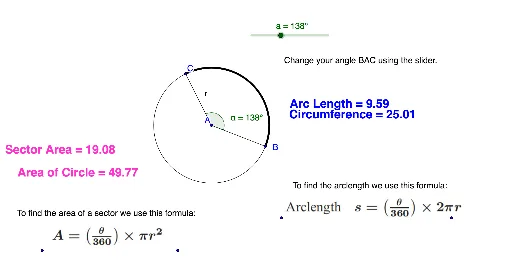
This example demonstrates the calculation and visualization of arc length and sector area in a circle. Key math concepts include the formula for arc length, sector area formula, and the relationship between angle and radius. Construction highlights involve GeoGebra commands like Circle, Segment, Rotate, Angle, and CircleArc. Suitable for middle school and above students to understand basic circle geometry and its applications.
GeoGebra Commands & Parameters
Circle(A, B) → cSegment(A, B) → bRotate(B, a, A) → CAngle(B, A, C) → αSegment(A, C) → rCircleArc(A, B, C) → d
AI Drawing Prompt Reference
Draw a circle and then connect two points on the circle to form a line segment. Rotate this segment around one of the endpoints by a certain angle to get another point on the circle. Connect the center of the circle to this new point to form a triangle. Measure the angle between the two segments and the lengths of the segments. Calculate the area of the sector using the angle and the radius, and the arc length using the radius and the angle in radians. Label the measurements and calculations on the graph to show the process of calculating the sector area and arc length.
The prompt above was compiled from the original drawing commands and is for reference only.