
Arc and Number Interaction Demo
Loading the math board and drawing, please wait…
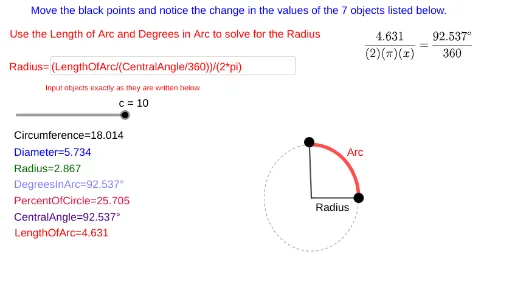
This example dynamically demonstrates the interaction between arcs and numbers, visually showcasing geometric properties of arcs, angles, and circles. It involves core mathematical concepts such as arc length, angle measurement, equilateral triangle construction, parallelogram characteristics, quadratic equation application, and function graphs. The construction highlights GeoGebra commands and objects like Point, CircleArc, Length, Angle, Segment, Rotate, and Textfield. Suitable for high school mathematics education to assist in understanding the practical applications of circle, arc, angle, and function concepts.
GeoGebra Commands & Parameters
Point(xAxis) → BPoint(xAxis) → ACircleArc(A, B, C) → LengthOfArcLength(LengthOfArc) → aAngle(B, A, C) → DegreesInArcLength(LengthOfArc) → bSegment(A, B) → RadiusAngle(B, A, C) → CentralAngleSegment(C, A) → hRotate(B, DegreesInArc, A) → B'CircleArc(A, B', B) → kTextfield(text9) → InputBox1Textfield(text10) → InputBox2Textfield(text12) → InputBox3Textfield(text15) → InputBox4Textfield(text18) → InputBox5Textfield(text20) → InputBox6Textfield(text22) → InputBox7Textfield(text24) → InputBox8Textfield(text27) → InputBox9Textfield(text28) → InputBox10
AI Drawing Prompt Reference
Draw an arc connecting points A, B, and C, measure the arc length and display it as a, measure the central angle and display it in degrees, construct a circle with center A and radius AB, rotate point B to get B', construct a new arc with center A and radius B'B, display arc length, angle, radius, etc., in input boxes.
The prompt above was compiled from the original drawing commands and is for reference only.