
Applying the Circumference Formula: Problem 1
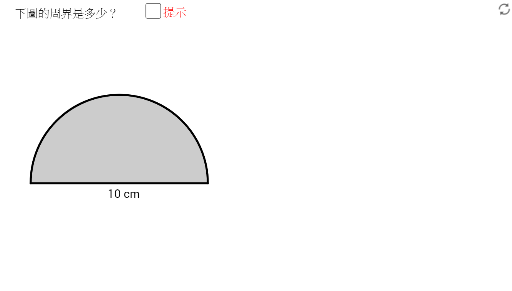
Loading the math board and drawing, please wait…
This GeoGebra applet demonstrates the practical application of the circumference formula in geometric construction and calculation. Students interactively explore how the formula C = 2πr (or C = πd) connects to real geometric figures by constructing segments, circles, arcs, sectors, and polygons step by step. The applet guides learners through drawing a circle from a given radius or diameter, then subdividing the circle into arcs and sectors to visually reinforce the relationship between the central angle and the arc length. As students manipulate the constructed elements, they observe how changes in radius directly affect the circumference, deepening their intuitive understanding of the proportional relationship between a circle's linear dimensions and its perimeter. The polygon constructions illustrate the approximation of a circle by inscribed and circumscribed polygons, providing a bridge to the historical and conceptual development of the value of pi. This interactive exploration is ideal for middle school and high school students studying basic circle concepts, geometric construction techniques, and the real-world application of the circumference formula. The applet supports both guided problem-solving and free exploration, making it a versatile teaching tool for classroom demonstrations, self-paced learning, and homework practice.
GeoGebra Commands & Parameters
Segment((x(F) - 2, y(F)), (x(F) + 2, y(F))) → aSegment((x(G) - 1, y(G)), (x(G) + 1, y(G))) → bCircle(F, 2) → kCircle(G, 1) → pSegment((x(F), y(F) + 2), (x(F), y(F) - 2)) → iSegment((x(G), y(G) + 1), (x(G), y(G) - 1)) → jCircle(H, 1) → qSegment((x(H) - 1, y(H)), (x(H) + 1, y(H))) → lSegment((x(H), y(H) + 1), (x(H), y(H) - 1)) → mCircleSector(O, B, A) → dCircleArc(C, I, J) → fPoint(Circle[C, I]) → KPoint(Circle[C, I]) → LPoint(Circle[P, 2]) → QPolygon(P, Q, R) → t1, r, p_1, q_1Segment(R, Q) → gPoint(Circle[S, 2]) → TPolygon(S, T, U) → t2, u, s, t
AI Drawing Prompt Reference
Draw three circles with radii 2, 1, and 1, each centered at a distinct point. For each circle, add a horizontal diameter and a vertical diameter, forming cross lines. On one circle, construct a sector; on another, draw an arc and place two points on it. Then, create a circle of radius 2, pick a point on it, and form a triangle with the center, drawing one side of that triangle. Finally, on another circle of radius 2, pick a point and form a second triangle with its center, drawing one side. The overall figure shows circles, diameters, a sector, an arc, and triangles.
The prompt above was compiled from the original drawing commands and is for reference only.