
Any Convex Quadrilateral Can Be Divided Into Parallelograms
Loading the math board and drawing, please wait…
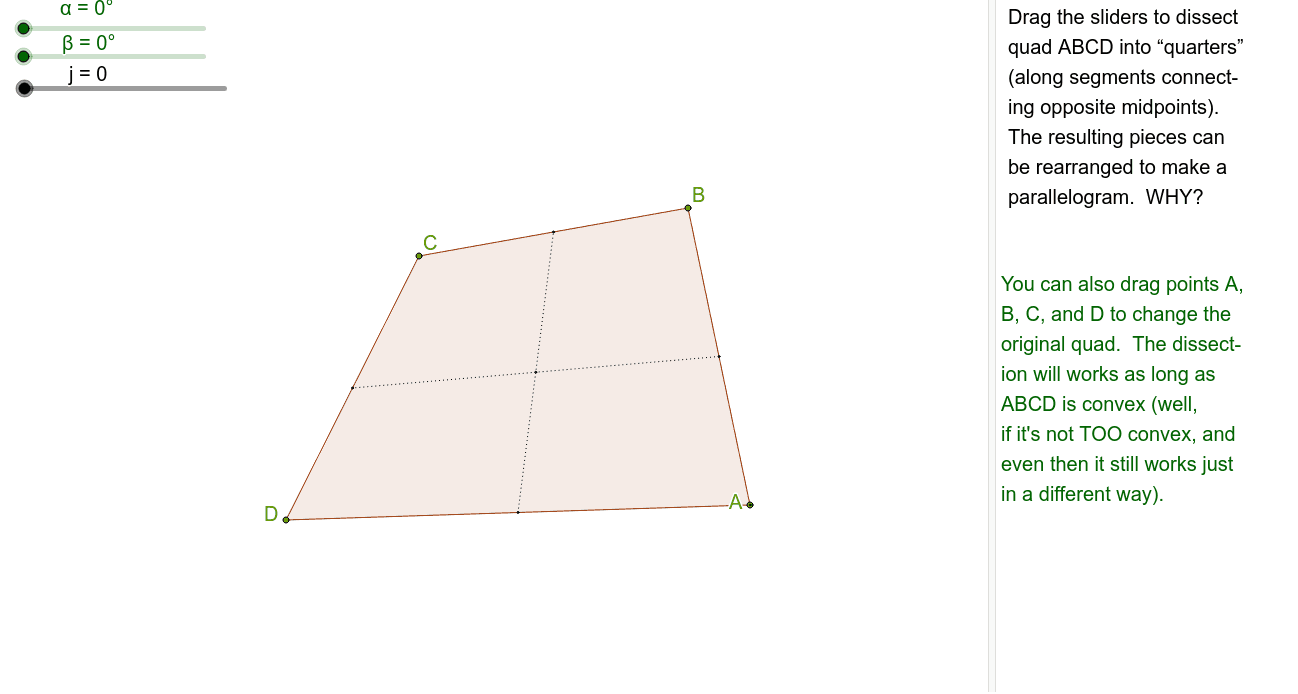
This example demonstrates how to divide any convex quadrilateral into four parallelograms by connecting the midpoints of opposite sides. Key mathematical concepts include the properties of parallelograms and the geometric meaning of midpoints. The construction uses commands such as Polygon, Midpoint, Segment, Intersect, Rotate, Circle, Vector, and Translate in GeoGebra. Suitable for students at middle school level and above to learn about geometric transformations and properties of quadrilaterals.
GeoGebra Commands & Parameters
Polygon(A, B, C, D) → poly1, a, b, c, dMidpoint(d) → EMidpoint(a) → FMidpoint(b) → GMidpoint(c) → HSegment(E, G) → eSegment(F, H) → fIntersect(e, f) → IPolygon(E, D, H, I) → poly2, e_1, d_1, h, iPolygon(I, G, B, F) → poly3, i_1, g, b_1, f_1Polygon(I, F, A, E) → poly4, i_2, f_2, a_1, e_2Rotate(E, α, H) → E'Rotate(D, α, H) → D'Rotate(H, α, H) → H'Rotate(I, α, H) → I'Polygon(E', D', H', I') → poly2', e', d', h', i'Rotate(I, (-β), G) → I'_1Rotate(G, (-β), G) → G'Rotate(B, (-β), G) → B'Rotate(F, (-β), G) → F'Polygon(I'_1, G', B', F') → poly3', i'_1, g', b', f'Segment(A, C) → kCircle(A, j) → pIntersect(p, k) → J, KVector(A, J) → uTranslate(I, u) → I'_2Translate(F, u) → F'_1Translate(A, u) → A'Translate(E, u) → E'_1Polygon(I, G, C, H) → poly5, i_3, g_1, c_1, h_1Polygon(I, G, C, H) → poly6, i_4, g_2, c_2, h_2Polygon(J, E'_1, I'_2, F'_1) → poly7, l, m, n, q
AI Drawing Prompt Reference
Draw a convex quadrilateral ABCD, connect the midpoints E, F, G, H of opposite sides, and draw line segments EG and FH, which intersect at point I. Construct parallelograms with vertices E, H, I; I, G, B, F; and I, F, A, E. Rotate these parallelograms. Draw line segment AC, and construct a circle centered at A that intersects AC at points J and K. Draw vector AJ and use it to translate I, F, A, E to form new parallelograms.
The prompt above was compiled from the original drawing commands and is for reference only.